Mobile App Development 101: iOS, Android, or Cross-Platform?
Most teams don’t fail because of a bad idea, they fail because they chose the wrong way to build it. This guide shows you exactly how to choose the right path from day one.
Table of contents
Key Takeaways
- Mobile is the primary channel now, with ~90% of user time spent inside apps
- The biggest decision is choosing between native, cross-platform, or hybrid
- Native gives the best performance but requires two separate codebases
- Cross-platform saves 30–40% cost with one shared codebase
- Hybrid is cheapest but often sacrifices user experience and performance
- Most startups in 2026 choose cross-platform for speed, cost, and scalability
Mobile isn’t just another channel anymore. It’s where people spend most of their digital time. Today, global smartphone subscriptions have crossed 7.3 billion, and app downloads are expected to exceed 181 billion in 2026. More importantly, users spend nearly 90% of their mobile time inside apps, not browsers, averaging over 3.5 hours a day. If you’re building a product and want to meet users where they actually are, mobile is where you need to be.
That’s why everyone wants an app. Maybe you have a startup idea. Maybe your company is moving to mobile. Or maybe you’re a developer trying to expand your skill set. No matter the starting point, the same question comes up every time:
Should you build for iOS, Android, or both?
I’ve spent the last seven years building across all three paths: native iOS, native Android, and cross-platform apps using React Native and Flutter. And here’s the reality: each option comes with trade-offs. Pick the wrong one, and you could lose months of time and burn through your budget faster than expected.
In this guide, you will learn everything you need to know to make the right choice. No hype, no marketing talk. Just practical advice from someone who has been building for years.
What is Mobile App Development?
Mobile app development is the process of creating software that runs on smartphones and tablets. There are over 6.8 billion smartphone users worldwide, and that number keeps growing every year. If you want to reach people where they spend most of their screen time, mobile is the way to go.
But mobile app development goes beyond just writing code. The full process includes market research, UX/UI design, architecture planning, development, testing, app store submission, and ongoing maintenance after launch. Unlike web apps accessed through a browser, mobile apps can tap directly into device hardware: GPS, camera, biometric sensors, push notifications, Bluetooth, and accelerometers. This is why apps consistently outperform mobile websites in engagement, retention, and conversion rates.
There are three main approaches to building mobile apps, and understanding the difference between them is the most important decision you will make at the start of your project.
Native vs Cross-Platform vs Hybrid (The Simple Explanation)
Native Development
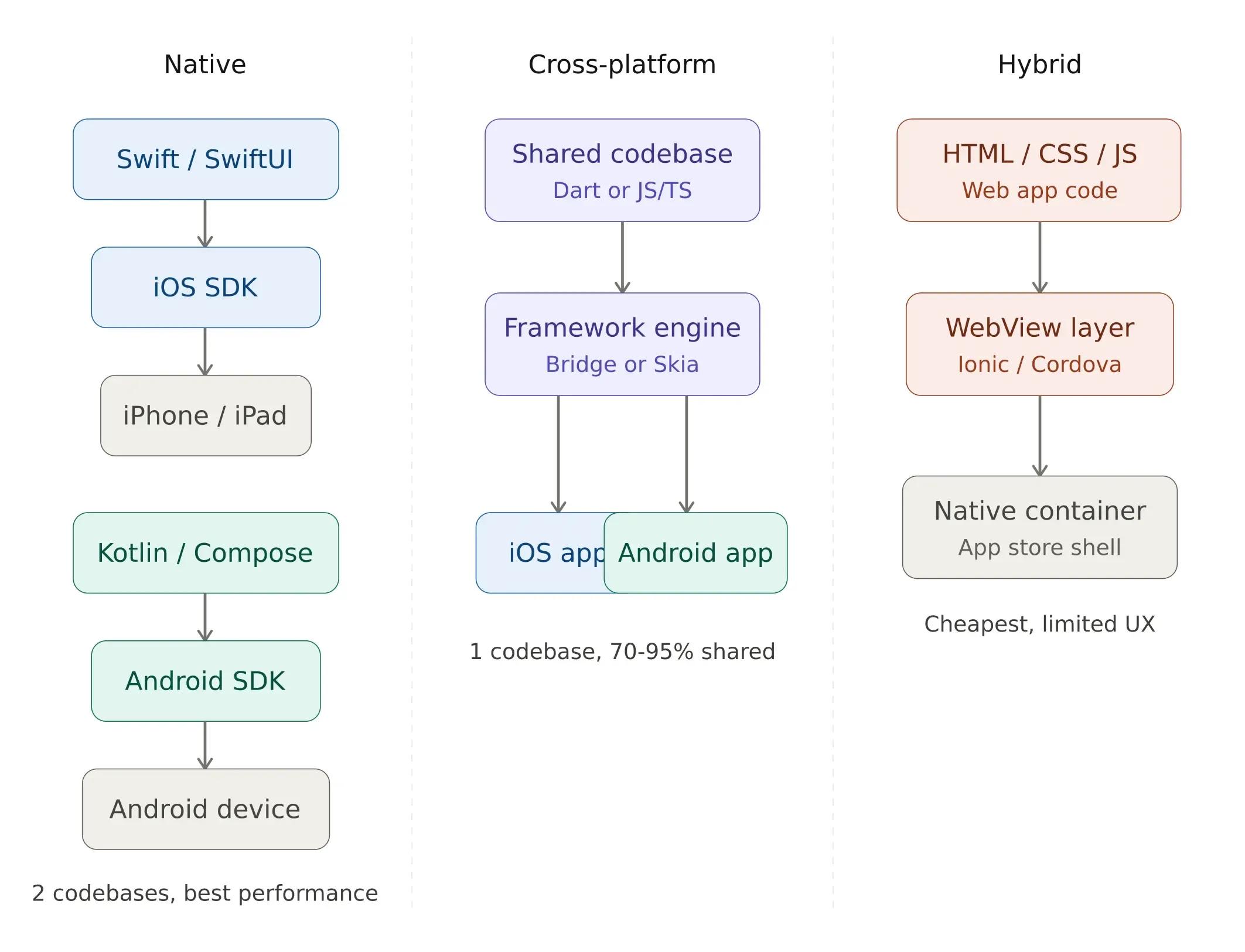
Native apps are built specifically for one platform using that platform's official tools and programming language.
iOS: Built with Swift or SwiftUI using Xcode on a Mac.
Android: Built with Kotlin or Java using Android Studio on any OS.
Native apps give you the best performance and full access to every device feature (camera, sensors, Face ID, etc). They render frames more consistently, handle complex animations more smoothly, and integrate deeply with platform-specific features. For apps that require augmented reality, real-time graphics, or heavy use of device sensors, native is the most reliable path.
The downside is that you need two separate codebases if you want to support both iOS and Android. Every feature addition, every bug fix, and every design update requires parallel implementation. This effectively doubles your engineering effort and your maintenance budget. For teams going the native route, having access to dedicated iOS and Android developers with platform-specific expertise is essential.
Here is what a basic screen looks like in Swift for iOS:
import SwiftUI
struct ContentView: View {
    @State private var count = 0
    var body: some View {
        VStack {
            Text("Count: \(count)")
                .font(.title)
            Button("Tap me") {
                count += 1
            }
        }
    }
}
And the same thing in Kotlin for Android:
@Composable
fun CounterScreen() {
    var count by remember { mutableStateOf(0) }
    Column(
        horizontalAlignment = Alignment.CenterHorizontally
    ) {
        Text("Count: $count", style = MaterialTheme.typography.h5)
        Button(onClick = { count++ }) {
            Text("Tap me")
        }
    }
}
Notice how similar they look? Both use declarative UI patterns. But they are completely separate codebases. If you change a feature, you change it in both places. For more on Swift, see: developer.apple.com/swift
Cross-Platform Development
Cross-platform frameworks let you write one codebase that runs on both iOS and Android. The two most popular options in 2026 are React Native and Flutter.
React Native: Uses JavaScript/TypeScript and React. Created by Meta. It communicates with native platform components through a bridge architecture, meaning your UI elements are genuine native components, not web views. Performance closely approximates a fully native application.
Flutter: Uses the Dart programming language. Created by Google. Takes a fundamentally different approach by rendering every pixel on screen using its own Skia-based engine. This gives complete control over visual output and ensures pixel-perfect consistency across platforms.
Cross-platform apps share 70-95% of their code between platforms. They look and feel close to native, though there can be subtle differences in performance and UI behavior. The remaining 5-30% accounts for platform-specific adjustments: permissions handling, push notification configuration, deep linking, and hardware-specific native modules.
Here is a counter in React Native:
import React, { useState } from 'react';
import { View, Text, Button, StyleSheet } from 'react-native';

export default function App() {
  const [count, setCount] = useState(0);

  return (
    <View style={styles.container}>
      <Text style={styles.text}>Count: {count}</Text>
      <Button title="Tap me" onPress={() => setCount(count + 1)} />
    </View>
  );
}

const styles = StyleSheet.create({
  container: { flex: 1, justifyContent: 'center', alignItems: 'center' },
  text: { fontSize: 24, marginBottom: 20 }
});
One codebase. Two platforms. Organizations looking to scale their mobile teams efficiently can hire React developers, hire React Native developers, or hire Flutter developers who specialize in cross-platform delivery.
Hybrid Apps
Hybrid apps use web technologies (HTML, CSS, JavaScript) wrapped in a native container. Tools like Ionic and Capacitor let you build a web app and package it as a mobile app. The entire UI renders inside a WebView, which is essentially a browser instance embedded within a native shell.
Hybrid apps are the cheapest to build, but they usually feel like a website in an app wrapper. Users can tell the difference. Scroll performance, gesture responsiveness, and transition smoothness rarely match what native or cross-platform frameworks deliver. Unless you are building something very simple or prototyping, we would not recommend this approach in 2026.
iOS Development: Swift, SwiftUI, Xcode
If you are building exclusively for iPhone and iPad, native iOS development gives you the best results. iOS users consistently demonstrate higher per-user spending on apps and in-app purchases. iOS accounts for approximately 65% of global app consumer spending despite representing roughly 27% of the global smartphone market share.
Swift is Apple's modern programming language. It is fast, safe, and designed specifically for Apple platforms. SwiftUI is the declarative UI framework that makes building interfaces much easier than the older UIKit approach. If you need engineers with deep Apple platform expertise, you can hire iOS developers through Softaims.
Xcode is Apple's development environment. You need a Mac to use it. There is no way around this. If you do not have a Mac, consider cross-platform development instead.
Key things to know about iOS development:
You need an Apple Developer account ($99/year) to publish to the App Store. App Store review can take 1-3 days. Plan for rejection and resubmission. Apple's design guidelines (Human Interface Guidelines) are strict. Follow them.
Apple Developer Documentation: developer.apple.com/documentation
Android Development: Kotlin, Jetpack Compose, Android Studio
Android has about 72% of the global smartphone market, so if you are targeting a wide audience, especially across Asia, Africa, Latin America, and parts of Europe, Android matters a lot.
Kotlin is the preferred language for Android development. Google made it the official language in 2019, and it is much nicer to write than Java. Kotlin is more concise, safer against null-pointer exceptions, and fully interoperable with existing Java codebases. Jetpack Compose is Android's modern UI toolkit, similar to SwiftUI on iOS. If you need dedicated engineers for Android, you can hire Android developers with hands-on Kotlin and Compose experience.
Android Studio runs on Windows, Mac, and Linux.
Key things to know about Android development:
Google Play Console costs a one-time $25 fee. Android fragmentation is real. You need to test on multiple screen sizes and API levels. A structured device matrix and automated testing across multiple configurations are necessary for a reliable release. Review times are usually faster than Apple (hours vs days).
Kotlin Documentation: kotlinlang.org/docs/home.html
Cross-Platform: React Native vs Flutter Comparison
Choose React Native if: your team already knows JavaScript/React, you need to share code with a React web app, or you want access to the massive npm ecosystem. You can hire React Native developers or browse dedicated React developers with cross-platform experience.
Choose Flutter if: you want the best cross-platform UI consistency, you are starting fresh with no existing codebase, or you need custom animations and complex UI. Flutter's rendering engine gives complete control over every pixel. You can hire Flutter developers with production experience.
Both frameworks are mature, well-supported, and used by major companies. Instagram uses React Native. Google Ads uses Flutter. You cannot go wrong with either one.
We wrote a detailed comparison here: Flutter vs React Native: Complete Comparison for 2026
Which Approach Should You Choose? (Decision Framework)
Here is how I help clients make this decision:
Go native if: you need maximum performance (gaming, AR, complex animations), you only need one platform, or you have the budget for two development teams.
Go cross-platform if: you need both iOS and Android, you want to save time and money, and your app does not need heavy platform-specific features. This is the most common choice for startups and mid-sized companies in 2026.
Go hybrid if: you are prototyping, your app is essentially a mobile website, or your budget is extremely tight.
Cost Comparison: Native vs Cross-Platform
Here are rough estimates based on a medium-complexity app (think a task manager or social feed with authentication):
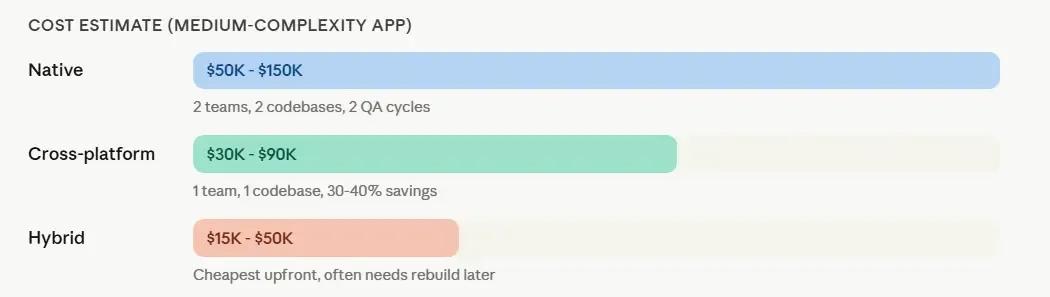
Native (iOS + Android separately): $50,000 - $150,000. Two teams, two codebases, two maintenance budgets.
Cross-Platform (React Native or Flutter): $30,000 - $90,000. One team, one codebase, one maintenance budget. You save 30-40% compared to building two native apps.
Hybrid: $15,000 - $50,000. Cheapest upfront, but often needs replacement as the app grows.
These numbers vary widely depending on features, complexity, and your developers' location. But they give you a ballpark for planning.
These numbers vary widely depending on features, complexity, and your developers' location. But they give you a ballpark for planning. To get precise estimates, review current freelance developer rates or schedule a consultation.
One thing most teams overlook: ongoing maintenance. Companies typically spend 15 to 25% of the initial development cost every year on security updates, OS compatibility patches, dependency upgrades, and feature enhancements. A $90,000 cross-platform build carries an implied annual maintenance commitment of $13,500 to $22,500. Factor this in from the start.
How Long Does It Take to Build a Mobile App?
A simple app (5-10 screens, basic features) takes about 2-3 months to develop. A medium app (15-25 screens, authentication, API integration) takes 3-6 months to develop. A complex app (with real-time features, payments, and an admin panel) takes 6-12 months.
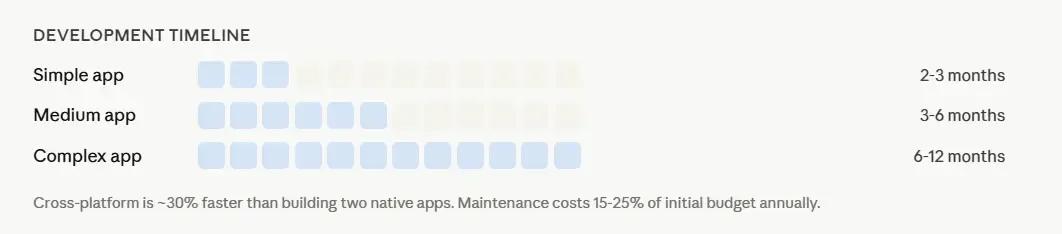
Cross-platform development is usually about 30% faster than building two native apps, because you only write the code once. Working with experienced mobile app developers who have shipped production apps accelerates this further.
The Technology Stack Behind Mobile Apps
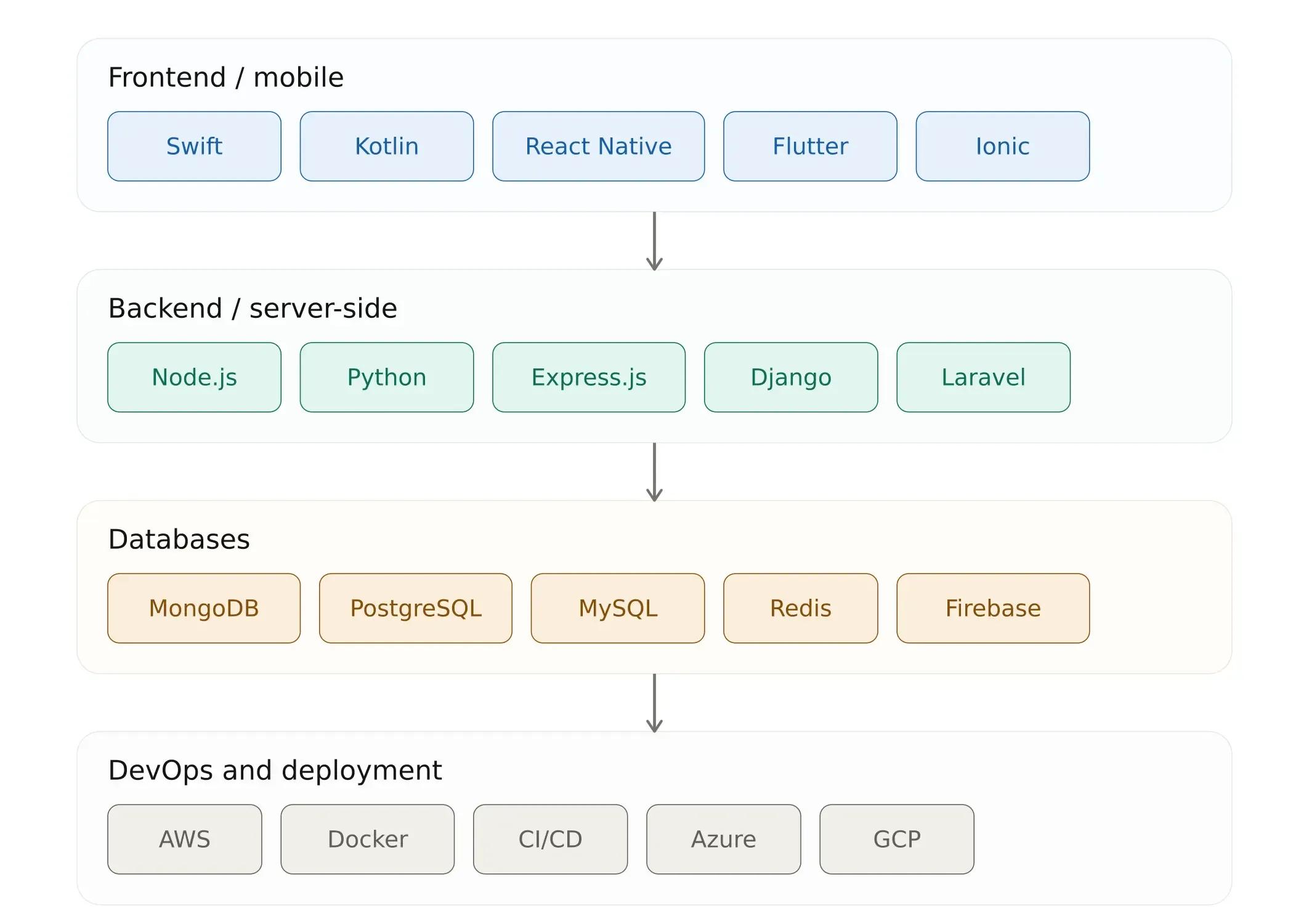
Building a mobile app is not just about the frontend framework. You also need a solid backend, a database, APIs, authentication, and deployment infrastructure. Here is how the pieces fit together:
The frontend is what users see. The backend handles data processing, authentication, business logic, and API management. Your mobile app's frontend is powerless until the backend is in place.
Common stack combinations include React Native + Node.js + MongoDB (the MERN mobile stack), Flutter + Python/Django, and native iOS/Android + PHP/Laravel. For apps that need server-side rendering and SEO, Next.js provides a full-stack React solution.
The choice of stack should align with your team's skills and your app's requirements. To explore learning paths for these technologies, visit the Softaims development roadmaps.
Ready to Build Your Mobile App?
Whether you choose native, cross-platform, or need help deciding, Softaims can connect you with experienced mobile developers who have shipped real apps to the App Store and Google Play.
Hire by technology:
- Hire Mobile App Developers
- Hire iOS Developers
- Hire Android Developers
- Hire React Developers
- Hire React Native Developers
- Hire Flutter Developers
- Hire Node.js Developers
- Hire Full-Stack Developers
- Hire Python Developers
- Hire JavaScript Developers
- Hire TypeScript Developers
- Hire Java Developers
- Hire MongoDB Developers
- Hire PostgreSQL Developers
- Hire PHP Developers
- Hire Laravel Developers
- Hire Next.js Developers
Or browse all talent: Browse Vetted Developers | View Pricing
Schedule a free consultation →
Frequently Asked Questions
How much does it cost to build a mobile app?
Costs depend on complexity and development approach. A medium-complexity app costs $50,000 to $150,000 for native (iOS + Android separately), $30,000 to $90,000 for cross-platform (React Native or Flutter), and $15,000 to $50,000 for hybrid. Check Softaims pricing for current rates.
How long does it take to develop a mobile app?
A simple app (5-10 screens) takes 2-3 months. A medium app (15-25 screens with authentication and APIs) takes 3-6 months. A complex app (real-time features, payments, admin panel) takes 6-12 months. Cross-platform development is about 30% faster than building two native apps.
Should I build a native app or a cross-platform app?
Go native if you need maximum performance (gaming, AR, complex animations) or only target one platform. Go cross-platform if you need both iOS and Android, want to save 30-40% on development costs, and your app does not require heavy platform-specific features. Most startups and mid-sized companies choose cross-platform in 2026.
What is the difference between native, cross-platform, and hybrid apps?
Native apps are built for one platform (iOS or Android) using platform-specific tools, delivering the best performance. Cross-platform apps use a shared codebase (React Native or Flutter) that compiles to both platforms, sharing 70-95% of code. Hybrid apps use web technologies (HTML, CSS, JS) wrapped in a native shell, offering the lowest cost but limited performance.
Is React Native or Flutter better?
Neither is universally better. Choose React Native if your team knows JavaScript/React or you are sharing code with a React web app. Choose Flutter if you are starting fresh, need pixel-perfect UI consistency, or want custom animations. Both are production-ready and used by major companies. Read our full comparison.
What programming languages are used for mobile app development?
iOS uses Swift (and SwiftUI). Android uses Kotlin (and Jetpack Compose). Cross-platform uses JavaScript/TypeScript (React Native) or Dart (Flutter). Backend technologies include Node.js, Python, PHP/Laravel, and databases like MongoDB or PostgreSQL.
How do I choose the right mobile app development company?
Look for a team with a proven track record of shipping apps to the App Store and Google Play. Check their portfolio, technology expertise, communication process, and post-launch support capabilities. Softaims connects you with pre-vetted developers who have real production experience.
What is the difference between an app and a mobile website?
A mobile app is installed on the device and can access native features like GPS, camera, push notifications, and biometric authentication. A mobile website runs in a browser and has limited access to device hardware. Apps generally offer better performance, higher engagement, and stronger retention.
How do I publish my app to the App Store and Google Play?
For iOS, you need an Apple Developer account ($99/year). For Android, you need a Google Play Console account ($25 one-time fee). Both stores have review processes with specific guidelines around design, performance, privacy, and content. Plan for at least one rejection cycle on iOS.
Looking to build with this stack?
Hire Mobile App Developers →

 Stackoverflow
Martin C.
 Verified Expert in Engineering
My name is Martin C. and I have over 7 years of experience in the tech industry. I specialize in the following technologies: .NET Framework, SQL, Web Application, Flutter, Mobile App Development, etc.. I hold a degree in Bachelor's degree, Other, Other, Other, Bachelor of Applied Science (BASc). Some of the notable projects I've worked on include: Windows Desktop UI Modernization, Smart Time Tracking, Payroll and Productivity, Cross-Platform Wallet App Re-Design and Re-Build, Offline Mode - Transforming UX for Missionaries, Centralized Resource Center For Certified Consultants, etc.. I am based in Panama, Panama. I've successfully completed 11 projects while developing at Softaims.
Information integrity and application security are my highest priorities in development. I implement robust validation, encryption, and authorization mechanisms to protect sensitive data and ensure compliance. I am experienced in identifying and mitigating common security vulnerabilities in both new and existing applications.
My work methodology involves rigorous testing—at the unit, integration, and security levels—to guarantee the stability and trustworthiness of the solutions I build. At Softaims, this dedication to security forms the basis for client trust and platform reliability.
I consistently monitor and improve system performance, utilizing metrics to drive optimization efforts. I'm motivated by the challenge of creating ultra-reliable systems that safeguard client assets and user data.

Leave a Comment
Need help building your team? Let's discuss your project requirements.
Get matched with top-tier developers within 24 hours and start your project with no pressure of long-term commitment.