Node.js Microservices Architecture: Building Scalable Applications
Almost all successful microservice stories started as monoliths first. This Node.js microservices architecture guide covers when to split, which framework to use for each service, and resilience patterns to prevent a single failure from cascading.
Technically reviewed by:
Navin J.|mustafa m.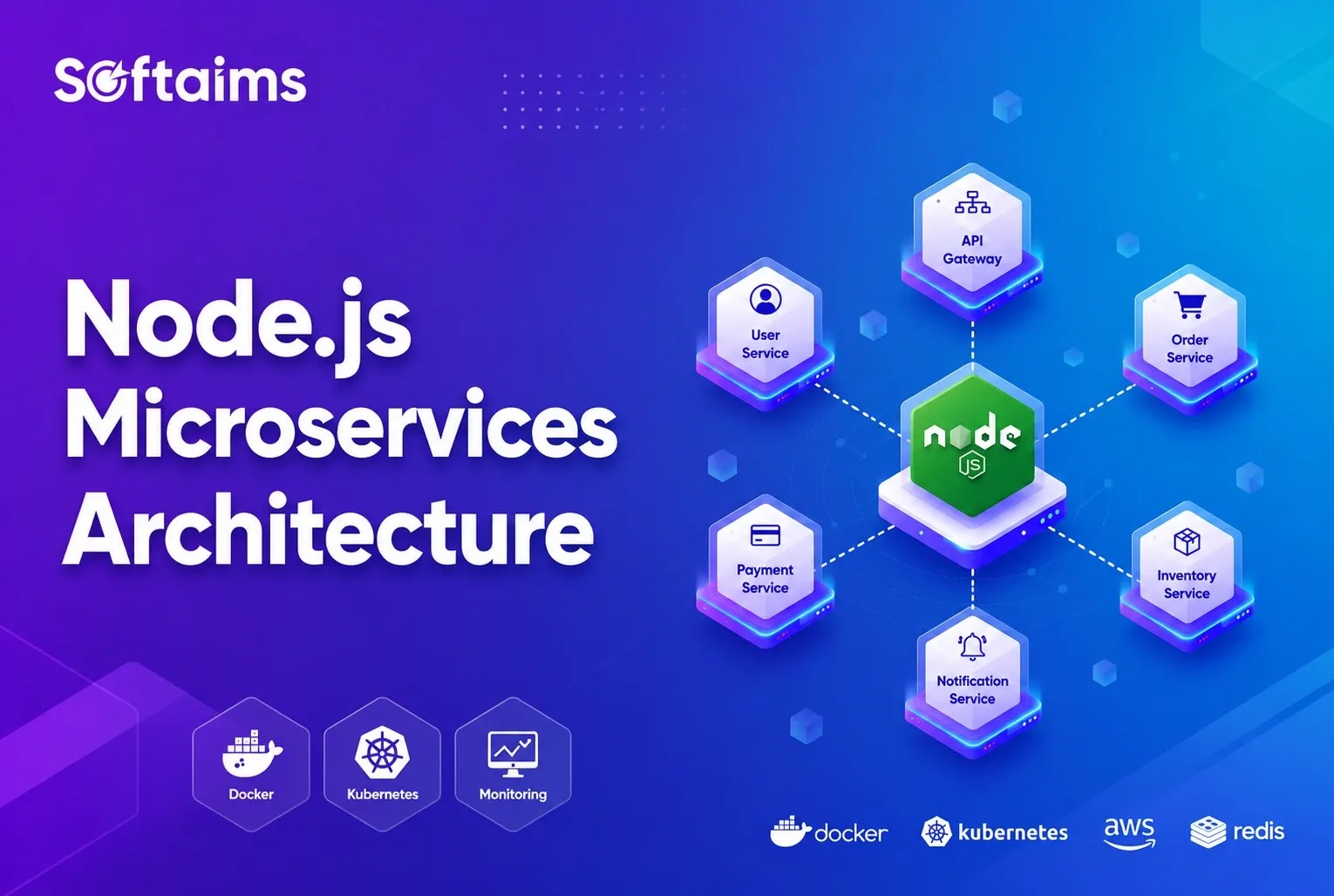
Table of contents
Key Takeaways
- You need rapid provisioning (hours, not days), deployment pipelines (under 2 hours), monitoring for both technical and business metrics, and DevOps culture with shared incident management. Without all four, do not ship microservices.
- Start with 2-3 larger services rather than 15 fine-grained ones. Get comfortable with the operational overhead before splitting further. Merging poorly-split services is the most expensive refactoring in software.
- Database-per-service is non-negotiable. Shared databases eliminate every benefit of splitting services.
- Fastify handles 30-40% more requests/sec than Express. Use it on performance-critical paths; use NestJS where team structure matters more than raw throughput.
- Every synchronous call is a failure dependency. If Service A calls Service B and B is down, A is down. Default to async (message brokers) unless you need an immediate response.
Your monolithic Node.js application served you well for the first two years. But now deployments take 45 minutes, a bug in the checkout flow crashes the entire platform, and your team of ten backend developers keeps stepping on each other's toes. Every pull request creates a merge conflict. Every Friday, deployment triggers a weekend on-call rotation. But as Martin Fowler warns in Microservice Premium, don't even consider microservices unless you have a system that is too complicated to manage as a monolith. The vast majority of software systems should be built as a single monolithic application.
Microservices architecture decomposes your application into small, independently deployable services, each responsible for a single business capability. Each service owns its database and its deployment pipeline and can be maintained by a separate team. The approach enables organizations to hire top-tier development talent for specific domains rather than requiring every developer to understand the entire system.
I have helped three companies migrate from monoliths to microservices, and I have also seen companies adopt microservices too early and regret it. Every pattern in this guide comes from real production systems. This article covers when microservices actually make sense, how to design them properly with Node.js, and the tools and patterns that make them work under real-world production load.
What Are Microservices? (vs Monolithic)
Understanding the fundamental difference between monolithic and microservices architecture is the first step toward making an informed decision about your software development roadmap. Both approaches have their place, and the right choice depends on your team size, product maturity, and scaling requirements.
Monolithic Architecture: One Codebase, One Deployment
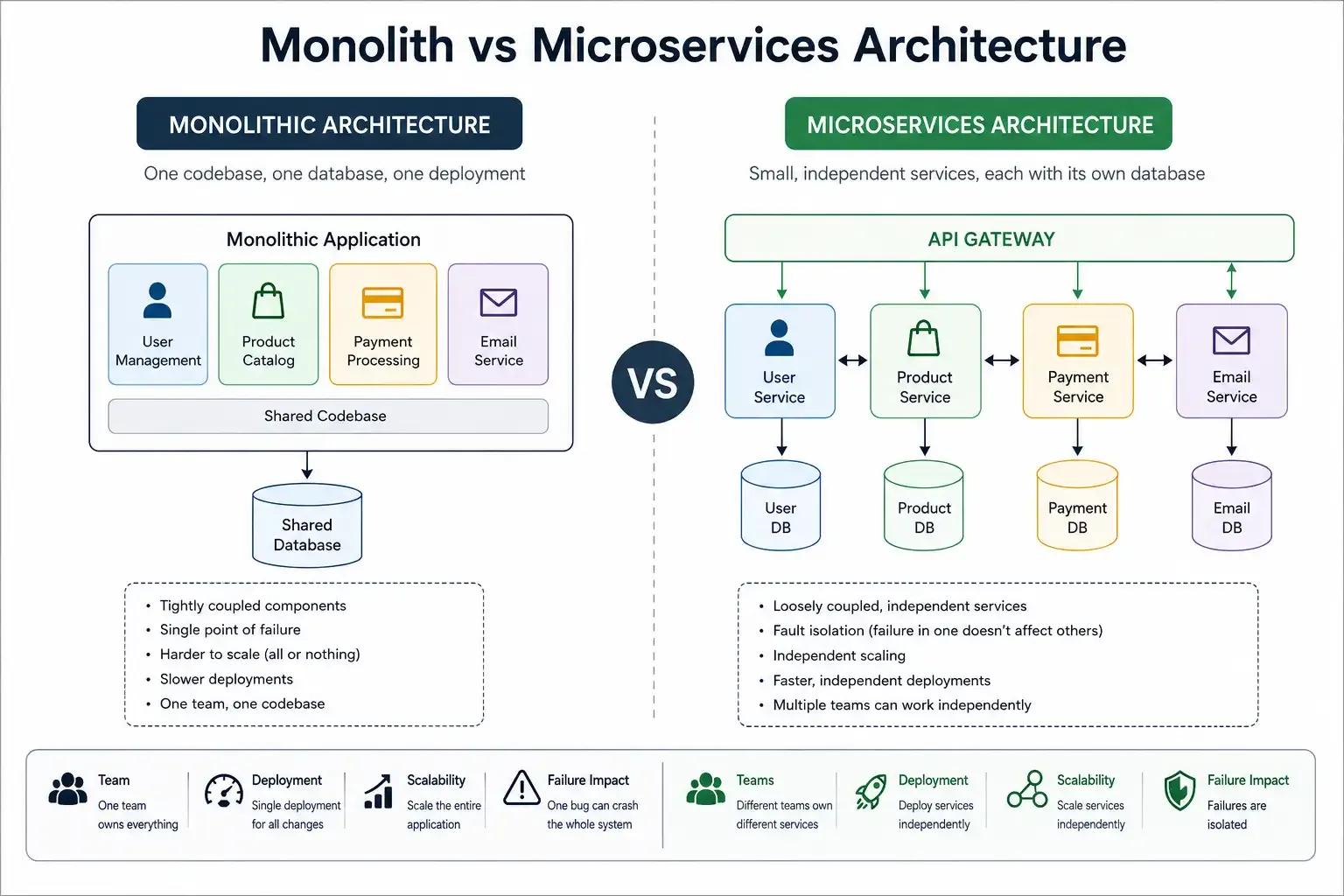
In a monolithic application, everything is running in a single process. Your user authentication, your product catalog, your payment processing, and your email sending- all of these are in the same code base, the same database, the same deployment. The structure is usually as follows:
my-app/
  src/
    auth/
    products/
    payments/
    emails/
  database (shared)
This works well in the early stages. A single codebase means simpler debugging, easier deployments, and lower operational overhead. For startups and small teams, a monolith is often the right starting point.
The problems surface at scale. When 15 developers are committing to the same repository, merge conflicts become a daily occurrence. Deploying a minor copy change to the checkout page requires redeploying the entire application, including the payment processing system that has not changed in weeks. A memory leak in the product search feature causes the user authentication system to crash.
Microservices Architecture: Independent Services, Independent Teams
In a microservices architecture, each business capability is a separate service. It has its own codebase, database, and deployment pipeline.
For example:
auth-service/       -> its own database
product-service/    -> its own database
payment-service/    -> its own database
email-service/      -> its own database
Each service runs independently. You can deploy the product service without touching the auth service. You can scale the payment service to handle Black Friday traffic without scaling everything else. You can even write different services in different programming languages if a specific problem domain benefits from it.
This also applies to teams. One team owns the product catalog, another owns payments. Each team can release changes on its own schedule, choose its tools, and make decisions within its service boundaries.
Why NodeJS for Microservices
Node.js has emerged as one of the most widely adopted runtimes for microservice development, and this is due to its architectural characteristics rather than popularity alone.
Node.js uses a non-blocking I/O model, which makes it lightweight and efficient, suitable for data-intensive real-time applications that run across distributed devices. This directly means less memory footprint per service instance, which is a big deal when you are running dozens or hundreds of service instances across a Kubernetes cluster.
Fast cold starts make Node.js ideal for environments where services need to scale up rapidly. The npm ecosystem provides mature libraries for every common microservices concern, from HTTP servers and message-queue clients to distributed tracing and health-check middleware. Organizations that hire remote developers with JavaScript expertise can build both their front-end and back-end in the same language, reducing context switching and enabling code sharing across the stack.
Companies like Netflix, LinkedIn, PayPal, and Uber have used Node.js for their microservices infrastructure, which shows its production readiness at scale. Netflix alone runs more than 700 microservices, many of which are powered by Node.js.
At What Stage Should a Startup Adopt Microservices Architecture
Microservices introduce their own complexity. Managing many services, deployments, monitoring, and data consistency across systems adds a lot of overhead. That premium is only worth it if your system has outgrown what a monolith can handle. If it hasn’t, the extra complexity just slows you down without adding real value.
The question is not "Are microservices better?" The question should be, Is your system complex enough that a monolith is actively holding you back?
Signals That Indicate Microservices Are the Right Move
Your team has grown beyond 8-10 developers, and they frequently block each other when working on the same codebase. The deployment cycles have become longer since every change needs full regression testing of the entire app. Different parts of the system need to scale independently: your search feature requires 5x more compute resources than your user profile feature, but your monolith forces you to scale everything uniformly.
You need the independent cadences of deployment. For example, if the product team wants to ship twice a day, the payments team needs a two-week release cycle with compliance reviews. You need technology agility, with some services using Python for machine learning workloads and others using Node.js for real-time communication.
Most importantly, your domain boundaries are well understood. You can clearly articulate which data and logic belong to which business capability. Even highly skilled architects working in familiar domains have difficulty getting the boundaries right at the start. If you cannot draw clear boundaries today, a microservices architecture will harden the wrong boundaries and make them expensive to change later.
If you are evaluating whether your organization is ready for this transition, consider how your team structure maps to Node.js job description templates that define clear ownership boundaries.
When NOT to Use Microservices
Research shows almost all successful microservice stories started as a monolith that got too big and was broken up. Almost all systems built from scratch as microservices ran into serious trouble. And the reasons are pragmatic, not philosophical.
So it’s better to stay with a monolith when:
Your team is under five developers. The overhead of managing multiple services, separate CI/CD pipelines, inter-service networking, and distributed debugging will slow you down more than it helps. Facebook and Etsy have operated at massive scale with monolithic architectures. Monolith does not mean broken.
You are building an MVP or prototype. At this stage, you do not fully understand your domain boundaries, and you need to prioritize speed and feedback loops. Scaling a poorly designed but successful software system may be difficult, but it is still preferable to the alternative. Start with a well-structured monolith. You can always add services later when your understanding matures. Splitting a well-factored monolith is cheap, but merging poorly factored microservices is not.
You don't have the microservice prerequisites in place. These are basic capabilities that are non-negotiable and identified as needed before any microservices deployment:
- Rapid provisioning: the ability to fire up a new server in hours, not days. This requires substantial automation.
- Basic monitoring: with many loosely-coupled services collaborating in production, things will go wrong in ways that are impossible to detect in test environments. You need monitoring for both technical issues (error rates, service availability) and business issues (order drop-off, revenue anomalies).
- Rapid application deployment: with many services to manage, you need a deployment pipeline that can execute in no more than a couple of hours.
- DevOps culture: close collaboration between developers and operations, including shared incident management and root-cause analysis.
Without these capabilities, microservices become a distributed mess that is harder to debug than the monolith you replaced. These are capabilities you should develop regardless, but they must be in place before you put a microservices system into production.
The Distributed Monolith Trap
There’s something worse than both a monolith and well-designed microservices: the distributed monolith.
Microservices only work when services are truly independent. Problems occur when services share databases, depend heavily on one another, and require coordinated deployments. Then even a small change can affect multiple services, and a single failure can spread across the system. Teams slow down because every update requires coordination across services.
You end up with the complexity of distributed systems without the flexibility or scalability they promise. If adding a single database field requires updating and deploying three services in sequence, the boundaries are wrong. If you hire backend developers experienced in distributed systems, you can avoid this trap by applying domain-driven design principles from the beginning.
Designing Microservices Architecture
How Do You Design Proper Service Boundaries
Service boundary design is the hardest problem in microservices architecture and has the highest long-term consequences. Bad boundaries create services that constantly depend on one another, share data they shouldn't, and must be deployed together. The result is a distributed monolith that carries all the operational complexity of microservices with none of the isolation benefits.
Here are some key principles that good microservice design follows:
Single Responsibility and Domain-Driven Design
First of all, services should be built around business needs, not technical layers or architecture trends. That’s what keeps them independent and easier to scale.
A common mistake is to split services along technical boundaries: an auth service, a database service, a logging service, and an API service. These are technical layers disguised as business domains, and they create tight coupling between services that should be independent.
Instead, design services around business capabilities: a user service, an orders service, a catalog service, a payments service, and a shipping service. Each service owns its data, its business logic, and its read/write API. Each can be described in one sentence. If you cannot describe what a service does in one sentence, it is probably doing too much.
Start with fewer, larger services. You can always decompose further once the boundaries are stable. Going in the opposite direction, merging services that should never have been separated, is far more expensive and disruptive.
Database Per Service Pattern
Each service should own its own database. Other services should not read or write to it directly. For example, the user service can use PostgreSQL, the order service can use MongoDB, and the cart service can use Redis. Services communicate through APIs or events, not shared database access.
This may seem expensive for small teams, but tools like AWS RDS, Google Cloud SQL, and MongoDB Atlas make it manageable. The benefit is isolation. One service failure is less likely to affect others, and each team can choose the database that best fits its needs. If multiple services share the same database, it’s not really microservices. It’s a distributed system built on a shared schema.
The Smoke Test for Good Boundaries
A simple way to test service boundaries is this: if adding one field requires changing three services, your boundaries are wrong. Good boundaries mean that most changes affect only one service. Changing one service should not require changing another. If services are tightly coupled, you get a distributed monolith, which is the worst version of both worlds.
Inter-Service Communication: Synchronous vs Asynchronous Patterns
After defining service boundaries, the next key decision is how services communicate with each other. There are two main methods: synchronous and asynchronous. Each comes with trade-offs in speed, coupling, reliability, and system complexity.
REST and gRPC for Synchronous Communication
Synchronous communication means one service calls another directly and waits for a response. This is the simplest model to understand and implement.
REST over HTTP is the most common starting point. A service calls another service's API endpoint and blocks until it receives a response:
// order-service calling user-service via HTTP const axios = require('axios');
async function getUser(userId) { try { const response = await axios.get(http://user-service:3001/api/users/${userId}); return response.data; } catch (error) { if (error.response?.status === 404) return null; throw error; } }
For high-performance internal communication between services, gRPC offers a substantial improvement over REST. It uses Protocol Buffers for serialization and HTTP/2 for transport, which makes it 5-10x faster than JSON over REST for service-to-service calls. gRPC also supports bi-directional streaming, which is useful for real-time data flows between services.
The trade-off with synchronous communication is coupling. When the user service is down, any service that depends on it synchronously will also fail. This creates cascading failure scenarios that are one of the primary challenges in microservices architecture.
Message Brokers for Asynchronous Communication
Asynchronous communication decouples services by introducing a message broker between them. One service publishes an event, and any interested service subscribes to it. The publisher does not wait for the consumer to process the message, and the consumer can process messages at their own pace.
// Using RabbitMQ with amqplib const amqp = require('amqplib');// Publisher (order-service) async function publishOrderCreated(order) { const conn = await amqp.connect('amqp://rabbitmq:5672'); const channel = await conn.createChannel(); const exchange = 'events';
await channel.assertExchange(exchange, 'topic', { durable: true }); channel.publish( exchange, 'order.created', Buffer.from(JSON.stringify(order)) ); }
// Consumer (email-service) async function listenForOrders() { const conn = await amqp.connect('amqp://rabbitmq:5672'); const channel = await conn.createChannel(); const exchange = 'events';
await channel.assertExchange(exchange, 'topic', { durable: true }); const q = await channel.assertQueue('email-order-queue', { durable: true }); await channel.bindQueue(q.queue, exchange, 'order.created');
channel.consume(q.queue, (msg) => { const order = JSON.parse(msg.content.toString()); sendOrderConfirmationEmail(order); channel.ack(msg); }); }
The primary message broker options serve different use cases:
RabbitMQ provides durable queues, flexible routing, and dead-letter queues. It is the standard default for work-queue patterns where reliable message delivery is critical.
Apache Kafka provides durable, replayable, partitioned event streams. It’s a good fit when events are part of your source of truth, and you need to replay event history. Kafka is more operationally heavy than RabbitMQ but scales to higher throughput.
Redis Pub/Sub is a lightweight option, best for simple notifications where occasional message loss is acceptable. It doesn’t store messages or guarantee delivery. On the other hand, SQS + SNS is a fully managed AWS option with durability, no infrastructure to maintain, and pay-per-use pricing.
When to Use Which Pattern
Use synchronous communication (REST or gRPC) when you need an immediate response to continue the flow. For example, a checkout service verifies a user before placing an order.
Use asynchronous communication (e.g., message brokers) when work can be deferred or spans multiple services. For example, sending emails, updating analytics, or adjusting inventory after an order.
Most production systems use both. The key is choosing the right pattern for each connection, not forcing one approach everywhere. You can hire vetted Node.js developers with distributed systems experience who can help you make these architectural decisions right from the start.
What Is the API Gateway Pattern
An API Gateway is a single entry point for your microservices. Instead of the frontend calling 5 different services directly, it calls the gateway. The gateway then routes each request to the right service.
Centralizing Client Access Through a Gateway
Without a gateway, every client needs to know the network address of every service. This creates tight coupling between clients and your internal service topology. When you split a service into two, every client needs to be updated. If a service splits or moves, every client needs the new address.
An API Gateway addresses this by providing a single, stable entry point. Clients depend on the gateway, while services can change behind it without affecting them.
Here’s a simple API gateway with Express:
// Simple API Gateway with Express const express = require('express'); const { createProxyMiddleware } = require('http-proxy-middleware');const app = express();
// Route to different services app.use('/api/users', createProxyMiddleware({ target: 'http://user-service:3001', changeOrigin: true }));
app.use('/api/orders', createProxyMiddleware({ target: 'http://order-service:3002', changeOrigin: true }));
app.use('/api/products', createProxyMiddleware({ target: 'http://product-service:3003', changeOrigin: true }));
app.listen(3000);
Gateway Responsibilities: Routing, Rate Limiting, Authentication
Beyond simple request routing, a production API gateway handles several cross-cutting concerns that you do not want to duplicate in every service:
Authentication and authorization. The gateway validates JWT tokens or API keys before forwarding requests to internal services. This centralizes security enforcement and ensures that internal services only receive verified traffic.
Rate limiting. Protecting services from excessive requests, whether from abusive clients or accidental infinite loops, is a gateway responsibility. Applying rate limits at the edge prevents overloaded services from cascading failures downstream.
Request aggregation. A single client request might require data from multiple services. The gateway can fan out requests to several services, aggregate the responses, and return a unified response to the client.
SSL termination, logging, and caching are additional concerns that benefit from centralized handling at the gateway layer.
Production-Grade API Gateway Tools
For production environments, building a custom gateway from scratch is rarely the right investment. Kong is a widely adopted open-source API gateway that provides load balancing, security plugins, rate limiting, and monitoring out of the box. AWS API Gateway offers a fully managed serverless option for teams on AWS infrastructure. NGINX can also serve as an effective API gateway with the right configuration, and Express Gateway provides a Node.js native option for teams that want to stay within the JavaScript ecosystem.
The gateway should scale independently of the microservices it fronts. It sits on the critical path for every external request, which makes it both a powerful control point and a potential single point of failure if not designed for high availability.
Which Node.js Microservices Framework Should You Use
Your choice of framework directly impacts development speed, maintainability, and performance at scale. Node.js offers several robust microservices frameworks, each suited to different team sizes and use cases. Here’s a practical comparison of the most commonly used ones in production.
Express.js: The Lightweight Default
Express.js remains the most widely adopted Node.js framework, with approximately 65% market share in 2026. It provides minimal abstractions over Node.js HTTP, which gives teams full control over their application structure. For a Node.js Express microservices example, the setup is intentionally simple:
const express = require('express'); const app = express();app.get('/api/products', async (req, res) => { const products = await productService.findAll(); res.json(products); });
app.get('/health', (req, res) => { res.json({ status: 'healthy', uptime: process.uptime() }); });
app.listen(3001, () => console.log('Product service running on port 3001'));
Express is the right choice when your team needs a quick setup with minimal opinions, the microservice is small- to medium-scope, and you want maximum flexibility in choosing middleware, ORMs, and authentication libraries. Its maturity means every Node.js developer is already familiar with it, which reduces onboarding time when you hire Node.js developers for your microservices team.
The trade-off is that Express provides no built-in structure for large applications. Without team discipline, Express codebases can become disorganized as the number of routes and middleware stacks grows.
NestJS: The Enterprise Choice
NestJS is an opinionated, TypeScript first framework built on top of Express (or Fastify). It enforces structure through modules, controllers, services, and dependency injection. Companies like Adidas, Roche, and Autodesk use NestJS for their microservices architecture.
It also supports microservices out of the box, including TCP, Redis, NATS, RabbitMQ, Kafka, gRPC, GraphQL, WebSockets, and CQRS. This makes it a strong fit for large systems with multiple backend developers. For teams with 5+ developers, the structure helps prevent codebase drift over time.
The trade-off is a steeper learning curve, especially for developers new to TypeScript or Angular-style patterns. It also adds some abstraction, but in most real systems, the performance impact is negligible compared to database latency.
Fastify: The Performance Option
Fastify is designed with raw throughput as its primary goal. In typical REST API workloads, it can handle around 30-40% more requests per second than Express. It achieves this through schema-based JSON serialization, optimized routing, and a lightweight plugin system.
const fastify = require('fastify')({ logger: true });fastify.get('/api/orders', { schema: { response: { 200: { type: 'array', items: { type: 'object', properties: { id: { type: 'integer' }, item: { type: 'string' }, status: { type: 'string' } } } } } } }, async (request, reply) => { return orderService.findAll(); });
fastify.listen({ port: 3002 });
Fastify is the right choice for performance-critical microservices that need to handle high request volumes and meet low-latency requirements. Automatic input/output checking from its schema validation leads to better security and documentation. Fastify is worth considering for teams building high-throughput Node.js microservices to build scalable applications, especially for services that sit on critical performance paths.
The trade-off is a smaller ecosystem than Express and no built-in guidance on application structure, which means your team is responsible for maintaining architectural consistency across services.
Moleculer: The Microservices-First Framework
Moleculer is purpose-built for microservices, unlike the general-purpose web frameworks above. It provides service discovery, load balancing, fault tolerance, event-driven communication, and distributed caching out of the box. It supports multiple transport protocols, including TCP, NATS, MQTT, Redis, and Kafka.
Moleculer is worth evaluating when you need built-in service mesh capabilities. Your architecture involves 10 or more services that need to discover and communicate with each other dynamically. And you want a framework that handles the distributed systems plumbing rather than assembling it yourself.
The tradeoff is less robust TypeScript support than NestJS and a smaller community. Teams should also consider whether they want framework-level lock-in for their distributed-systems patterns or to assemble those capabilities from individual libraries.
How to Choose
Pick your framework based on team size, service complexity, and performance needs. Small teams building simple REST microservices should use Express or Fastify to keep things lightweight. Enterprise teams that need structure and built-in microservices features should use NestJS. For complex distributed systems where service discovery and fault tolerance matter most, Moleculer is a better fit.
Review the Softaims development roadmaps for each framework to understand the learning path and technology ecosystem before making your selection.
How Do You Handle Failures in Distributed Microservices
In distributed systems, failures are normal. Services will fail due to network issues, timeouts, database limits, or deployments. The question is not about avoiding failures, but about how your system behaves when they happen. It should degrade smoothly rather than break completely.
The Saga Pattern for Distributed Transactions
In a monolith, a single transaction can handle multiple steps, like creating an order, reserving inventory, and processing payment, all within a single database transaction. In microservices, each step runs in a separate service with its own database, so ACID transactions don’t span services.
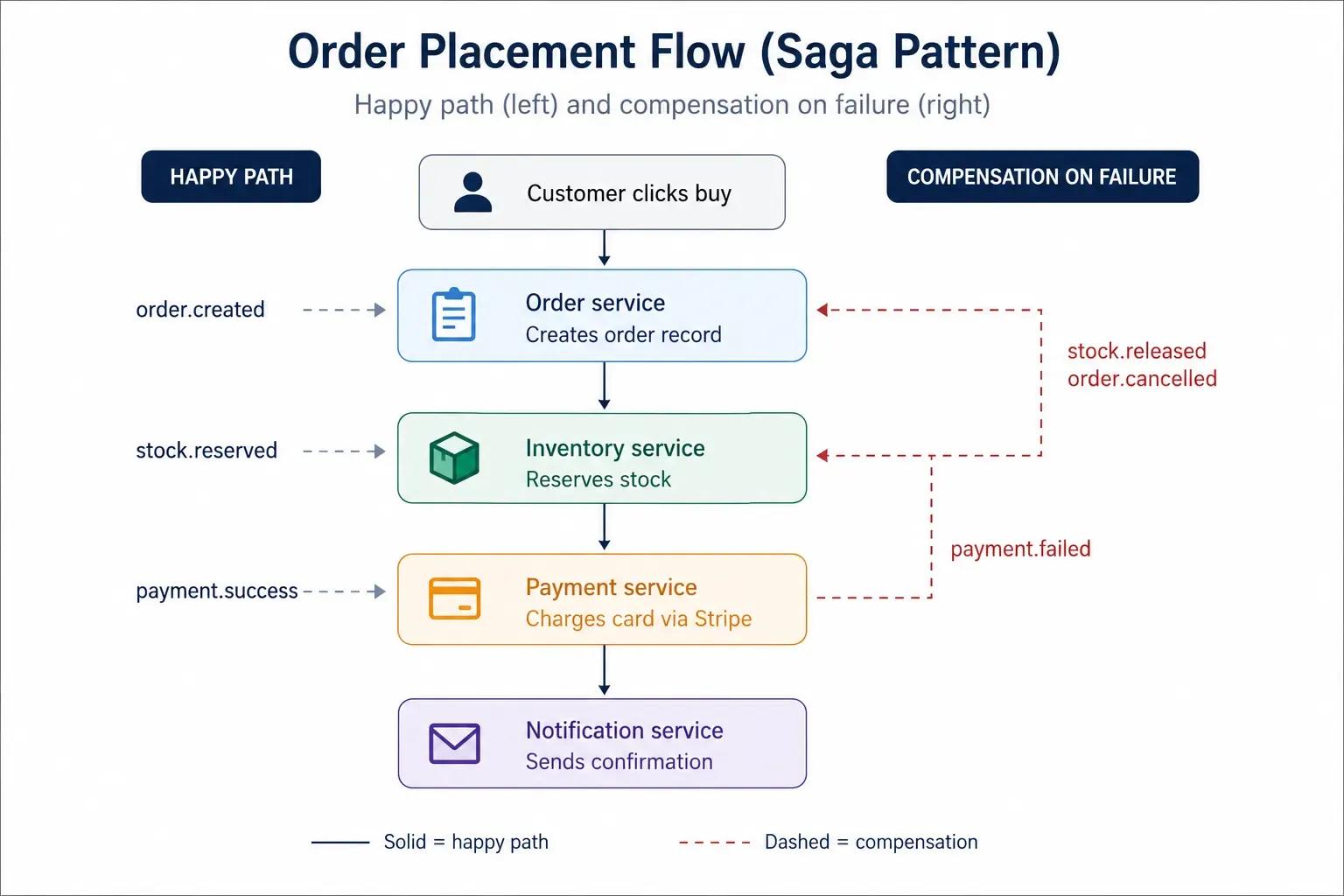
The Saga pattern solves this by breaking the process into a chain of local transactions. Each service completes its own step and triggers the next through events. If a step fails, compensating actions are run to undo the previous steps.
For example, in an e-commerce flow:
- The order service creates an order and publishes an OrderCreated event.
- The inventory service listens for that event, reserves stock, and publishes a StockReserved event.
- The payment service picks up StockReserved, charges the customer's card, and publishes PaymentSuccessful.
- If payment fails, the payment service publishes a PaymentFailed event. The inventory service listens for that event and releases the reserved stock. The order-service cancels the order.
This pattern guarantees data consistency across services without the need for distributed locks or two-phase commit protocols that create tight coupling and performance bottlenecks. If you want to learn more, the Microsoft Azure Architecture Center provides detailed documentation on saga implementation patterns for production systems.
Circuit Breakers, Retries, and Fallbacks
When one service calls another that is slow or failing, it can get stuck waiting for responses. This wastes resources and can spread failures across the system. The circuit breaker pattern prevents this cascading failure by monitoring call success rates and cutting off traffic to failing services. It works in three states:
Closed state (normal operation): Requests flow through normally. The circuit breaker monitors failure rates and response times.
Open state (failure detected): When the failure rate exceeds a threshold, the circuit breaker "opens" and immediately returns errors without calling the downstream service. This gives the failing service time to recover without being overwhelmed by requests.
Half-open state (testing recovery): After a waiting period, the circuit breaker sends a small number of trial requests to the service. If they succeed, it switches back to the closed state. If they fail, they return to the open state and keep blocking traffic.
Combine circuit breakers with retry logic using exponential backoff to avoid thundering herd issues, and add graceful fallbacks like cached data or reduced responses. This keeps services usable even when dependencies are down or slow. Libraries like Opossum provide ready-made circuit breaker support for Node.js applications.
Why Resilience Patterns Are Non-Negotiable
Without resilience patterns, a single slow database query in one service can consume all available connections in calling services, which in turn fail, causing their callers to fail, until the entire system collapses. This domino effect is the most common pattern of production outages in microservice systems.
Each call between services must have a timeout. And there should be a fallback behavior for every timeout. Each chain of synchronous calls should be protected by circuit breakers. Everyone who is not disciplined in early development always learns how important this is with their first major production incident.
Containerization and Orchestration: Docker and Kubernetes
Once your services are designed and communicating with each other, you need a reliable way to package, deploy, and operate them in production. Containerization and orchestration form the backbone of the infrastructure for any microservices deployment.
Packaging Each Service With Docker
Docker wraps each service's code, dependencies, and runtime environment into a self-contained, portable unit. A service running on a developer's laptop behaves identically in staging, CI, and production.
Each microservice gets its own Dockerfile:
dockerfileDockerfile for user-service
FROM node:20-alpine WORKDIR /app COPY package*.json ./ RUN npm ci --only=production COPY . . EXPOSE 3001 CMD ["node", "server.js"]
The key principle is that each Node.js microservice should be independently deployable. Its Docker image contains everything it needs to run, and deploying one service does not require rebuilding or redeploying any other service.
Local Development With Docker Compose
Running five services, their databases, and a message broker on a developer's laptop is one of the practical challenges of microservices development. Docker Compose addresses this by defining all services and their dependencies in a single configuration file:
yamldocker-compose.yml
version: '3.8' services: user-service: build: ./user-service ports: ['3001:3001'] environment: - MONGODB_URI=mongodb://mongo:27017/users depends_on: [mongo, rabbitmq]
order-service: build: ./order-service ports: ['3002:3002'] environment: - MONGODB_URI=mongodb://mongo:27017/orders depends_on: [mongo, rabbitmq]
api-gateway: build: ./gateway ports: ['3000:3000'] depends_on: [user-service, order-service]
mongo: image: mongo:7 volumes: ['mongo_data:/data/db']
rabbitmq: image: rabbitmq:3-management ports: ['5672:5672', '15672:15672']
volumes: mongo_data:
A single docker-compose up command starts the entire development environment. This approach works well for small- to medium-sized service fleets. For larger systems with 15 or more services, teams typically run only the services they are actively developing and mock the rest using service contracts.
Production Orchestration With Kubernetes
Docker Compose handles local development, but production environments need Kubernetes (K8s). Kubernetes provides auto-scaling (adjusting the number of service instances based on CPU, memory, or custom metrics), load balancing (distributing traffic across healthy instances), self-healing (automatically restarting crashed containers), and rolling deployments (deploying new versions with zero downtime).
A basic Kubernetes deployment for one service:
yamluser-service-deployment.yaml
apiVersion: apps/v1 kind: Deployment metadata: name: user-service spec: replicas: 3 selector: matchLabels: app: user-service template: metadata: labels: app: user-service spec: containers: - name: user-service image: your-registry/user-service:latest ports: - containerPort: 3001 env: - name: MONGODB_URI valueFrom: secretKeyRef: name: db-secrets key: mongodb-uri resources: requests: memory: '128Mi' cpu: '100m' limits: memory: '256Mi' cpu: '500m'
For managed Kubernetes, AWS EKS, Google GKE, and DigitalOcean Kubernetes reduce the operational overhead of running your own control plane. Remote Node.js framework specialists with Kubernetes experience can help you configure deployments, define resource limits, and establish CI/CD pipelines that deploy services independently.
One operational detail is to ensure each service has its own CI/CD pipeline, with separate versioning and rollout schedules. The usual error is to create a monorepo with shared CI that rebuilds and redeploys everything on every change. This removes one of the main benefits of microservices, independent deployment.
Handling CPU-Intensive Tasks and Serverless Deployment
Node.js is perfect for I/O-bound work, but some microservices can occasionally have CPU-heavy workloads: data transformation, report generation, image processing, or complex business rule evaluation. Also, serverless deployment models are a strong alternative to container orchestration for some service types. And you need to know how to address both challenges to build a production-ready Node.js microservices architecture.
Worker Threads for CPU-Bound Operations
Node.js uses a single-threaded event loop, so a CPU-heavy operation can block the entire service from processing other requests. The worker_threads module (stable since Node.js 12) solves this limitation by providing true parallelism across CPU cores.
For microservices that occasionally need to perform heavy computation, offloading that work to a worker thread keeps the main event loop responsive for incoming HTTP requests:
const { Worker, isMainThread, parentPort, workerData } = require('worker_threads');if (isMainThread) { // Main thread: delegate CPU work to a worker function runHeavyTask(data) { return new Promise((resolve, reject) => { const worker = new Worker(__filename, { workerData: data }); worker.on('message', resolve); worker.on('error', reject); }); }
// Express route stays responsive app.post('/api/reports/generate', async (req, res) => { const result = await runHeavyTask(req.body); res.json(result); }); } else { // Worker thread: perform CPU-intensive computation const result = processLargeDataset(workerData); parentPort.postMessage(result); }
For services that consistently handle CPU-intensive workloads, consider extracting them into a dedicated microservice written in a language better suited for parallel computation (Python, Go, or Rust). The beauty of microservices architecture is that each service can use the technology best suited to its specific workload.
Serverless Microservices With AWS Lambda and Node.js
Not every microservice needs a persistent container. Serverless platforms like AWS Lambda, Azure Functions, and Google Cloud Functions offer an alternative deployment model. Where you can run services on demand, scale automatically to zero, and charge only for actual execution time.
There are a number of reasons why Node.js is particularly well-suited to serverless environments: very fast cold start times (usually less than 200ms), small memory footprint, and an async-first programming model. Notification services, webhook processors, scheduled data transformations, and event-triggered workflows are all natural candidates for the serverless paradigm.
The trade-off is that serverless functions have execution-time limits (15 minutes on AWS Lambda), cold-start latency for infrequently invoked functions, and limited control over the execution environment. For latency-sensitive services that handle consistent traffic, container-based deployment remains the better option.
A pragmatic approach is to combine both models: deploy core, high-traffic services (user, product, order) as containers in Kubernetes and deploy event-triggered, bursty services (notifications, analytics, image processing) as serverless functions. This hybrid model balances cost and performance for your fleet of microservices.
Organizations evaluating serverless for their Node.js microservices framework should also consider platforms like Vercel and Cloudflare Workers, which offer edge-native execution closer to end users for latency-sensitive workloads. Teams that need to hire full-stack developers with serverless experience can leverage these platforms to significantly reduce infrastructure costs.
Monitoring, Logging, and Distributed Tracing
A failed request in a microservices system can be significantly more difficult to trace back to its root cause than in a monolith. One user action might go through five services, and the failure could be in any one of them. Without proper observability infrastructure, debugging is guesswork.
Centralized Logging With the ELK Stack or Grafana Loki
In a monolith, you check one log file. In microservices, you check dozens. Centralized logging aggregates logs from all services into a single searchable interface.
The ELK Stack (Elasticsearch, Logstash, and Kibana) is the de facto solution for centralized log management. Elasticsearch is used to index & store logs, Logstash is used to process and transform log data, and Kibana is used as the search & visualization interface. Grafana Loki is a lighter-weight alternative that integrates well with Grafana dashboards.
Every log entry across all services should include a correlation ID, a unique identifier generated at the API gateway and propagated through every downstream service call. When a user reports an issue, you search for the correlation ID and view the complete request trace across all services in a single view.
Use structured JSON logging with libraries like Pino or Winston. Structured logs are parseable, searchable, and filterable. Unstructured console.log output is none of these.
Distributed Tracing With OpenTelemetry
Logging tells you what happened in a service. Distributed tracing tells you what happened across your services. It follows a request as it passes through various services, measuring latency at each step and identifying where the time is spent.
OpenTelemetry is the industry standard for instrumenting your code for distributed tracing. It provides vendor-neutral Node.js SDKs that automatically capture trace data from HTTP requests, database queries, and message broker operations.
Trace data is typically visualized using Jaeger, Grafana Tempo, or commercial solutions like Datadog and AWS X-Ray. A trace visualization shows the complete journey of a request, with each service call represented as a span, making it immediately obvious where latency or errors originate.
Setting up observability infrastructure from scratch for a fleet of Node.js services takes approximately a week of dedicated effort. Doing it right once and templating it for new services saves that time on every new service you add. Review your monitoring strategy alongside your engineering tools and best practices to ensure consistency across the organization.
Metrics, Alerting, and Health Checks
Prometheus, combined with Grafana, is the standard self-hosted stack for monitoring service health. Track the RED metrics for every service: request rate, error rate, and duration (latency). These three metrics surface most production issues before they escalate.
Every service should expose a /health endpoint that Kubernetes uses to determine if the service is alive (liveness probe) and ready to receive traffic (readiness probe). A service that cannot connect to its database should report itself as unhealthy so Kubernetes can restart it or route traffic elsewhere.
Define alerts for anomalies: error rate > 1%, latency > SLA, or a spike in pod restarts. Alerts need to be actionable. If you have an alert that fires 5 times a day, and you don't have to do anything, it's noise, not observability.
Real-World Case Study: E-Commerce Platform Microservices Breakdown
Theory is good, but the real test of architecture is in its application to a real system. This is how a production e-commerce platform can be decomposed into Node.js microservices, with the reasoning behind each boundary.
Service Decomposition
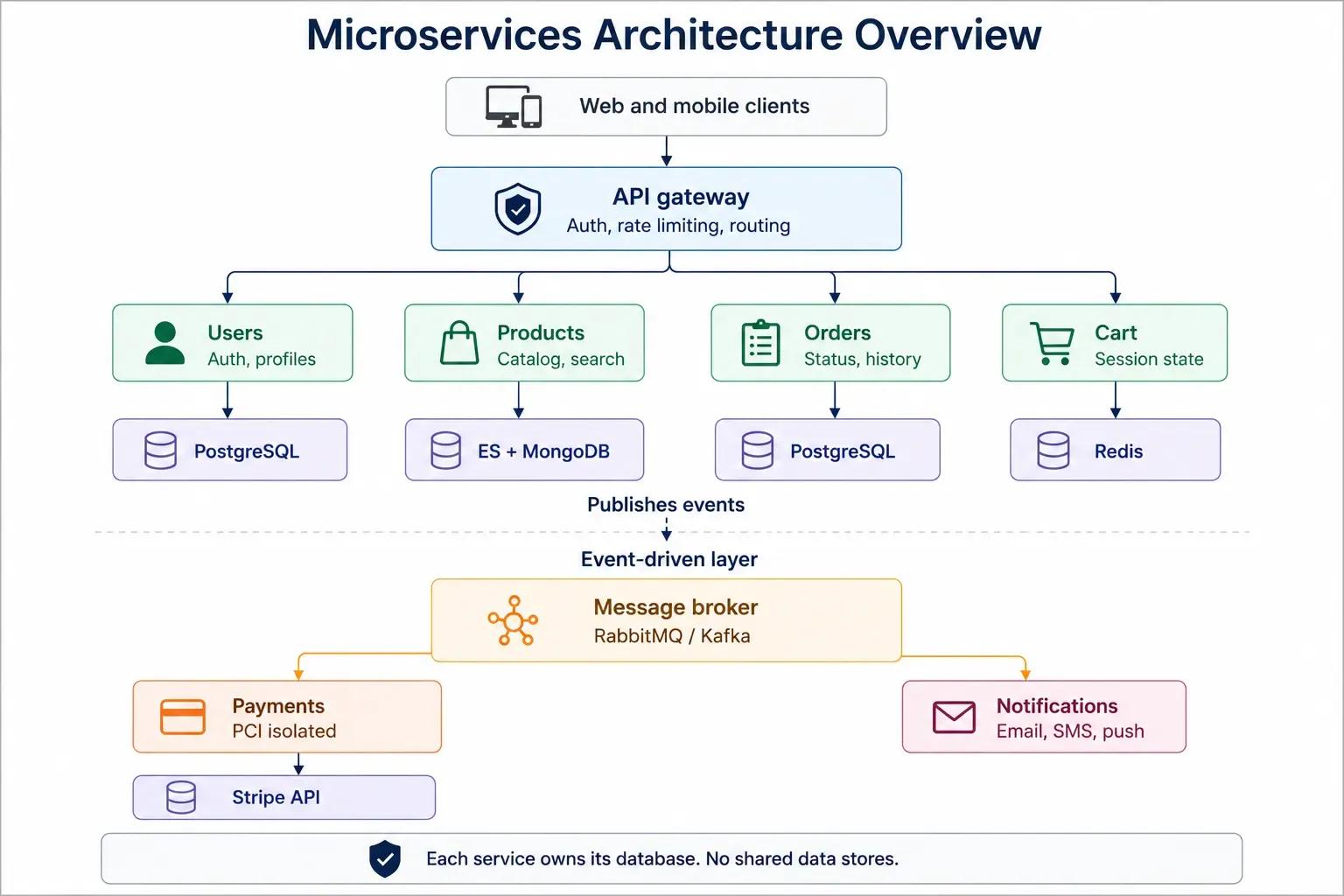
User Service: Handles registration, login, profile management, and address storage. Uses PostgreSQL for relational user data. Exposes REST APIs consumed by the API gateway. This is a straightforward CRUD service with authentication logic.
Product Service: Manages the product catalog, categories, search, and filtering. Uses Elasticsearch for fast full-text search alongside MongoDB for product document storage. Search-heavy workloads justify the dual-database approach, as relational databases do not perform well with the faceted search patterns demanded by e-commerce catalogs.
Cart Service: Manages shopping cart state. Uses Redis for sub-millisecond read/write access. Cart data is inherently ephemeral and access-pattern-sensitive, making Redis the natural fit. This service handles high write volumes during peak traffic.
Order Service: Manages order creation, status tracking, and order history. Uses PostgreSQL for transactional integrity. Order data requires strong consistency, as you do not want duplicate charges or phantom orders.
Payment Service: Processes payments via Stripe or similar providers. Deliberately isolated from other services for PCI DSS compliance. Keeping payment processing in a separate service with its own security boundary limits the scope of compliance audits. Only the payment service handles card data, so only it needs to meet PCI requirements.
Notification Service: Handles email, SMS, and push notifications. This service is purely event-driven. It listens for events like order.created, payment.completed, and shipment.dispatched, then sends the appropriate notification. It never needs to be called synchronously, making it a clean example of asynchronous, event-driven architecture.
API Gateway: Routes external requests, handles JWT validation, enforces rate limits, and provides a stable API surface for web and mobile application clients.
Event-Driven Notification Service
Notification Service is a good example of the power of event-driven architecture. It has no synchronous callers. It consumes events from the message broker and produces notifications based on the event type:
- order.created triggers an order confirmation email
- payment.completed triggers a payment receipt
- shipment.dispatched triggers a shipping notification with tracking information
If the Notification Service is down for a bit, events will accumulate in the message broker. When the service comes back, it processes the backlog. No other services are impacted by the outage, and no notifications are lost.
Isolated Payment Service for PCI Compliance
PCI DSS compliance is costly and operationally intensive. By splitting payment processing into its own service, the compliance boundary is reduced from the whole application down to a single service. Only the infrastructure, codebase, and deployment pipeline for the payment service need to be PCI-compliant.
This is a concrete example of how microservice boundaries can be driven by compliance and security requirements, not just by scaling or team-structure concerns.
Getting microservices wrong is expensive. Shared databases, chatty services, missing circuit breakers, and a lack of observability turn a distributed system into a distributed problem. Getting them right requires engineers who have shipped microservices to production and dealt with failures that only surface under real load.
Softaims’ Node.js engineers build microservices using Express, NestJS, and Fastify and integrate RabbitMQ, Kafka, and gRPC to enable communication between microservices. We configure Docker and Kubernetes pipelines, implement saga patterns and circuit breakers, and integrate OpenTelemetry tracing from day one. All patterns in this guide are patterns that our team has deployed for companies processing millions of requests.
Hire Node.js developers | Browse backend developers | See rates
Frequently Asked Questions
Is Node.js good for microservices?
Yes. Its non-blocking I/O handles thousands of concurrent connections per service instance with low memory. Fast cold starts make it ideal for containerized and serverless deployments. Netflix, Uber, and PayPal run Node.js microservices in production at scale.
When should I use microservices instead of a monolith?
If your team has more than 8-10 developers, deployments require full regression testing, or features need to scale independently. If you’re a team of fewer than five people or building an MVP, stick with a monolith. Most successful microservice stories started as monoliths.
What is the best Node.js framework for microservices?
Express.js is best for lightweight services with quick setup. NestJS fits enterprise teams that need structure and TypeScript support. Fastify is ideal when raw performance and high throughput matter (often 30–40% faster than Express). Moleculer is better for complex distributed systems that need service discovery, load balancing, and built-in fault tolerance.
How do microservices communicate with each other?
Two ways. Synchronous (REST or gRPC) when the caller needs an immediate response. Asynchronous (RabbitMQ, Kafka, or Redis Pub/Sub), when the action can happen later. Default to async. Every synchronous call is a failure dependency: if the downstream service is down, the caller is down too.
What is the database-per-service pattern?
Each microservice owns its own database. No other service can read or write to it directly. This avoids shared-schema coupling, reduces cascading failures, and lets each team pick the right storage technology for its needs. If two services share a database, you have a distributed monolith.
What do I need before deploying microservices to production?
You need four things: fast server provisioning (hours, not days), a deployment pipeline that runs in under two hours, monitoring for both system metrics (latency, errors) and business metrics (like conversion or order drop-off), and a DevOps culture where developers and operations share responsibility for incidents.


 Stackoverflow
Oleksandr K.

 Verified Expert in Engineering
My name is Oleksandr K. and I have over 10 years of experience in the tech industry. I specialize in the following technologies: React, JavaScript, TypeScript, Laravel, Python, etc.. I hold a degree in Master of science. Some of the notable projects I've worked on include: Zicklin Contracting, Custom wordpress theme development and optimization, Custom Wordpress project from designs, Responsive website with animations, Woocommerce website, etc.. I am based in Roseville, United States. I've successfully completed 17 projects while developing at Softaims.
I specialize in architecting and developing scalable, distributed systems that handle high demands and complex information flows. My focus is on building fault-tolerant infrastructure using modern cloud practices and modular patterns. I excel at diagnosing and resolving intricate concurrency and scaling issues across large platforms.
Collaboration is central to my success; I enjoy working with fellow technical experts and product managers to define clear technical roadmaps. This structured approach allows the team at Softaims to consistently deliver high-availability solutions that can easily adapt to exponential growth.
I maintain a proactive approach to security and performance, treating them as integral components of the design process, not as afterthoughts. My ultimate goal is to build the foundational technology that powers client success and innovation.

Leave a Comment
Need help building your team? Let's discuss your project requirements.
Get matched with top-tier developers within 24 hours and start your project with no pressure of long-term commitment.