A Complete Django Guide for Beginners: Build Your First Web App in 2026
Django powers Instagram, Pinterest, and Mozilla. This tutorial takes you from pip install django to a deployed blog with posts, comments, an admin panel, and production security in one sitting. Every line of code is tested and copy-paste ready.
Technically reviewed by:
Wilian B T.|Joseph R.
Table of contents
Key Takeaways
- Django ships with ORM, admin panel, auth, forms, and security built in. You do not need third-party packages to build a complete web application.
- The MVT pattern (Model-View-Template) separates data, logic, and presentation. Learn it once, apply it to every Django project.
- Migrations are version control for your database. Run makemigrations and migrate every time you change a model.
- Django protects against CSRF, SQL injection, XSS, and clickjacking out of the box. Run python manage.py check --deploy before going live.
- For production: set DEBUG = False, switch to PostgreSQL, use environment variables for secrets, and enforce HTTPS.
- The admin panel gives you a full content management interface with search, filters, and bulk actions in under 10 lines of code.
Django is the web framework that powers Instagram, Pinterest, Mozilla, and thousands of other production websites. It is written in Python, and if you already know some Python, Django is probably the fastest way to go from zero to a working web application.
I first started using Django about 8 years ago when a client needed to quickly build a content management system. What took me weeks in other frameworks took days in Django. I have been reaching for it ever since for projects that require rapid development, rock-solid security, and a built-in admin interface. If you are looking to hire Python developers with this kind of hands-on experience, that context matters.
In this tutorial, we are going to build a blog application from scratch. Not a toy example. A real blog with posts, comments, an admin panel, and proper database setup. By the end, you will understand how Django works and feel confident building your own projects. If you are evaluating backend development options for your team, this will also help you understand what Django developers do day to day.
Let’s get started!
What is Django? (Python Web Framework Explained)
Django is a high level Python web framework that helps in rapid development and clean, pragmatic design. It was originally developed in 2003 at the Lawrence Journal-World, a newspaper in Kansas, by a team that needed to build web applications quickly under tight newsroom deadlines.
That origin story explains a lot about Django’s design philosophy. It takes the approach that the Django community calls “batteries-included,” meaning that it ships with everything you need out of the box: a database layer (ORM), a URL router, a template engine, an authentication system, an admin panel, form handling, and security protections. You don’t have to search for third-party packages to get basic functionality to work.
Django has maintained its position as one of the most popular Python web frameworks. The JetBrains Developer Ecosystem Survey shows that it remains one of the most popular choices among Python developers, alongside Flask and FastAPI, and that it has a community of millions worldwide. The framework powers large platforms such as Instagram, Spotify, and Pinterest. Companies looking to hire dedicated Django developers benefit from this large talent pool and mature ecosystem.
How Django Handles Requests: The MVT Architecture
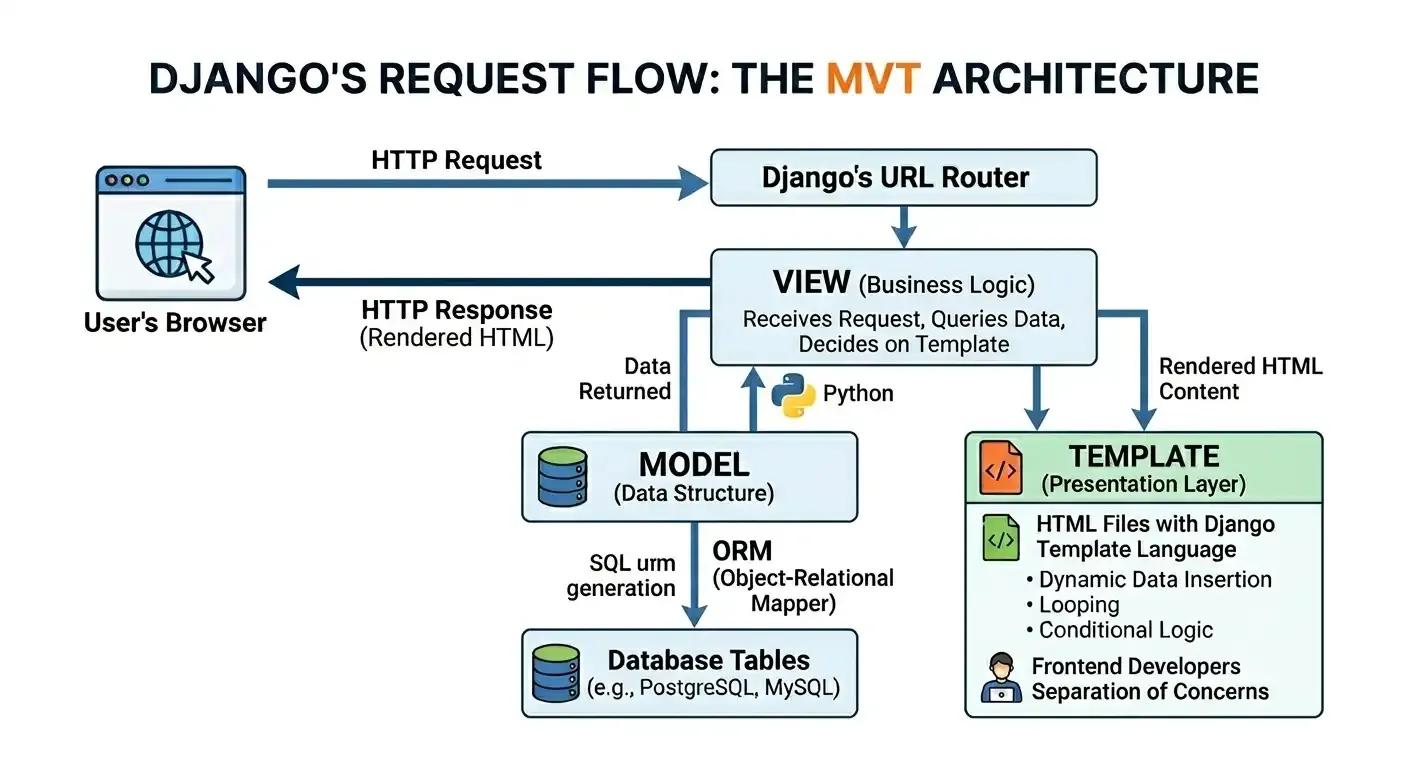
Django follows the MVT (Model View Template) style, which is similar to MVC (Model View Controller) style in other frameworks. This pattern is essential to understand because it defines the structure of every Django application. The three layers work together like this:
- Model defines your data structure. You write Python classes, and Django automatically creates database tables from them. The ORM (Object-Relational Mapper) handles all SQL generation, allowing you to work with your database in Python code rather than writing raw SQL.
- View contains the business logic. It receives an HTTP request, processes the data (typically querying the database via models), and returns an HTTP response. Views are where decisions are made: what data to fetch, what computations to perform, and which template to render.
- Template handles the presentation layer. These are HTML files enhanced with Django's template language, which lets you insert dynamic data, loop through lists, and apply conditional logic. Templates separate your HTML from your Python code. This means that you are following the principle of separation of concerns. If your team has frontend developers, they will spend most of their time working with this layer.
The request flow looks like this: The user’s browser sends an HTTP request to the URL router in Django, which then finds the appropriate view. The view queries the DB against models, then passes data to a template. The template is compiled into HTML and sent back to the browser. At this point, I encourage you to spend some time with the architecture diagram below to get the full picture of how these pieces fit together.
Why Django? (vs Flask, vs FastAPI)
Before we start coding, let me tell you why you might want to use Django over other Python frameworks. Get it wrong, and you could lose weeks of development time on your project. So it’s worth getting it right.
Django vs Flask
Flask is a microframework. It gives you the basics (routing and request handling) and lets you choose everything else yourself, from the database layer to the authentication system. Django gives you everything included.
For beginners, Django is easier because you do not have to make dozens of decisions about which packages to use before writing your first line of application code. For experienced developers, it means faster project setup and a consistent structure that new team members can understand quickly. This is a major reason why companies that hire remote developers often default to Django for new web projects.
Flask is the better option when you need the most flexibility, are creating a lightweight microservice, or your project's requirements do not align with Django's built-in tools. If you need experienced engineers for either approach, you can browse our vetted backend developers who work across both frameworks.
Django vs FastAPI
FastAPI is designed for building APIs, with automatic OpenAPI docs and async support. It is very fast on benchmarks. It uses Python type hints to provide extensive built-in request validation. It doesn't have an ORM, an admin panel, a template engine, or an authentication system. These parts you have to put together yourself.
If you’re building a full-stack web application with server-rendered pages, user accounts, and an admin panel, Django saves you a lot of development time. If your project is purely an API backend for a separate frontend (built in React, Vue, or a mobile application), FastAPI is worth serious consideration. Django REST Framework bridges this gap for teams that want Django's ecosystem while also serving API endpoints.
When to Choose Which Framework
Our common rule is that if your project needs a web interface, user accounts, and an admin panel, start with Django. If you are building a pure API for a frontend app, consider FastAPI. If you want maximum flexibility and your project is small, use Flask. For a deeper comparison, read our guide on choosing the right frontend framework to pair with your backend.
For teams building full-stack applications, Django's integrated tooling typically significantly reduces time-to-production.
Installing Django and Setting Up Your Environment
Let us get everything installed. You will need Python 3.10 or higher. Check your version:
python --versionIf you do not have Python, download it from python.org/downloads. Make sure to check "Add Python to PATH" during installation on Windows.
Create a Virtual Environment
It keeps your project dependencies separate from your system Python. Skipping this step is a common source of problems for beginners, and every professional Python project uses one. The Python documentation on venv covers all the details if you want to understand what is happening under the hood.
# Create project directory
mkdir myblog
cd myblog
# Create virtual environment
python -m venv venv
# Activate it
# On Mac/Linux:
source venv/bin/activate
# On Windows:
venv\Scripts\activate
# You should see (venvat the start of your terminal prompt
Install Django
pip install django
# Verify installation
django-admin --version
# Should show something like 5.1.x
Create the Django Project
# Create the project
django-admin startproject config .
# The dot (.) at the end is important!
# It creates your project in the current directory
# instead of creating a nested folder
Your project structure now looks like this:
myblog/
  config/
    __init__.py
    settings.py     # Project configuration
    urls.py         # URL routing
    wsgi.py         # Production server entry point
    asgi.py         # Async server entry point
  manage.py         # Command-line utility
  venv/             # Virtual environment
Let us make sure it works:
python manage.py runserverOpen http://127.0.0.1:8000 in your browser. You should see the Django welcome page with a rocket. Your development server is running.
Note: This built-in server is for development purposes only. It reloads automatically when you change code, which is handy in development, but it doesn’t have the performance and security features you need for production. For production deployments, you would use a WSGI server such as Gunicorn behind a reverse proxy like Nginx.
Understanding Django Project Structure
Django breaks code into "apps," and each app does one thing. It’s a stand-alone, reusable component for other projects. This modular approach is useful in organizing large codebases. If you have worked with Node.js or other frameworks, think of Django apps as similar to modules or packages, but with a standard structure that Django automatically recognizes.
For our blog, we will create a blog app:
python manage.py startapp blogThis creates a new blog/ directory:
blog/
  migrations/       # Database migration files
  __init__.py
  admin.py          # Admin panel configuration
  apps.py           # App configuration
  models.py         # Database models
  tests.py          # Unit tests
  views.py          # View functions/classes
Understanding the difference between a "project" and an "app" is key here. The project (our config/ directory) contains a site-wide configuration: settings, root URL routing, and server entry points. An app (our blog/ directory) is a self-contained module that implements specific functionality. A project can contain multiple apps. An app can be reused in multiple projects. This architecture is one reason Django scales well from small side projects to large enterprise applications. The official Django documentation on applications covers this topic in detail, and understanding it early on saves you from confusion as your project grows.
Now register the app in config/settings.py. Find the INSTALLED_APPS list and add our blog app:
INSTALLED_APPS = [
    'django.contrib.admin',
    'django.contrib.auth',
    'django.contrib.contenttypes',
    'django.contrib.sessions',
    'django.contrib.messages',
    'django.contrib.staticfiles',
    'blog',  # Add this line
]
Creating Your First App: Blog with Posts and Comments
Step 1: Define the Models
Models are the only source of information about your data. Each model corresponds to a single database table. Each attribute corresponds to a database field. Django's ORM translates your Python model definitions into the appropriate SQL for your database backend, which means you can switch databases (from SQLite to PostgreSQL, for example) without changing your application code. The Django models documentation is the canonical reference for everything you can do with models.
Open blog/models.py:
from django.db import models
from django.utils import timezone
from django.contrib.auth.models import User
class Post(models.Model):
    title = models.CharField(max_length=200)
    slug = models.SlugField(max_length=200, unique=True)
    author = models.ForeignKey(User, on_delete=models.CASCADE)
    content = models.TextField()
    created_at = models.DateTimeField(default=timezone.now)
    updated_at = models.DateTimeField(auto_now=True)
    published = models.BooleanField(default=False)
    class Meta:
        ordering = ['-created_at']
    def __str__(self):
        return self.title
class Comment(models.Model):
    post = models.ForeignKey(Post, on_delete=models.CASCADE, related_name='comments')
    author_name = models.CharField(max_length=100)
    email = models.EmailField()
    content = models.TextField()
    created_at = models.DateTimeField(auto_now_add=True)
    approved = models.BooleanField(default=False)
    class Meta:
        ordering = ['created_at']
    def __str__(self):
        return f'Comment by {self.author_name} on {self.post.title}'
Let me explain what is happening here, because there are several important concepts worth understanding in detail.
Field types and database mapping. CharField creates a VARCHAR column with a specified maximum length. TextField creates a TEXT column for longer content without a length limit. SlugField is a specialized CharField that only accepts letters, numbers, hyphens, and underscores, making it safe for use in URLs. BooleanField maps to a boolean column that stores True or False.
Relationships between models. The ForeignKey on Post.author creates a many-to-one relationship between posts and users: one user can write many posts, but each post has exactly one author. The on_delete=models.CASCADE parameter tells Django to delete all of an author's posts if the author account is deleted. The ForeignKey on Comment.post creates the same type of relationship: one post can have many comments. The related_name='comments' parameter lets you access a post's comments with post.comments.all() instead of the default post.comment_set.all().
Timestamps. The default=timezone.now on created_at sets the creation time when the object is first saved. The auto_now=True on updated_at automatically updates the timestamp every time the object is saved. The auto_now_add=True on Comment's created_at sets the timestamp once when the object is created and never changes it.
The Meta class and str method. The Meta class provides metadata about the model. ordering = ['-created_at'] tells Django to return posts in reverse-chronological order by default (the minus sign indicates descending order). The __str__ method defines how each object is displayed in the admin panel and the Django shell, which makes debugging significantly easier.
At this point, I will recommend you spend some time reading the model code above to get a complete understanding of how the fields, relationships, and metadata work together.
Step 2: Create and Run Migrations
Migrations convert your model changes into database operations. Think of them as a control version for your database schema.
# Create migration files
python manage.py makemigrations
# Apply them to the database
python manage.py migrate
When you run makemigrations, Django compares your current model definitions against the existing migration files and generates new migration files for any changes it detects. When you run migrate, Django applies those files to your database.
Django uses SQLite by default, which is perfect for development. It is a file based database and doesn't require a separate server process. For production you would switch to PostgreSQL for robustness, concurrent access, and advanced features such as full-text search. We’ll come back to this later in the deployment section. MongoDB is common to add if your application needs a document database on top of the relational layer. It does not replace the main Django ORM database.
A common mistake is editing migration files directly or deleting them. Do not do that. Let Django manage migrations. If you get into a mess, the safest approach is to delete the database file and all migration files (except __init__.py), then re-run makemigrations and migrate from scratch.
Step 3: Create the Views
Views are responsible for the logic of what to show the user. Django supports both function-based views (simpler and more explicit) and class-based views (more structured and reusable). For this tutorial, we use function-based views because they make the request-response cycle easier to follow. The Django views documentation covers both approaches in detail. If you are coming from a Node.js Express background, Django views serve a similar role to Express route handlers.
Open blog/views.py:
from django.shortcuts import render, get_object_or_404
from django.http import HttpResponseRedirect
from .models import Post, Comment
def post_list(request):
   posts = Post.objects.filter(published=True)
   return render(request, 'blog/post_list.html', {'posts': posts})
def post_detail(request, slug):
   post = get_object_or_404(Post, slug=slug, published=True)
   comments = post.comments.filter(approved=True)
   if request.method == 'POST':
       author_name = request.POST.get('author_name')
       email = request.POST.get('email')
       content = request.POST.get('content')
       if author_name and email and content:
           Comment.objects.create(
               post=post,
               author_name=author_name,
               email=email,
               content=content
           )
           return HttpResponseRedirect(request.path)
   return render(request, 'blog/post_detail.html', {
       'post': post,
       'comments': comments
   })
As you can see, the post_list view fetches all published posts and passes them to a template. The post_detail view fetches a single post by its slug and also handles comment submission. Let's go through the three patterns in this code that are worth understanding well.
QuerySet filtering. Post.objects.filter(published=True) returns a QuerySet containing only published posts. QuerySets are lazy, meaning they do not hit the database until you actually evaluate them (by iterating, slicing, or calling methods like .count()).This allows Django to optimize database queries. The other big security benefit of an ORM is that it protects you from SQL injection by automatically parameterizing all queries. This is something that is easy to miss, easy to do, and critical for production applications.
The get_object_or_404 pattern. Instead of fetching an object and manually checking if it exists, get_object_or_404 returns the object if found or raises a 404 HTTP response if not. This is both cleaner and safer than showing an ugly error page. It is a pattern you will use constantly in Django views.
Post-Redirect-Get. After successfully processing a comment submission, the view returns an HttpResponseRedirect to the same page. Why? This prevents duplicate submissions if the user refreshes their browser. This is a standard web development pattern called Post-Redirect-Get (PRG), and Django makes it easy to implement.
Step 4: Set Up URLs
Django uses a URL configuration system to map URL patterns to views. Each URL pattern specifies a path, the view function to call, and an optional name for reverse lookups.
Create a new file blog/urls.py:
from django.urls import path
from . import views
urlpatterns = [
   path('', views.post_list, name='post_list'),
   path('post/<slug:slug>/', views.post_detail, name='post_detail'),
]
Then include these URLs in config/urls.py:
from django.contrib import admin
from django.urls import path, include
urlpatterns = [
   path('admin/', admin.site.urls),
   path('', include('blog.urls')),
]
The <slug:slug> syntax is a path converter. It captures a URL segment, validates that it matches the slug format (letters, numbers, hyphens, underscores), and passes it to the view function as a keyword argument. Django provides several built-in converters: int, str, slug, uuid, and path.
Naming your URL patterns (with the name parameter) is an important best practice. Instead of hardcoding URLs in your templates, you can use {% url 'post_detail' post.slug %}, which means changing a URL pattern in one place automatically updates it everywhere in your application. This also benefits SEO: clean, descriptive URLs with meaningful slugs perform better in search engine rankings than numeric IDs or query parameters. The Django URL dispatcher documentation covers advanced patterns, including regular expressions and custom converters. Teams that invest in proper URL architecture from the start avoid painful restructuring later.
Step 5: Create the Templates
Django's template system separates presentation from business logic. Templates use a combination of HTML and Django's template language, which provides tags (for logic like loops and conditionals) and filters (for transforming values).
Create the directory blog/templates/blog/ and add two files.
First, post_list.html:
<!DOCTYPE html>
<html>
<head>
   <title>My Blog</title>
   <style>
       body { font-family: Arial, sans-serif; max-width: 800px; margin: 0 auto; padding: 20px; }
       .post { margin-bottom: 30px; border-bottom: 1px solid #eee; padding-bottom: 20px; }
       .post h2 a { color: #333; text-decoration: none; }
       .post h2 a:hover { color: #007bff; }
       .meta { color: #666; font-size: 14px; }
   </style>
</head>
<body>
   <h1>My Blog</h1>
   {% for post in posts %}
   <div class="post">
       <h2><a href="{% url 'post_detail' post.slug %}">{{ post.title }}</a></h2>
       <p class="meta">By {{ post.author.username }} | {{ post.created_at|date:"F j, Y" }}</p>
       <p>{{ post.content|truncatewords:50 }}</p>
   </div>
   {% empty %}
   <p>No posts yet.</p>
   {% endfor %}
</body>
</html>
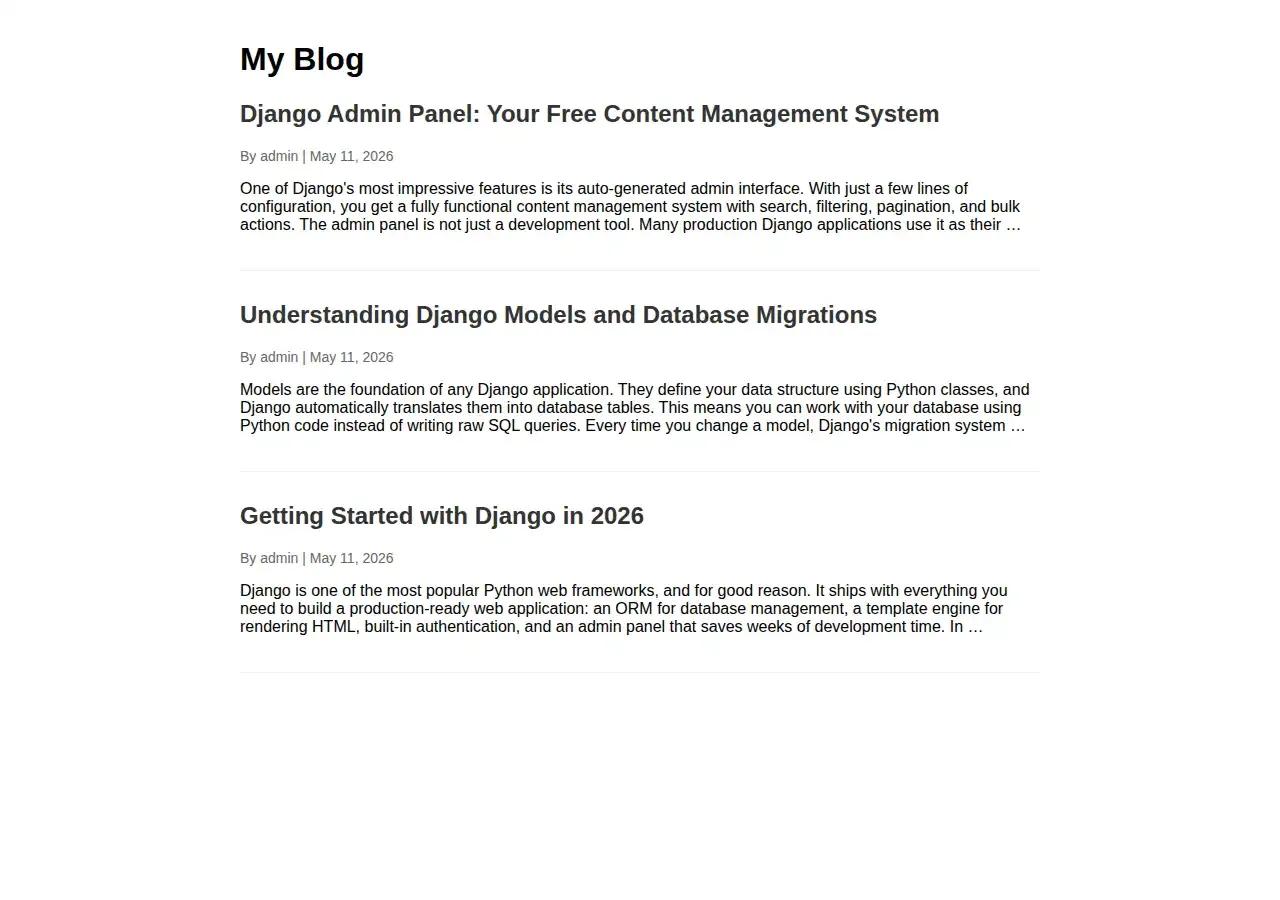
Your blog homepage will look like this:
Then post_detail.html:
<!DOCTYPE html>
<html>
<head>
   <title>{{ post.title }}</title>
   <style>
       body { font-family: Arial, sans-serif; max-width: 800px; margin: 0 auto; padding: 20px; }
       .comment { background: #f8f9fa; padding: 15px; margin: 10px 0; border-radius: 5px; }
       input, textarea { width: 100%; padding: 10px; margin: 5px 0; box-sizing: border-box; }
       button { padding: 10px 20px; background: #007bff; color: white; border: none; cursor: pointer; }
   </style>
</head>
<body>
   <a href="{% url 'post_list' %}">Back to all posts</a>
   <h1>{{ post.title }}</h1>
   <p class="meta">By {{ post.author.username }} | {{ post.created_at|date:"F j, Y" }}</p>
   <div>{{ post.content|linebreaks }}</div>
   <h3>Comments ({{ comments|length }})</h3>
   {% for comment in comments %}
   <div class="comment">
       <strong>{{ comment.author_name }}</strong> <span style="color:#999">{{ comment.created_at|date:"M j, Y" }}</span>
       <p>{{ comment.content }}</p>
   </div>
   {% endfor %}
   <h3>Leave a Comment</h3>
   <form method="post">
       {% csrf_token %}
       <input type="text" name="author_name" placeholder="Your name" required>
       <input type="email" name="email" placeholder="Your email" required>
       <textarea name="content" rows="4" placeholder="Your comment" required></textarea>
       <button type="submit">Submit Comment</button>
   </form>
</body>
</html>
Notice the {% csrf_token %} tag in the form. Django requires this for security. It protects against cross-site request forgery attacks by creating a unique token for each single user session and checking it for every form submission. If you forget it, your form submissions will get a 403 Forbidden error.
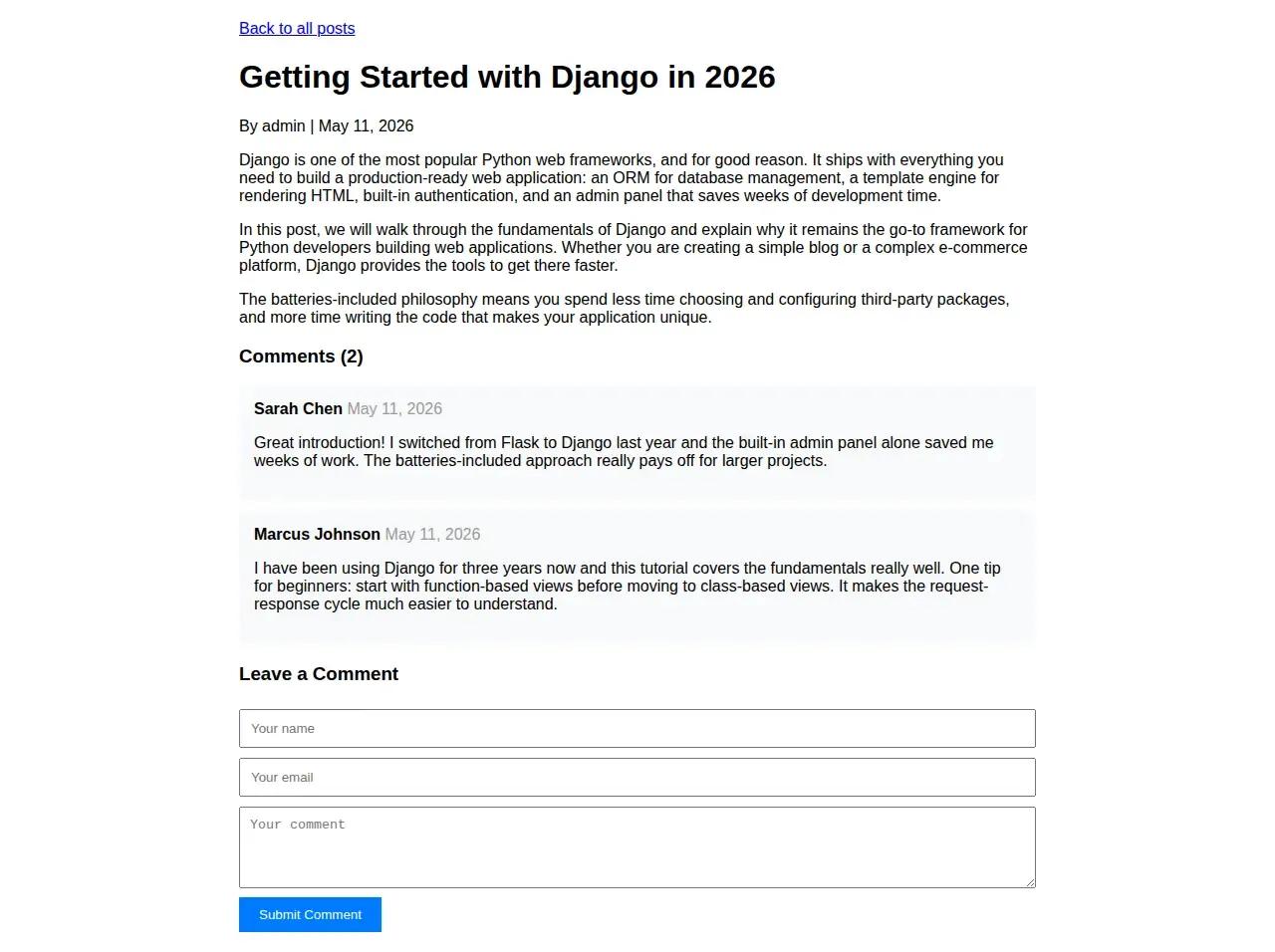
Click any post title to open it. Your blog post detail page, complete with content, reader comments, and a comment form, will look like this:
At this point, you might ask, "What about XSS protection?" Django's template system handles that for you. Any variable output through {{ variable }} is automatically escaped to prevent cross-site scripting attacks. Characters like <, >, and & are converted to their HTML entities. The |safe filter can bypass this escape, but it should only be used with content you fully control and trust.
Django Admin Panel (Free Admin Interface!)
This is one of Django's killer features. With just a few lines of code, you get a full admin interface for managing your data. Open blog/admin.py:
from django.contrib import admin
from .models import Post, Comment
@admin.register(Post)
class PostAdmin(admin.ModelAdmin):
   list_display = ['title', 'author', 'created_at', 'published']
   list_filter = ['published', 'created_at']
   search_fields = ['title', 'content']
   prepopulated_fields = {'slug': ('title',)}
   list_editable = ['published']
@admin.register(Comment)
class CommentAdmin(admin.ModelAdmin):
   list_display = ['author_name', 'post', 'created_at', 'approved']
   list_filter = ['approved', 'created_at']
   search_fields = ['author_name', 'content']
   list_editable = ['approved']
Now, create a superuser account to access the admin:
python manage.py createsuperuser
Follow the prompts to set username, email, and password
Start the server with python manage.py runserver and go to http://127.0.0.1:8000/admin/. Log in, and you will see a beautiful admin interface where you can create posts, manage comments, and moderate content.
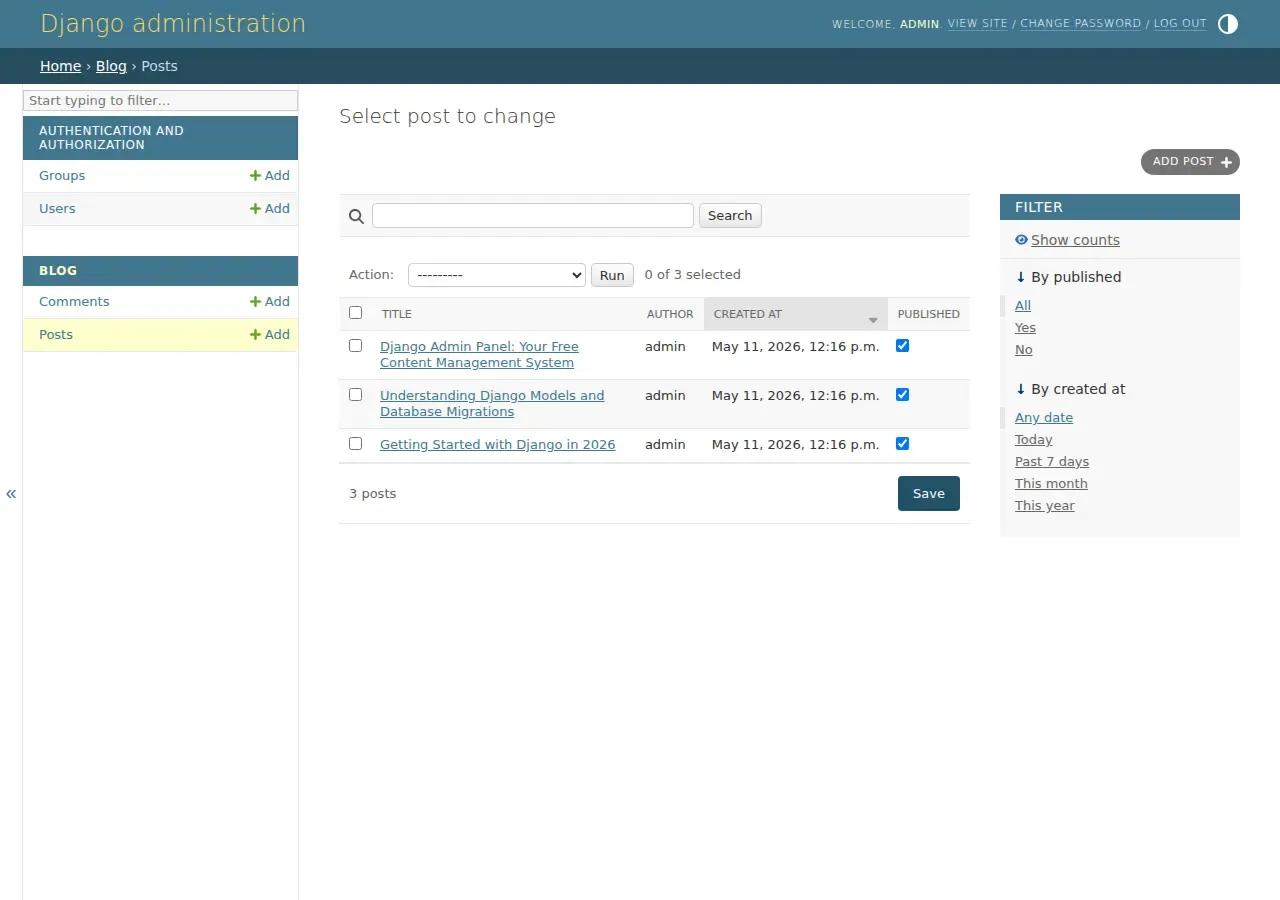
Let us walk through what each configuration option does, because understanding these will help you customize the admin for any project.
list_display controls which columns show up in the list view. By default, Django only shows the str representation, but listing specific fields makes the admin immediately useful for content management.
list_filter adds sidebar filters. For a blog with hundreds of posts, filtering by published status or date range saves significant time.
search_fields adds a search bar that performs case-insensitive searches across the specified fields. Django generates SQL LIKE queries under the hood.
prepopulated_fields will automatically populate the slug field with what you type into the title field. This means slugs are generated in a way that keeps them URL-friendly without any manual work. This improves both usability and SEO. Search engines can better understand page content and increase click-through rates in search results when URLs are clean and descriptive.
list_editable allows you to edit field values directly from the list view without opening each object individually. This is particularly useful for toggling the published and approved flags across multiple objects at once.
This is production-quality admin functionality with almost zero effort. Many Django applications in production use the admin as their primary content management tool, which eliminates the need to build custom CRUD interfaces for internal teams. The Django admin documentation shows how to further customize it with inline models, custom actions, and permission controls. If you want to compare this to building admin panels manually in React or other frontend frameworks, Django's approach saves weeks of development time.
Database Migrations Explained
Every time you change your models (add a field, rename something, change a relationship), you need to create and run a migration. Migrations are version control for your database’s schema, and understanding how they work will save you from painful debugging sessions. The Django migrations documentation is the definitive resource. If you are coming from a Node.js background where you might use Knex.js or Sequelize migrations, you will find Django's migration system more tightly integrated with the ORM.
# After changing models.py:python manage.py makemigrations # Creates migration file python manage.py migrate # Applies it to the database
See what SQL a migration would run:
python manage.py sqlmigrate blog 0001
Check for issues without making changes:
python manage.py check
The sqlmigrate command is particularly useful for understanding what Django is doing under the hood. It shows you the exact SQL statements a migration will execute, which helps when you need to review changes before applying them to a production database.
So what does the workflow look like? When you modify your models, Django compares your current model definitions with the last migration file. When you run makemigrations, it creates a new Python file describing the change. Running migrate will execute the corresponding SQL on your database. Each migration file records a dependency on the previous migration, forming a chain that ensures migrations are applied in the correct order, even when multiple engineers are working on the same project simultaneously.
A common mistake among beginners is editing migration files directly or deleting them when things go wrong. Do not do that. Let Django manage migrations. If you get into a mess, the safest approach during development is to delete the database file and all migration files except init.py, then re-run makemigrations and migrate from scratch. In production, migration management requires more careful planning, including testing migrations on staging environments before applying them to live databases.
How Django Handles Security
Django's approach to security is one of its strongest selling points, and it is worth understanding what protections you get out of the box. The framework provides built-in protection against the most common web application vulnerabilities, many of which are listed in the OWASP Top 10.
Cross-Site Request Forgery (CSRF). We covered this earlier with the {% csrf_token %} tag. Django's CSRF middleware generates and validates unique tokens for every form submission, preventing attackers from forging requests on behalf of authenticated users.
SQL Injection. Django's ORM uses parameterized queries by default, so user input is never directly interpolated into SQL statements. This removes the most common attack surface for compromise of the database. If you must use raw SQL (which is rare), Django has methods for safe parameter substitution.
Cross-Site Scripting (XSS). Django's template engine automatically escapes HTML output, converting characters like < and > into their safe HTML entities. This prevents attackers from injecting malicious JavaScript through user input fields.
Clickjacking. Django includes X-Frame-Options middleware that prevents your pages from being embedded in iframes on malicious sites, a technique attackers use to trick users into clicking hidden elements.
Session Security. Django's session framework uses signed cookies with the secret key, preventing session tampering. It supports secure cookie flags (SESSION_COOKIE_SECURE, CSRF_COOKIE_SECURE) for HTTPS-only transmission.
These protections work out of the box with Django's default configuration. However, they must be configured correctly for production environments. The command python manage.py check --deploy audits your settings and warns about common security misconfigurations. You should run this before every production deployment.
For teams building applications where security is a top priority, working with experienced backend developers who deeply understand Django's security model can help prevent costly vulnerabilities. You can also read Django's own security documentation and the OWASP Django Security Cheat Sheet for a comprehensive overview.
Deploying Your Django App
Moving from development to production involves several configuration changes. Here is a deployment checklist that covers the essentials:
- Set DEBUG = False in settings.py. This is the single most critical production setting. When DEBUG is True, Django displays detailed error pages that expose your source code, database queries, and environment variables. In production, Django shows a generic error page and logs the details on the server side instead.
- Configure ALLOWED_HOSTS. Set this to your domain name (e.g., ['yourdomain.com', 'www.yourdomain.com']). Django uses this setting to prevent HTTP Host header attacks.
- Use PostgreSQL instead of SQLite. SQLite does not handle concurrent writes well. PostgreSQL is the recommended production database for Django because of its robustness, advanced features, and excellent integration with Django. If your project involves MongoDB or other NoSQL databases alongside Django, they typically serve specific use cases like caching or document storage rather than replacing the primary relational database.
- Set up static file serving. Django has built-in support for static files in development. Use a dedicated solution for production. The popular whitenoise package allows you to serve static files directly from your WSGI app, avoiding the need for a separate file server.
- Use environment variables for secrets. Your SECRET_KEY, database credentials, and any API keys should never be hardcoded in settings.py. Use environment variables or a package like python-decouple to load them.
- Enforce HTTPS. Set SECURE_SSL_REDIRECT = True to redirect all HTTP requests to HTTPS, and enable SESSION_COOKIE_SECURE and CSRF_COOKIE_SECURE to ensure cookies are only transmitted over encrypted connections.
- Run collectstatic. The command python manage.py collectstatic gathers all static files from your applications into a single directory for production serving.
For a quick deployment, platforms like Railway and Render offer simplified Django hosting. For production at scale, a typical setup involves Docker containers running Gunicorn as the WSGI server, behind Nginx as a reverse proxy, deployed on AWS, Google Cloud, or DigitalOcean. Teams that need DevOps expertise alongside Django development should plan for this infrastructure from the start.
SEO Best Practices for Your Django Blog
Building a Django blog is only the first step. Making it discoverable by search engines requires implementing SEO best practices from the start. Django's architecture provides a strong foundation for SEO by giving you complete control over URLs, meta tags, and content structure. Here is what you should implement following Yoast's SEO guidelines.
Clean URL Structure with Slugs
The slug field in our Post model creates human-readable, keyword-rich URLs like /post/django-for-beginners/ instead of /post/42/. Search engines use URL structure as a ranking signal, and descriptive slugs help both users and crawlers understand page content before clicking. Django's prepopulated_fields in the admin make slug generation automatic.
Dynamic Meta Tags and Titles
Every important page should have a unique title tag and meta description. In Django, you can pass these dynamically from your views through template context to make sure that each page is individually optimized. Use the {% block %} template tag to set page-specific titles in child templates:
<title>{% block title %}My Blog{% endblock %}</title>
<meta name="description" content="{% block description %}{% endblock %}">
XML Sitemaps
Django includes a built-in sitemap framework (django.contrib.sitemaps) that automatically generates XML sitemaps for search engine crawlers. It helps Google and other search engines to locate and index all of your pages, especially for content-heavy sites. The Django SEO packages directory lists community tools that extend this further with meta tag management and OpenGraph support.
Heading Hierarchy
Use a proper heading structure (H1, H2, H3) in your templates. Every page should have only one H1 tag (the post title), with H2 and H3 tags for sections and subsections. This hierarchy allows search engines and AI systems to better understand the importance and structure of your content, which affects how your pages are surfaced in search results and AI-generated answers.
Performance Optimization
Search engines use web pages' load speed as a ranking metric. Django supports multiple caching strategies (per-view caching, template fragment caching, and database query caching) and works well with CDNs for static asset delivery. Implementing caching from the start prevents performance degradation as your content library grows. For high-traffic applications, pairing Django with Redis for caching and session storage is a common production pattern.
For teams looking to build SEO-optimized Django applications with a solid technical foundation, check out our developer roadmaps for structured learning paths across the Django ecosystem.
Django Community and Learning Path
One of Django's most underrated strengths is its community. Unlike newer frameworks, where documentation is sparse and you are largely on your own, Django has a mature ecosystem of learning resources maintained by experienced practitioners. If you are serious about learning Django, here is a recommended path based on what we have seen work for developers at all levels.
For absolute beginners, the official Django tutorial is the most recommended starting point. It walks you through building a poll application and introduces core concepts in a structured process. The Django Girls tutorial is another excellent free resource that takes a more approachable tone and covers deployment. LearnDjango.com provides step-by-step tutorials that don't skip a step, which is invaluable when you are just getting started.
For project-based learning, build progressively more complex applications.
- Start with a simple blog (like the one in this tutorial).
- Then move to a CRUD application with user authentication.
- And then tackle something with real-time features or API integration.
The key is to avoid tutorial hell, where you watch endless videos but never build anything on your own. Each project should push you slightly beyond your current skill level.
For intermediate developers ready to write production-grade Django, focus on:
- Docker and environment variable management,
- PostgreSQL configuration,
- Email integration, proper security headers,
- And deployment to cloud platforms like AWS or DigitalOcean.
These are some of the skills that separate hobby projects from professional-grade applications.
The Django Forum is the official discussion space with over 93,000 members. For real-time help, there is an official Django Discord community and Stack Overflow. DjangoCon conferences happen annually and are a great way to connect with the community and learn from experienced practitioners. The Django Chat podcast covers everything from concepts to use cases, including how Django is used at scale in production. And for a curated directory of community-built packages, Django Packages helps you find solutions without reinventing the wheel.
For teams evaluating Django for a commercial project, our company FAQs and web development FAQs cover common questions about working with remote Django developers.
Need Experienced Django Developers?
Django is powerful, but building production-grade applications with proper security, scalable database design, and clean architecture takes experience. At Softaims, our Django developers have built everything from e-commerce platforms to content management systems for clients worldwide.
If you are building a Django project and need to move fast without compromising on architecture, our engineering team can help. Whether you need a single Django developer or a full development team, we have been building Django applications for over 8 years, from small blogs to large-scale platforms serving millions of users. Check our freelance developer rates to plan your budget, or browse our developer job description templates to streamline your hiring process.
Frequently Asked Questions About Django
Is Django worth learning in 2026?
Yes. Django is actively maintained, powers production applications at Instagram, Spotify, Mozilla, and NASA, and has a strong job market. It gets released every 9 months with long-term support versions. Python remains the most popular programming language, and Django is its leading web framework.
Is Django frontend or backend?
Django is a backend framework. It handles databases, URL routing, authentication, and business logic. It includes a template engine for server-rendered HTML, but in modern stacks, Django often serves as a REST API backend while React, Vue, or Angular handles the frontend.
Is Django just Python?
Django is written in Python, but it is a full web framework, not just the language. It includes an ORM, template engine, URL router, authentication system, admin interface, form handling, and security middleware. Python is the language; Django is a comprehensive toolkit built on top of it for web development.
What is the main purpose of Django?
To build web applications fast without repeating yourself. Djprebuiltides pre-built solutions for databases (ORM), user accounts (auth), content management (admin), forms, and security so builders can focus on business logic instead of boilerplate. A team using Django ships working applications significantly faster than with most alternatives.
How does Django compare to Node.js?
Django is a batteries-included Python framework with ORM, admin, and auth built in. Node.js is a JavaScript runtime that requires separate packages for each feature (e.g., Express, Sequelize, Passport). Django is faster to ship full web applications. Node.js is better for real-time apps and full-stack JavaScript teams. Many companies use both.
Can Django handle real-time features?
Yes, through Django Channels, which adds WebSocket support for live chat, notifications, and streaming data. For lighter interactivity, HTMX pairs with Django for dynamic page updates without JavaScript. Both work alongside existing Django code.
Hire Django developers | Hire Python developers | Hire backend developers | Hire full-stack developers
Looking for complementary skills for your project? Explore our talent across the full stack: Hire React developers | Hire Node.js developers | Hire mobile app developers | Hire MongoDB developers
Looking to build with this stack?
Hire Django Developers →

 Stackoverflow
Brian K.

 Verified Expert in Engineering
My name is Brian K. and I have over 5 years of experience in the tech industry. I specialize in the following technologies: MySQL, Drupal, Shopify, JavaScript, Java, etc.. I hold a degree in Bachelor's degree, Master of Computer Science (MSCS). Some of the notable projects I’ve worked on include: Imagine It, MDVIP. I am based in London, United States. I've successfully completed 2 projects while developing at Softaims.
I approach every technical challenge with a mindset geared toward engineering excellence and robust solution architecture. I thrive on translating complex business requirements into elegant, efficient, and maintainable outputs. My expertise lies in diagnosing and optimizing system performance, ensuring that the deliverables are fast, reliable, and future-proof.
The core of my work involves adopting best practices and a disciplined methodology, focusing on meticulous planning and thorough verification. I believe that sustainable solution development requires discipline and a deep commitment to quality from inception to deployment. At Softaims, I leverage these skills daily to build resilient systems that stand the test of time.
I am dedicated to making a tangible difference in client success. I prioritize clear communication and transparency throughout the development lifecycle to ensure every deliverable exceeds expectations.

Leave a Comment
Need help building your team? Let's discuss your project requirements.
Get matched with top-tier developers within 24 hours and start your project with no pressure of long-term commitment.