Django REST Framework: Build a Complete API in 60 Minutes
Django REST Framework (DRF) is the industry-standard Python toolkit for building RESTful APIs on top of Django. This Django REST Framework tutorial walks you through building a complete bookstore API from scratch.
Table of contents
Key Takeaways
- Django REST Framework extends Django by replacing the template layer with serializers that convert Python objects to JSON and back, adding authentication, permissions, throttling, and pagination on top of Django's existing ORM and model infrastructure.
- Serializers handle both directions of data flow: converting model instances to JSON for API responses (serialization) and parsing incoming JSON into validated Python objects for database writes (deserialization). Use separate serializers for list and detail views to keep list endpoints fast.
- The N+1 query problem is the most common performance issue in DRF applications. Solve it by applying select_related() for foreign key relationships and prefetch_related() for reverse and many-to-many relationships in your viewset querysets.
- ViewSets with routers are the most efficient way to build standard CRUD endpoints. A single ModelViewSet class with a router registration generates list, create, retrieve, update, partial update, and delete endpoints automatically.
- Token authentication stores tokens in the database and requires a lookup per request. JWT authentication validates tokens cryptographically without a database hit, making it better suited for high-traffic APIs and microservices architectures.
- Cursor pagination eliminates the COUNT(*) query that slows down PageNumberPagination on large datasets. Use it for APIs that power infinite scroll or data stream interfaces.
- Throttling protects your API from abuse. Configure UserRateThrottle and AnonRateThrottle globally, and use Redis-backed caching for consistent rate limiting across multiple server instances.
- drf-spectacular generates OpenAPI 3.0 schemas and interactive Swagger documentation automatically from your viewsets and serializers, enabling automated client library generation for TypeScript, Swift, or Kotlin frontends.
Django handles web applications well. It gives you models, views, URL routing, and an admin panel out of the box. But in 2026, most projects need more than server-rendered HTML pages. Your React frontend needs a structured data layer. Your mobile app needs endpoints it can call over HTTP. Third-party integrations need a programmatic interface to your business logic. This is where Django REST Framework comes into the picture and why learning to use Django for REST API development has become an essential backend skill.
Django REST Framework (DRF) is the industry standard toolkit for building Web APIs on top of Django. I have been building APIs with DRF for about six years now, and it is still my go-to choice for Python backends. It handles the boring stuff like serialization, validation, authentication, and pagination so you can focus on your business logic. If you are coming from a Django background and want to move into API development, DRF is the natural next step. In this Django REST Framework tutorial, we will build a complete bookstore API from scratch with CRUD operations, authentication, permissions, filtering, and proper documentation.
What is Django REST Framework?
How DRF Extends Django's Architecture
Django follows the Model-View-Template (MVT) pattern. Models define your data structure, views handle request logic, and templates render HTML. DRF keeps the first two layers intact and replaces the template layer with serializers that convert your Python objects into JSON (and back). It also adds infrastructure that Django does not provide natively: request parsing, content negotiation, API-level authentication, permission classes, throttling, and pagination.
Think of it this way: Django gives you the foundation for a web application. Django REST Framework (DRF) provides tools to expose your application's data and logic as a structured, documented, and secure API that any client can use. That client could be a React frontend, a mobile application, or another backend service. Building a restful Django backend becomes simple once these components are in place.
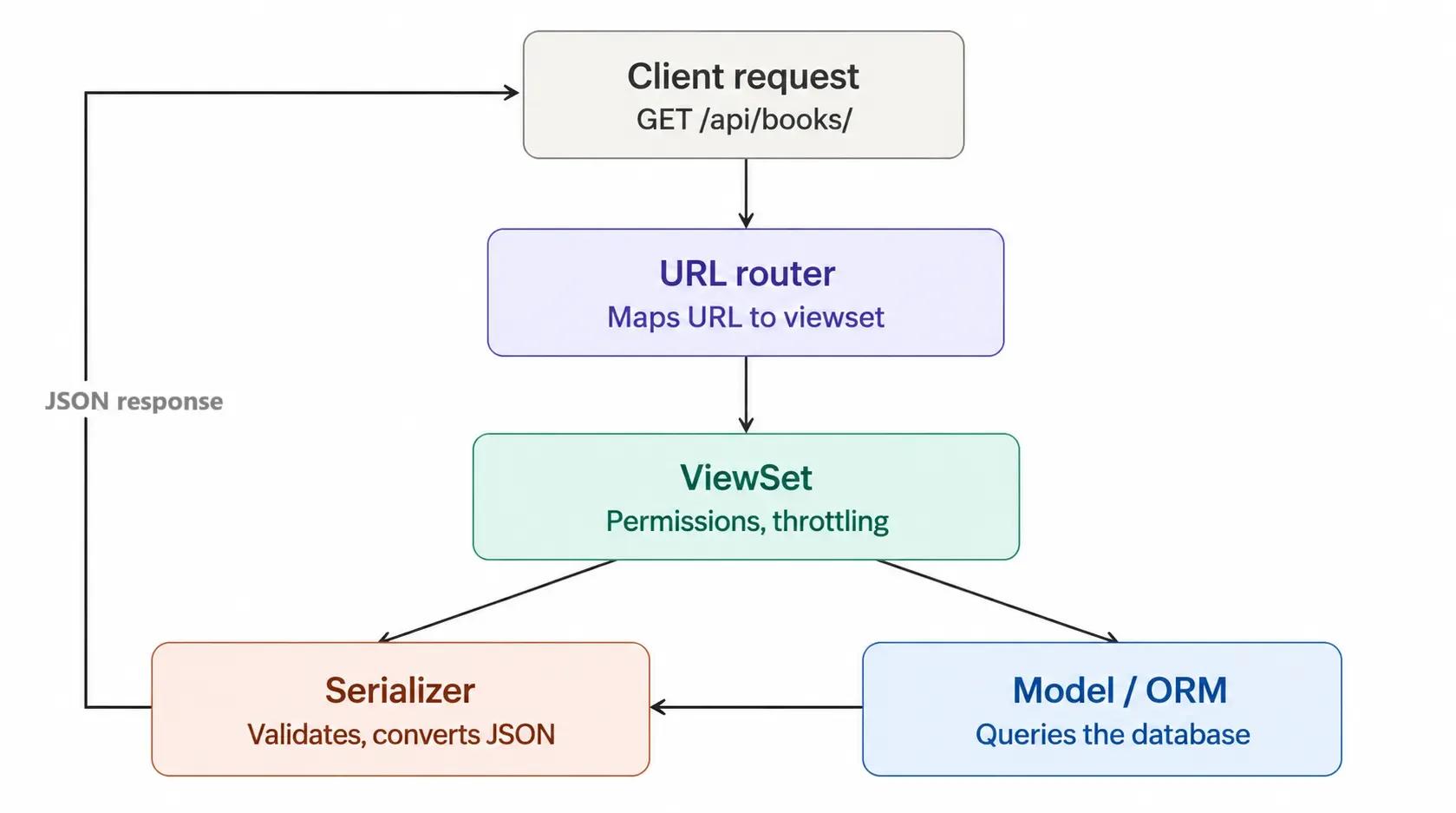
The diagram below shows this request lifecycle. When a client makes a request to your API, the URL router directs it to the appropriate viewset. It also handles permission and throttling rules and acts as a bridge between the serializer (validates data and converts data to/from JSON) and the model layer (queries the database). The serializer wraps the result up in a JSON response and sends it back to the user/client.
Who Uses Django REST Framework (DRF) in Production
DRF is not an experimental library. Organizations like Mozilla, Red Hat, Heroku, and Eventbrite rely on Django REST Framework for their API infrastructure. The framework has been actively maintained since 2011 and has a large community of contributors. According to the official DRF documentation, the framework supports OAuth 1.0a and OAuth 2.0 authentication, ORM and non-ORM data sources, and is customizable at every layer. For teams already invested in the Django ecosystem, Django REST Framework is the standard choice for building a REST API layer. And proficiency with it is often the single most important skill for a modern Django backend role.
The Browsable API: A Built-In Developer Tool
One of the most underrated features of Django REST Framework is the browsable API. When you visit an API endpoint in your web browser, DRF shows an interactive HTML page instead of the raw JSON. This interface allows you to see response data, submit POST requests using built-in forms, and test authentication without leaving the browser. For development teams, this eliminates the need to transition between your code editor and a separate tool like Postman during early development. The browsable API is also living documentation: new team members can browse your API’s structure, try out endpoints, and see response formats without reading a single line of code. No extra configuration is necessary; it is enabled by default.
When Should You Use DRF Instead of a Microframework
Django REST Framework is not the right tool for every Python API project. If you are building a lightweight REST API that does not require database access, user authentication, or an admin interface, a microframework like Flask or FastAPI may be a better fit. Microframeworks offer less overhead and more flexibility for simple services, WebSocket applications, or projects that integrate with NoSQL databases, where Django's ORM provides no advantage.
But when your project needs user registration, session management, an admin panel, access to relational databases, or any of the other things that Django gives you out of the box, you’re going to be better off using DRF. Building your own authentication, permissions, and ORM-level data validation in a microframework takes a lot of development time. DRF handles these issues with a bit of configuration. It really depends on the project requirements. If you need Django's infrastructure, then DRF is the natural API layer to sit on top of it. If not, consider a lighter alternative. Teams evaluating their technology stack need to understand this trade-off early to avoid costly rewrites later on.
Setting Up Django REST Framework in Your Django Project
Installing Dependencies and Configuring Settings
Setting up DRF requires three packages: Django itself, djangorestframework, and django-filter for queryset filtering.
# Create project directory and virtual environment
mkdir bookstore-api && cd bookstore-api
python -m venv venv
source venv/bin/activate    # On Windows: venv\Scripts\activate
# Install packages
pip install django djangorestframework django-filter
# Create Django project and app
django-admin startproject config .
python manage.py startapp books
Register both DRF and your app in settings.py:
# config/settings.py
INSTALLED_APPS = [
    'django.contrib.admin',
    'django.contrib.auth',
    'django.contrib.contenttypes',
    'django.contrib.sessions',
    'django.contrib.messages',
    'django.contrib.staticfiles',
    # Third party
    'rest_framework',
    'django_filters',
   # Local
   'books',
]
REST_FRAMEWORK = {
   'DEFAULT_PAGINATION_CLASS': 'rest_framework.pagination.PageNumberPagination',
   'PAGE_SIZE': 20,
   'DEFAULT_FILTER_BACKENDS': [
       'django_filters.rest_framework.DjangoFilterBackend',
       'rest_framework.filters.SearchFilter',
       'rest_framework.filters.OrderingFilter',
   ],
   'DEFAULT_AUTHENTICATION_CLASSES': [
       'rest_framework.authentication.TokenAuthentication',
       'rest_framework.authentication.SessionAuthentication',
   ],
}
Understanding the REST_FRAMEWORK Configuration Dictionary
The REST_FRAMEWORK dictionary is your API's global configuration layer. Every setting you define here applies to all endpoints by default, though you can override any of them at the view level.
The configuration above accomplishes three objectives. First, it enables pagination with 20 items per page, which prevents your API from returning unbounded result sets. Returning an unlimited dataset from an endpoint is one of the most common performance mistakes in API development. If a client requests /api/products/ and you have 500,000 records, serializing and transmitting all of them in a single response will overwhelm both your server and the client. Pagination limits the data you fetch, serialize, and send over the network.
Second, it registers three filter backends: DjangoFilterBackend for exact-match filtering, SearchFilter for text search across fields, and OrderingFilter for sorting results. These integrate automatically with every viewset you create.
Third, it configures two authentication classes: TokenAuthentication for API clients and SessionAuthentication for browser-based access (including DRF's browsable API). We will explore authentication in more depth later in this guide.
Designing Models for a RESTful Django API
Bookstore Data Model: Author, Book, and Review
A well-structured data model is the foundation of a well-structured API. The bookstore model consists of three entities with clear relationships: Authors write Books, and Users leave Reviews on Books. If you are new to Django model design, the official documentation covers field types, relationships, and Meta options in depth.
Open books/models.py and replace the contents with the following:
# books/models.py
from django.db import models
from django.conf import settings
from django.core.validators import MinValueValidator, MaxValueValidator
class Author(models.Model):
   name = models.CharField(max_length=200)
   bio = models.TextField(blank=True)
   birth_date = models.DateField(null=True, blank=True)
   website = models.URLField(blank=True)
   created_at = models.DateTimeField(auto_now_add=True)
   class Meta:
       ordering = ['name']
   def str(self):
       return self.name
class Book(models.Model):
   title = models.CharField(max_length=300)
   author = models.ForeignKey(
       Author, on_delete=models.CASCADE, related_name='books'
   )
   isbn = models.CharField(max_length=13, unique=True)
   description = models.TextField(blank=True)
   price = models.DecimalField(max_digits=8, decimal_places=2)
   published_date = models.DateField()
   pages = models.PositiveIntegerField()
   in_stock = models.BooleanField(default=True)
   created_at = models.DateTimeField(auto_now_add=True)
   updated_at = models.DateTimeField(auto_now=True)
   class Meta:
       ordering = ['-published_date']
   def str(self):
       return self.title
   @property
   def average_rating(self):
       reviews = self.reviews.all()
       if reviews:
           return round(sum(r.rating for r in reviews) / len(reviews), 1)
       return None
class Review(models.Model):
   book = models.ForeignKey(
       Book, on_delete=models.CASCADE, related_name='reviews'
   )
   user = models.ForeignKey(
       settings.AUTH_USER_MODEL, on_delete=models.CASCADE
   )
   rating = mThels.IntegerField(
       validators=[MinValueValidator(1), MaxValueValidator(5)]
   )
   comment = models.TextField()
   created_at = models.DateTimeField(auto_now_add=True)
   class Meta:
       unique_together = ['book', 'user']
       ordering = ['-created_at']
Then run migrations one by one:
python manage.py makemigrations
python manage.py migrate
python manage.py createsuperuser
Model Design Decisions That Affect API Performance
Several design decisions in this model directly influence how the API will perform under load.
The related_name parameter on each ForeignKey field establishes a reverse relationship that lets you traverse the data graph efficiently. With related_name='books' on the Author foreign key, you can call author.books.all() to retrieve all books by a given author. Without related_name, Django generates a default reverse accessor (book_set), which works but is less readable and harder to maintain across a large codebase.
The unique_together constraint on the Review model is a data integrity rule that prevents a user from submitting multiple reviews for the same book. This constraint is enforced at the database level, so it applies regardless of whether the request comes through your API, the Django admin, or a management command. Enforcing data integrity rules at the model level rather than the view level is a best practice that experienced backend developers follow consistently.
The average_rating property on the Book model calculates the rating on the fly from related reviews. That works fine for moderate traffic, but if your API is handling thousands of concurrent requests, you probably want to denormalize this into a cached field that updates when a review is created or modified. This is a trade-off between freshness and query speed, and the right answer depends on your application's access patterns.
How Do Serializers Work in Django REST Framework
The Role of Serializers in Data Conversion
Serializers are the glue between your Python model instances and the JSON that your API returns to clients. They perform two important tasks: translating complex Django objects into native Python data types that can be easily rendered into JSON (serialization), and translating incoming JSON data into validated Python objects that can be saved to the database (deserialization).
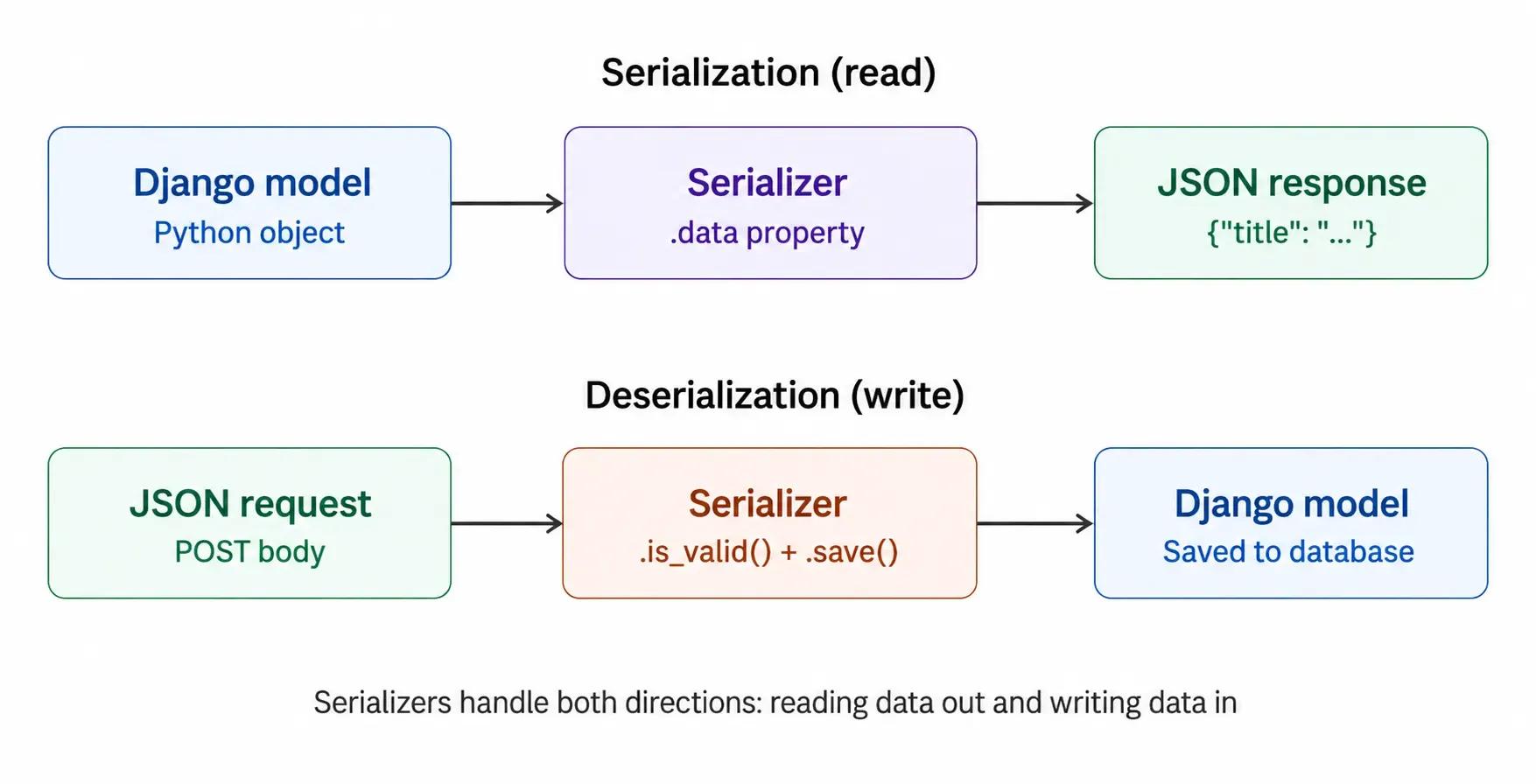
This bidirectional flow is what makes serializers the most important abstraction in Django REST Framework. Every request that reads data from your API goes through serialization. Every request that writes data goes through deserialization and validation. A well-designed serializer ensures that your Django API REST endpoints return consistent, predictable data structures and reject invalid input before it reaches your database.
Create books/serializers.py:
# books/serializers.py
from rest_framework import serializers
from .models import Author, Book, Review
class ReviewSerializer(serializers.ModelSerializer):
   user = serializers.StringRelatedField(read_only=True)
   class Meta:
       model = Review
       fields = ['id', 'user', 'rating', 'comment', 'created_at']
       read_only_fields = ['user']
class BookListSerializer(serializers.ModelSerializer):
   """Lightweight serializer for list views"""
   author_name = serializers.CharField(source='author.name', read_only=True)
   average_rating = serializers.FloatField(read_only=True)
   class Meta:
       model = Book
       fields = [
           'id', 'title', 'author', 'author_name', 'isbn',
           'price', 'published_date', 'in_stock', 'average_rating'
       ]
class BookDetailSerializer(serializers.ModelSerializer):
   """Full serializer with nested reviews"""
   author_name = serializers.CharField(source='author.name', read_only=True)
   average_rating = serializers.FloatField(read_only=True)
   reviews = ReviewSerializer(many=True, read_only=True)
   review_count = serializers.SerializerMethodField()
   class Meta:
       model = Book
       fields = [
           'id', 'title', 'author', 'author_name', 'isbn',
           'description', 'price', 'published_date', 'pages',
           'in_stock', 'average_rating', 'review_count',
           'reviews', 'created_at', 'updated_at'
       ]
   def get_review_count(self, obj):
       return obj.reviews.count()
class AuthorSerializer(serializers.ModelSerializer):
   books = BookListSerializer(many=True, read_only=True)
   book_count = serializers.SerializerMethodField()
   class Meta:
       model = Author
       fields = [
           'id', 'name', 'bio', 'birth_date', 'website',
           'book_count', 'books', 'created_at'
       ]
   def get_book_count(self, obj):
       return obj.books.count()
We are using two different serializers for the Book model: BookListSerializer for list endpoints and BookDetailSerializer for detail endpoints. This is not an arbitrary choice. It is a performance optimization strategy that directly affects response times.
When a client requests /api/books/ (the list view), they typically need a summary for each book: title, author, price, and stock status. They do not need the full description, nested review objects, or timestamps. Loading and serializing that additional data for every book in the list wastes both database queries and serialization cycles.
The detail serializer, however, returns everything: the full description, the nested reviews, the review count, and all timestamps. This data is relevant when a client is viewing a page of a single book and needs the whole picture.
This dual-serializer pattern is considered a production best practice in the Django REST Framework community. It is worth noting that you should always explicitly list your fields in the serializer's Meta.fields attribute rather than using "all". Exposing every field in your model to the API by default is a security risk and can leak internal implementation details.
Avoiding the N+1 Query Problem with Serializer Design
The most common performance issue in Django REST Framework applications is the N+1 query problem. It occurs when a serializer accesses a related object (like author.name) for each item in a queryset. Django's ORM is lazy by default: it only executes a query when you access data. So for a list of 100 books, accessing book.author.name triggers 100 individual database queries, one per book, in addition to the initial query that fetched the books.
This means a simple competency can silently generate hundreds of database queries. The solution is to use select_related() for foreign key relationships (which performs a SQL JOIN) and prefetch_related() for reverse foreign key and many-to-many relationships (which performs a second query and joins the results in Python). You will see this applied in the viewset section below. This optimization pattern is well documented in the Django community and should be applied from the outset of any project, not retroactively.
Building CRUD Endpoints with ViewSets and Routers
Understanding the DRF View Hierarchy: APIView, GenericView, and ViewSet
Django REST Framework provides three levels of abstraction for handling API requests, and choosing the right one depends on how much control you need versus how much boilerplate you want to eliminate.
APIView is the base class. It maps HTTP methods directly to class methods (get(), post(), put(), delete()), giving you full control over request handling. This is appropriate when you need custom logic that does not follow standard CRUD patterns, such as an endpoint that triggers a background job or aggregates data from multiple models.
GenericAPIView builds on APIView by adding a queryset and serializer_class attribute, plus mixin classes for common operations. For example, ListCreateAPIView combines listing and creation in a single view with minimal code. This is the right choice when your endpoint follows a standard pattern, but you need more control than a ViewSet provides.
ModelViewSet sits at the top of the hierarchy. It combines all standard CRUD operations into a single class and works with DRF routers for automatic URL generation. For most API endpoints that perform standard database operations, ModelViewSet is the most efficient choice. It reduces code duplication and keeps your URL configuration consistent across your entire API.
The trade-off is readability. A ModelViewSet does a lot under the hood, and developers new to the codebase may need to understand DRF's internals to follow the logic. If an endpoint's behavior is highly customized, dropping down to GenericAPIView or APIView makes the logic more explicit. In our bookstore API, we use ModelViewSet because all three resources (authors, books, reviews) follow standard CRUD patterns. For teams hiring Django developers, familiarity with this view hierarchy is a key competency to assess during technical interviews.
ModelViewSet for Standard Operations
ViewSets are the most efficient way to build standard CRUD (Create, Read, Update, Delete) API endpoints. A single ModelViewSet class provides list, create, retrieve, update, partial_update, and destroy actions, mapping to the corresponding HTTP methods (GET, POST, PUT, PATCH, DELETE).
Create books/views.py:
# books/views.py
from rest_framework import viewsets, permissions, status
from rest_framework.decorators import action
from rest_framework.response import Response
from .models import Author, Book, Review
from .serializers import (
   AuthorSerializer, BookListSerializer,
   BookDetailSerializer, ReviewSerializer
)
class AuthorViewSet(viewsets.ModelViewSet):
   queryset = Author.objects.all()
   serializer_class = AuthorSerializer
   search_fields = ['name']
   ordering_fields = ['name', 'created_at']
class BookViewSet(viewsets.ModelViewSet):
   queryset = Book.objects.select_related('author').prefetch_related('reviews')
   filterset_fields = ['author', 'in_stock']
   search_fields = ['title', 'isbn', 'author__name']
   ordering_fields = ['title', 'price', 'published_date']
   def get_serializer_class(self):
       if self.action == 'list':
           return BookListSerializer
       return BookDetailSerializer
   @action(detail=True, methods=['post'],
           permission_classes=[permissions.IsAuthenticated])
   def add_review(self, request, pk=None):
       book = self.get_object()
       serializer = ReviewSerializer(data=request.data)
       if serializer.is_valid():
           serializer.save(book=book, user=request.user)
           return Response(serializer.data, status=status.HTTP_201_CREATED)
       return Response(serializer.errors, status=status.HTTP_400_BAD_REQUEST)
class ReviewViewSet(viewsets.ModelViewSet):
   queryset = Review.objects.select_related('user', 'book')
   serializer_class = ReviewSerializer
   permission_classes = [permissions.IsAuthenticatedOrReadOnly]
   def perform_create(self, serializer):
       serializer.save(user=self.request.user)
Notice the BookViewSet queryset: Book.objects.select_related('author').prefetch_related('reviews'). This single line eliminates the N+1 query problem discussed in the serializer section. select_related('author') performs a SQL JOIN to fetch each book's author in the same query. prefetch_related('reviews') fetches all reviews for all books in a second query, then maps them in Python. The result: two database qDRFs instead of potentially hundreds.
Custom Actions with the @reasonor
The @action decorator creates custom endpoints on a viewset. In the example above, add_review creates a POST endpoint at /api/books/{id}/add_review/. This approach keeps related logic grouped together rather than scattered across separate views. The detail=True parameter means this action operates on a single book instance (identified by pk), and the permission_classes parameter restricts it to authenticated users only.
Setting Up URLs with Routers
DRF's DefaultRouter automatically generates URL patterns for all standard CRUD operations on each registered viewset. This eliminates the need to manually define individual URL paths for list, detail, create, update, and delete operations.
books/urls.py:
# books/urls.py
from django.urls import path, include
from rest_framework.routers import DefaultRouter
from . import views
router = DefaultRouter()
router.register('authors', views.AuthorViewSet)
router.register('books', views.BookViewSet)
router.register('reviews', views.ReviewViewSet)
urlpatterns = [
   path('', include(router.urls)),
]
config/urls.py:
# config/urls.py
from django.contrib import admin
from django.urls import path, include
urlpatterns = [
   path('admin/', admin.site.urls),
   path('api/', include('books.urls')),
   path('api-auth/', include('rest_framework.urls')),
]
The DefaultRouter automatically creates URLs for all standard CRUD operations. With the above configuration, a single router.register('books', views.BookViewSet) call generates all of the following endpoints: GET /api/books/ (list), POST /api/books/ (create), GET /api/books/{id}/ (detail), PUT /api/books/{id}/ (update), PATCH /api/books/{id}/ (partial update), DELETE /api/books/{id}/ (delete), and POST /api/books/{id}/add_review/ (custom action)TheESTful URL Design Principles
When designing your API's URL structure, follow REST conventions to make your endpoints intuitive for consumers. Use nouns to represent resources (/api/books/) rather than verbs (/api/get_books/). Use plural nouns consistently (/api/authors/, not /api/author/). Nest resources only when there is a clear parent-child relationship, and limit nesting to one level deep to avoid overly complex URLs. For example, /api/books/5/reviews/ is acceptable, but /api/authors/3/books/5/reviews/12/comments/ becomes difficult. DRF routers enforce these conventions by default, which is one reason they are preferred over manual URL configuration.
Authentication and Permissions
Token-Based Blocklisting
Django REST Framework's built-in TokenAuthentication is the simplest way to add API authentication to your project. It creates a unique token for each user, stores it in the database, and then clients must send that token in the Authorization header of every request.
Add 'rest_framework.authtoken' to INSTALLED_APPS, and run migrations. Then create a token endpoint:
# config/urls.py - add this
from rest_framework.authtoken.views import obtain_auth_token
urlpatterns = [
   # ... existing urls
   path('api/token/', obtain_auth_token),
]
Clients authenticate by sending their credentials to the token (/api/token/) endpoint and receiving a token in response. That token is then included in every subsequent request:
# Getting a token curl -X POST http://localhost:8000/api/token/
-d 'username=admin&password=yourpassword'Using the token
curl http://localhost:8000/api/books/
-H 'Authorization: Token abc123def456...'
Token authentication is well-suited for small to medium-sized applications because it is straightforward to implement and tokens can be revoked immediately by deleting them from the database. However, every authenticated request requires a database lookup to validate the token, which adds latency at scale.
JWT Authentication for Scalable APIs
For larger apps or microservice architectures, there is a stateless alternative with JSON Web Token (JWT) authentication. Unlike token authentication, JWT doesn’t store any tokens in the database. Instead, the server signs the token with a secret key. Validation is done cryptographically on the server, without touching the database.
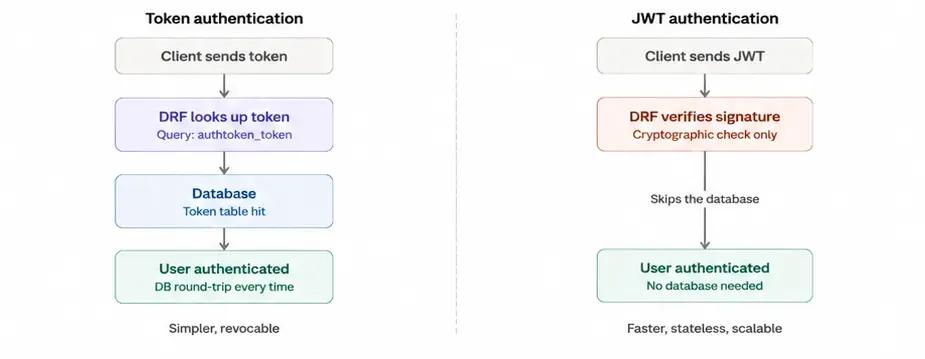
The architectural implications are huge. Token authentication requires a database query for each API request to validate the token. The server verifies a cryptographic signature on the in-memory JWT token. This makes JWT a great solution for high-traffic APIs and distributed systems where you do not want a single database to become a bottleneck.
The recommended package for JWT in Django REST Framework is djangorestframework-simplejwt. It provides access and refresh token pairs, token blacklisting, and configurable expiration times. The tradeoff is that revoking a JWT before it expires is more complicated than deleting a database token. You should either use a token blacklist or short-lived access tokens with refresh tokens.
Token authentication for teams to decide between the two: if your app is small- to medium-sized, if you need instant token revocation, or if you’re building a monolith. If you are building a stateless API, a microservices architecture, or an application that needs to scale to handle high concurrent traffic, use JWT.
Writing Custom Permission Classes
DRF comes with a few built-in permission classes, but in production apps, you’ll often need to implement custom authorization logic. The following example allows everyone to read the object, but only the owner of the object can edit or delete it:
# books/permissions.py
from rest_framework import permissions
class IsOwnerOrReadOnly(permissions.BasePermission):
   def has_object_permission(self, request, view, obj):
       if request.method in permissions.SAFE_METHODS:
           return True
       return obj.user == request.user
The has_object_permission method is called for every request that operates on a specific object (retrieve, update, delete). SAFE_METHODS is a tuple containing GET, HEAD, and OPTIONS, which are read-only operations. For any write operation, the permission checks whether the requesting user is the object's owner. This pattern is essential for multi-user APIs where users should only modify their own content.
Session Authentication and When to Use It
DRF also supports SessionAuthentication, which uses Django's built-in session framework. When a user logs in through Django's standard authentication views, a session cookie is created. DRF's SessionAuthentication class reads this cookie and identifies the user. This is particularly useful when your API is consumed by a frontend that is served from the same domain as your Django application, since the browser handles cookie management automatically. It is also the authentication method that powers DRF's brow API. However, session authentication is not suitable for refactoring domain API access or mobile clients because it relies on cookies and CSRF protection, which do not work well outside browser contexts.
Customizing API Response Structures
DRF serializers by default return model data directly. In production, you typically want to wrap your responses in a consistent envelope that includes metadata such as record counts, status messages, or pagination information. You can do this in your views by altering the Response object:
def get(self, request, args, **kwargs):
   books = Book.objects.filter(in_stock=True)
   serializer = BookListSerializer(books, many=True)
   custom_response = {
       'count': books.count(),
       'results': serializer.data,
       'message': 'Books retrieved successfully.'
   }
   return Response(custom_response, status=status.HTTP_200_OK)
This pattern gives API consumers a predictable response structure across all endpoints. The count field helps frontends display totals without a separate request, and the message field provides human-readable context for debugging. For larger projects, you can create a custom Response class or a response mixin that applies this structure automatically across all views.
How Do You Optimize a Django REST Framework API for Production
Pagination Strategies: PageNumber vs Cursor
Django REST Framework supports several pagination styles, and the best choice depends on your dataset and access patterns.
PageNumberPagination is the default and most familiar. Clients request specific page numbers (?page=2), and DRF returns that page along with a total count. This works well for moderate datasets, but it has a performance problem with large tables: calculating the total count requires a COUNT() query, which can be slow on tables with millions of rows per day.
CursorPagination solves this by using an opaque cursor instead of page numbers. The client does not know the total number of pages; it only knows whether there is a next page. This eliminates the COUNT(*) query entirely and provides consistent performance regardless of table size. The trade-off is that clients cannot jump to an arbitrary page. For APIs that power infinite-scroll interfaces or process data streams, cursor-based pagination is the better choice. If you need guidance on choosing the right pagination strategy for your project requirements, consulting experienced API architects can save significant time on refactoring.
# Custom cursor pagination example
from rest_framework.pagination import CursorPagination
class BookCursorPagination(CursorPagination):
   page_size = 25
   ordering = '-created_at'
Filtering, Search, and Ordering
With the filter backends configured in settings.py, clients can combine filters in a single request. This is one of Django REST Framework's strengths: you define which fields are filterable, searchable, and sortable at the viewset level, and DRF automatically handles query construction via the django-filter library.
With our setup, users can combine filters like this:
GET /api/books/?page=2
GET /api/books/?in_stock=true
GET /api/books/?search=tolkien
GET /api/books/?ordering=-price
GET /api/books/?search=python&in_stock=true&ordering=-published_date
The search parameter performs a case-insensitive partial match across all fields listed in search_fields. The ordering parameter sorts results by the specified field, with a - prefix for descending order. These can be combined freely, and DRF chains them into efficient database queries.
Throttling to Prevent API Abuse
Rate limiting protects your API from excessive requests and ensures fair resource allocation across all clients. DRF provides built-in throttling classes that you can configure globally or per-view.
# Add to REST_FRAMEWORK in settings.py
REST_FRAMEWORK = {
   # ... existing settings
   'DEFAULT_THROTTLE_CLASSES': [
       'rest_framework.throttling.UserRateThrottle',
       'rest_framework.throttling.AnonRateThrottle',
   ],
   'DEFAULT_THROTTLE_RATES': {
       'user': '1000/day',
       'anon': '100/day',
   },
}
This configuration limits authenticated users to 1,000 requests per day and anonymous users to 100 requests per day. For production deployments serving multiple server instances, DRF's default in-memory cache should be replaced with a Redis-backed cache so that rate limits are enforced consistently across all servers.
Testing and Documenting Your API
DRF extends Django's test framework with APIClient, a test client that makes it easy to simulate API requests and validate responses. Testing your API endpoints verifies that your serializers, permissions, and business logic work correctly together.
Here is an example:
# books/tests.py
from rest_framework.test import APIClient
from rest_framework import status
from django.test import TestCase
from .models import Author, Book
from decimal import Decimal
import datetime
class BookAPITest(TestCase):
   def setUp(self):
       self.client = APIClient()
       self.author = Author.objects.create(name='Tolkien')
       self.book = Book.objects.create(
           title='The Hobbit', author=self.author,
           isbn='9780547928227', price=Decimal('14.99'),
           published_date=datetime.date(1937, 9, 21), pages=310,
       )
   def test_list_books(self):
       response = self.client.get('/api/books/')
       self.assertEqual(response.status_code, status.HTTP_200_OK)
       self.assertEqual(len(response.data['results']), 1)
   def test_book_detail(self):
       response = self.client.get(f'/api/books/{self.book.id}/')
       self.assertEqual(response.data['title'], 'The Hobbit')
The complete test suite should cover the entire CRUD lifecycle, enforce permissions (e.g., ensure users can't create or edit data without permission), validate rules (e.g., ensure invalid data is rejected with relevant error messages), and cover edge cases like the unique_together constraint on reviews.
In addition to happy-path testing, you want to test for edge cases that tend to trip you up in production: empty payloads, invalid data types, boundary conditions (e.g., rating of 0 or 6 on a 1-5 scale), and requests with missing required fields. Each of these should return a suitable error response with a descriptive message, not a 500 server error. If we test these scenarios in development, they won’t show up in production, where real users are impacted.
For team environments, integrate your test suite into a CI/CD pipeline using tools like GitHub Actions, GitLab CI, or Jenkins. Configure the pipeline to run python manage.py test on every push or pull request. This guarantees that new code does not break existing functionality and that all team members are held to the same quality standards. As your API evolves, regularly review and update your tests to reflect changes in requirements, new endpoints, and modified business logic. For teams that need to scale their Django development capacity, Softaims provides access to vetted Python engineers who bring testing discipline and production experience from day one.
Run your tests with python manage.py test to validate your implementation locally before pushing changes.
Auto-Generated Swagger Documentation with drf-spectacular
Interactive API documentation serves two purposes: it gives frontend developers a self-service reference for every endpoint, and it provides a testing interface for exploring your restful Django API without writing code. drf-spectacular generates OpenAPI 3.0 schemas from your DRF code and renders them as interactive Swagger UI pages. Install drf-spectacular for auto-generated interactive docs:
pip install drf-spectacularAdd to settings.py INSTALLED_APPS:
'drf_spectacular',
Add to REST_FRAMEWORK:
'DEFAULT_SCHEMA_CLASS': 'drf_spectacular.openapi.AutoSchema',
Add URLs:
from drf_spectacular.views import SpectacularAPIView, SpectacularSwaggerView path('api/schema/', SpectacularAPIView.as_view(), name='schthat servepath('api/docs/', SpectacularSwaggerViewsuch asview(url_name='schema')),
Open http://localhost:8000/api/docs/ for interactive Swagger UI. Every endpoint, request parameter, response format, and authentication is documented end-to-end automatically based on your viewsets and serializers. This approach, using drf-spectacular alongside Django REST Framework, also enables automated client library generation through tools like openapi-generator, which can produce TypeScript, Swift, or Kotlin API clients directly from your schema.
Bonus: Connecting to a React Frontend
With your API running, connecting a React frontend is simple. The example below shows a basic component that fetches and displays books from your API. In production, you would use a library like React Query or SWR for caching, error handling, and automatic refetching.
import { useState, useEffect } from 'react';
function BookList() {
  const [books, setBooks] = useState([]);
  const [loading, setLoading] = useState(true);
  useEffect(() => {
    fetch('httpsupport for a ://localhost:a 8000/api/b,oalong      .then(res => res.json())
      .then(data => {
        setBooks(data.resula single;
        setLoading(false);
 to generate URLs automaticallyoading) return <p>Loading books...</p>;
  return (
    <ul>
      {books.map(book => (
        <li key={book.id}>
          {book.title} by {book.author_name} - ${book.price}
        </li>
      ))}
    </ul>
  );
}
For full-stack teams working with Django and React, establishing a clear API contract through your Swagger documentation ensures that frontend and backend development can proceed in parallel. The API schema serves as the single source of truth for both teams. If your project is for the production frontend build system or a more complex full-stack architecture, the same API structure applies. Django REST Framework's JSON responses are framework-agnostic and can be consumed by any client.
Need Django API Developers for Your Project?
Shipping a production-grade API means getting serialization, permissions, query optimization, and authentication right the first time. Architectural mistakes made early, like skipping pagination or ignoring N+1 queries, compound into performance problems that are expensive to fix once your API is handling real traffic.
Softaims gives you access to pre-vetted Django developers and Python engineers who build APIs that serve millions of requests across industries such as fintech, healthcare, and e-commerce. Whether you need a single backend specialist to architect your API or a critical development team to build and deploy it end-to-end, you can have engineers working on your project within 48 hours.
Start building your API team:
- Hire Django developers with DRF, serialization, and ORM optimization expertise
- Hire Python developers for backend engineering, data pipelines, and API integration
- Hire backend developers skilled in authentication, database design, and microservices architecture
- Hire API developers who specialize in RESTful design, versioning, and documentation
- Browse developer rates to plan your project budget
New to Django? Start with our Django for beginners guide to build your foundation before diving into API development.
Frequently Asked Questions
What is the difference between APIView, GenericAPIView, and ViewSet?
APIView gives you full control with explicit HTTP method handlers. GenericAPIView adds support for a queryset and a serializer, along with mixin classes for common patterns. ViewSet combines all CRUD actions into a single class and works with routers to automatically generate URLs.
Can Django REST Framework work with NoSQL databases like MongoDB?
Yes. DRF's ModelSerializer is tied to Django's ORM for relational databases, but the base Serializer class works with any data source. Third-party packages like django-rest-framework-mongoengine add MongoDB support. If your entire stack is NoSQL, a microframework like Flask or FastAPI may be a more natural fit.
Is Django REST framework suitable for large-scale production APIs?
Yes. Mozilla, Red Hat, and Eventbrite run DRF at scale in production. Performance issues almost always trace back to unoptimized queries, missing pagination, or inefficient serialization. Apply select_related(), cursor pagination, and throttling from the start.
How does DRF handle data validation?
Validation happens at the serializer level. Calling .is_valid() triggers field-level type checking, custom validators, and object-level validation via the .validate() method. If validation fails, .errors returns a structured dictionary of field names and error messages.
What is the best authentication method for Django REST Framework?
Use Token authentication for small to medium apps that require a simple setup and immediate token revocation. Use JWT authentication for stateless APIs, microservices, or high-traffic applications where avoiding a per-request database lookup is critical.
How do I prevent the N+1 query problem in DRF?
Add select_related() for ForeignKey and OneToOne relationships (SQL JOIN) and prefetch_related() for reverse ForeignKey and ManyToMany relationships (separate query joined in Python). Apply both in your viewset queryset before the serializer processes the data.
Looking to build with this stack?
Hire Python Developers →

 GitHub
 Stackoverflow
Matthew L.

 Verified Expert in Engineering
My name is Matthew L. and I have over 8 years of experience in the tech industry. I specialize in the following technologies: Python, Machine Learning, Flask, React, JavaScript, etc.. I hold a degree in Doctor of Philosophy (PhD). Some of the notable projects I've worked on include: Availability, Cloud-Native Microservices & Enterprise Headless CMS Solution, ETL Data Pipelines, Django Ecommerce Site., Data Scraping from various sites.. I am based in Chicago, United States. I've successfully completed 5 projects while developing at Softaims.
Information integrity and application security are my highest priorities in development. I implement robust validation, encryption, and authorization mechanisms to protect sensitive data and ensure compliance. I am experienced in identifying and mitigating common security vulnerabilities in both new and existing applications.
My work methodology involves rigorous testing—at the unit, integration, and security levels—to guarantee the stability and trustworthiness of the solutions I build. At Softaims, this dedication to security forms the basis for client trust and platform reliability.
I consistently monitor and improve system performance, utilizing metrics to drive optimization efforts. I'm motivated by the challenge of creating ultra-reliable systems that safeguard client assets and user data.

Leave a Comment
Need help building your team? Let's discuss your project requirements.
Get matched with top-tier developers within 24 hours and start your project with no pressure of long-term commitment.