ReactJS for Absolute Beginners: Complete Guide 2026
React powers nearly 70% of JavaScript-framework websites and remains the most in-demand frontend skill in 2026, yet starting from zero still feels overwhelming. This hands-on guide breaks down every foundational concept for you.

Table of contents
Key Takeaways
- React isn’t just a library anymore. It powers nearly 70% of JavaScript framework websites and is still the most requested frontend skill in 2026.
- You’ll finally understand why React exists instead of just memorizing syntax and copying tutorials.
- The guide explains complex topics like components, state, hooks, and the Virtual DOM in simple words with real examples.
- You’ll learn how modern React apps are actually structured so you can read real-world codebases with confidence.
- By the end, you’ll know how React updates interfaces efficiently and why companies use it to build scalable applications.
If you have been writing HTML, CSS, and some JavaScript, you have probably heard people talk about React. It is everywhere. React currently powers close to 70% of all websites that use a JavaScript framework. From small startups to companies like Netflix, Airbnb, and Instagram, they rely on it to build interfaces that handle millions of users daily. The React ecosystem is projected to reach a market value of $28.6 billion by 2027, and over 40% of professional developers report using it across web and mobile projects.
Yet, if you are sitting down to learn React for the first time, none of those numbers makes the initial learning curve feel any less steep. You open the documentation, see terms like "Virtual DOM," "state," and "JSX," and wonder where even to begin. I have been working with React for over seven years now, and I still remember how confusing it felt at first. This guide is what I wish someone had given me back then. We will go over every foundational concept, explain how the pieces fit together, and build a working application by the end. No prior React experience is required.
No prior React experience needed. If you know basic HTML, CSS, and a bit of JavaScript, you are good to go. And if you ever reach a point where your project needs to move faster than your team can learn, our expert React developers at Softaims can step in and build alongside you.
What is React? (The Simple Explanation)
React is an open-source JavaScript library created by Facebook (now Meta). It helps you build user interfaces, which are the parts of a website or app that users see and interact with. It was first released in 2013, and the latest stable version as of April 2026 is React 19.2.5.
To understand why React exists, think about how traditional web development works. You write HTML to define the structure of a page, CSS to style it, and JavaScript to make it interactive. When you need to change something on the page, say, updating a single product price in a list of 200 items, you have to locate that specific element in the page structure (the DOM), change its value, and ensure nothing else breaks in the process. In a small application, this is manageable. In a large application with hundreds of interactive elements, it becomes fragile and difficult to maintain.
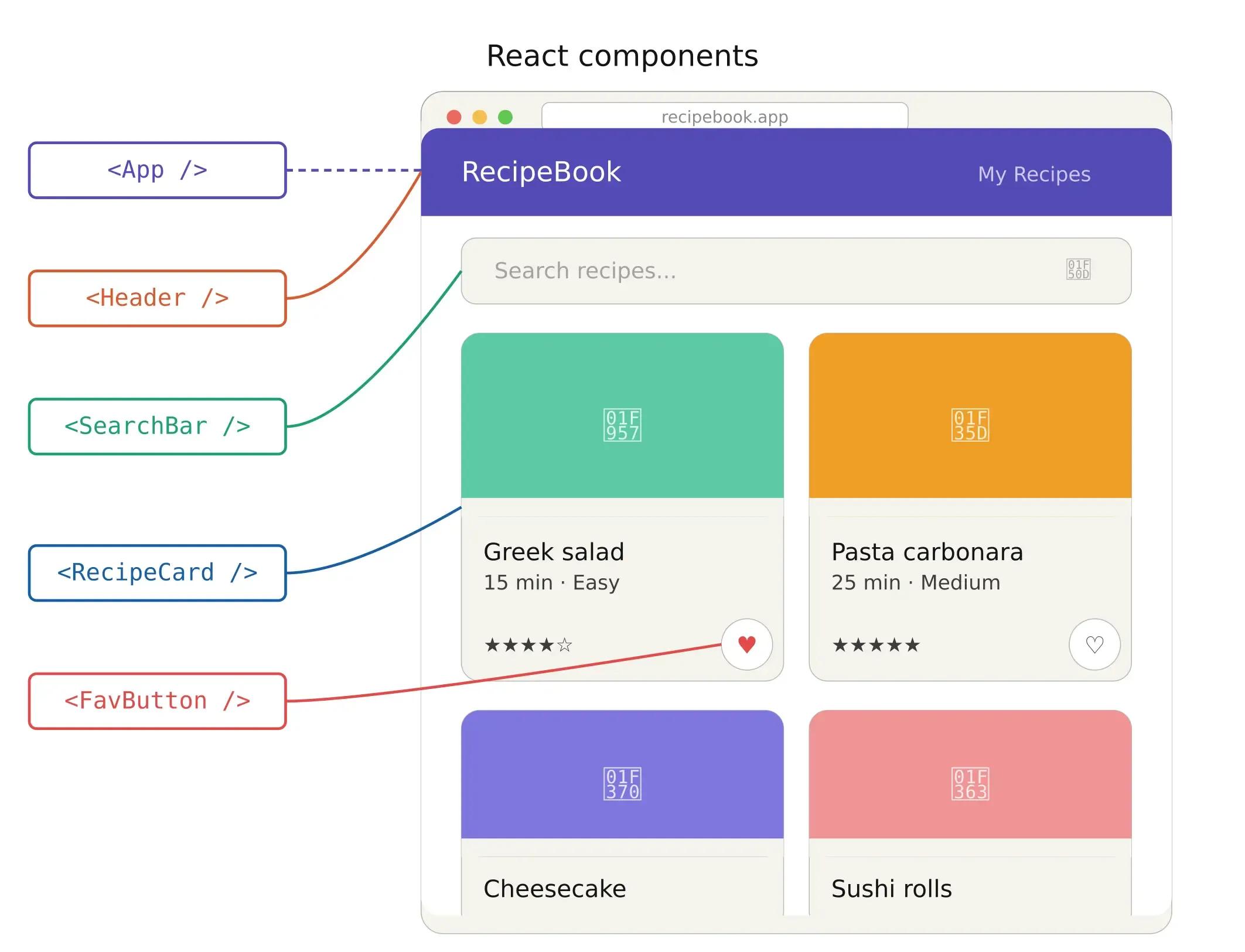
React addresses this by introducing a component-based architecture. Instead of thinking of your page as a single large HTML document, you break it into small, self-contained pieces called components. Each component manages its own content, appearance, and behavior. A navigation bar is one component. A product card is another. A search form is another. You combine these components, like building blocks, to create your complete interface.
This approach has two immediate advantages. First, components are reusable. If you build a button component once, you can use that same button across your entire application. Change the button's design in one place, and it updates everywhere. Second, components are isolated. A bug in your search form component does not cascade into your navigation bar. Each piece manages itself.
React uses something called a Virtual DOM. Instead of updating the entire page when something changes, React compares the new version with the old one and updates only the parts that have changed. This makes your app faster.
How the Virtual DOM Actually Works
One of React's most discussed features is the Virtual DOM. To understand it, you first need to understand the real DOM.
The DOM (Document Object Model) is the browser's representation of your web page as a tree of objects. Every HTML element, every piece of text, every attribute becomes a node in this tree. When JavaScript changes something in the DOM, the browser has to recalculate styles, reflow the layout, and repaint the affected elements. These operations are computationally expensive, especially when they happen frequently.
React introduces an intermediary layer: the Virtual DOM. This is a lightweight JavaScript copy of the real DOM that React keeps in memory. When your application's data changes, React does not immediately update the real DOM. Instead, it follows a three-step process:
Step 1: Create a new Virtual DOM tree. When a component's data changes, React creates a new Virtual DOM representation of the UI.
Step 2: Diff the new tree against the previous one. React compares the new Virtual DOM with the snapshot it took before the change. This comparison process is called "reconciliation" or "diffing." It identifies exactly which elements have changed, which ones were added, and which ones were removed.
Step 3: Batch update the real DOM. React applies only the changes identified in Step 2 to the real DOM in a single, optimized batch. Instead of updating 200 elements when one product's price changes, React updates only the element that changed.
This process happens so fast that users perceive the updates as instantaneous. According to technical benchmarks, React 19 applications outperform their predecessors significantly, primarily due to improved hydration and reduced unnecessary re-renders.
Refs and useRef: Direct Access to DOM Elements
Most of the time in React, you interact with the UI through state and props, and React handles the DOM for you. But there are situations where you need direct access to a DOM element: setting focus on an input field after a form submission, scrolling to a specific element, measuring an element's dimensions, or integrating with a third-party library that needs a DOM node.
The useRef hook creates a reference object that persists across re-renders. You attach it to a DOM element using the ref attribute, and React populates the reference's .current property with the actual DOM node after the component mounts. You can then call native DOM methods on it, like .focus() or .scrollIntoView().
The general principle is to use refs sparingly. They break React's declarative model by giving you imperative access to the DOM, which can make code harder to follow if overused. Treat them as an escape hatch for the specific cases where React's data-driven approach does not cover what you need, not as a general-purpose tool for reading or manipulating the UI.
React by the Numbers: Where It Stands in 2026
The data tells a clear story about React's position in the development ecosystem:
React holds a 44.7% market share among frameworks, according to Stack Overflow developer surveys, making it the most widely used frontend framework globally. Among websites that use any JavaScript framework, React's share is even higher at approximately 69.74%.
On the job market side, React developer positions are projected to grow by 667,600 new openings between 2020 and 2030. React consistently leads all frontend frameworks in job posting demand, and it pairs naturally with TypeScript, Next.js, and Node.js to form the most popular full-stack web development ecosystem.
For companies evaluating their technology stack, React's track record of backward compatibility and its consistent release cycle reduces platform risk. Applications built in React can be maintained and evolved over the years without requiring complete rewrites, which makes it a strategic choice rather than just a technical one.
Why React? (vs Vanilla JavaScript)
You might be wondering, why not just use plain JavaScript? This is a fair question, and the honest answer is: it depends on what you are building. If you are building a simple static page with no interactivity, plain HTML and JavaScript work just fine. React shines when you have dynamic content that changes in response to user actions. React introduces an additional layer of abstraction, and for simple projects, that layer adds complexity without adding any benefit.
React's advantages become obvious when your application has dynamic content, meaning data that changes based on user actions, API responses, or real-time updates. Here is where those advantages become concrete.
Reusable Components Save Development Time
In a vanilla JavaScript application, if you want to display a user card in three different places with slightly different data, you typically write three separate blocks of HTML and JavaScript to manage each one. If the card's design changes, you update three locations and hope you do not miss any.
In React, you write a single UserCard component. You pass different data to each instance using "props" (which we will cover shortly). When the design changes, you update the component once. Every instance across the application reflects the change automatically.
This pattern scales. An application with 50 reusable components requires significantly less code than an equivalent vanilla JavaScript application, and the code is easier to understand because each component has a single responsibility.
State Management Keeps Your UI in Sync
State is data that change over time. The current value of a form input, the list of items in a shopping cart, whether a dropdown menu is open or closed: these are all state.
In vanilla JavaScript, keeping the UI in sync with state is the developer's responsibility. You change a variable, then manually find every DOM element that displays it and update it. Forget one, and you have a bug where the screen shows old data.
React inverts this relationship. You declare what the UI should look like for any given state, and React handles the DOM updates automatically. When state changes, React re-renders the affected component, compares the new output against what is currently on screen, and applies only the necessary updates. You never manually touch the DOM.
The React Ecosystem and Job Market
Beyond the library itself, React benefits from an extensive ecosystem of tools, libraries, and community resources. React Router handles navigation between pages. State management libraries like Zustand and Redux Toolkit manage complex application data. Next.js extends React with server-side rendering, file-based routing, and deployment optimizations.
For developers evaluating career options, 55% of companies plan to increase their developer headcount in 2026, and React expertise remains one of the most sought-after skills in front-end development. Developers who combine React proficiency with TypeScript and Node.js are positioned for the widest range of opportunities in the current market.
Setting Up Your First React App (Step by Step)
Let us get our hands dirty. Before you write any React code, you need two things installed on your computer.
Prerequisites
Node.js is a JavaScript runtime that lets you run JavaScript outside of a browser. It also includes npm (Node Package Manager), which you will use to install React and its dependencies. Download the LTS (Long Term Support) version from nodejs.org. After installation, verify it is working by opening your terminal and running node --version. You should see a version number.
A code editor. We recommend VS Code (Visual Studio Code). It is free and cross-platform, with excellent React support through extensions like ES7+ React/Redux/React-Native snippets.
Creating the Project with Vite
Open your terminal (Command Prompt on Windows, Terminal on Mac/Linux) and run the following commands one by one:
npm create vite@latest my-first-react-app -- --template react
cd my-first-react-app
npm install
npm run dev
We are using Vite here, not the older Create React App (CRA). The React team now recommends Vite as the standard tool for bootstrapping new projects. Vite offers faster development server startup, quicker hot module replacement (meaning your changes appear in the browser almost instantly), and a smaller production build.
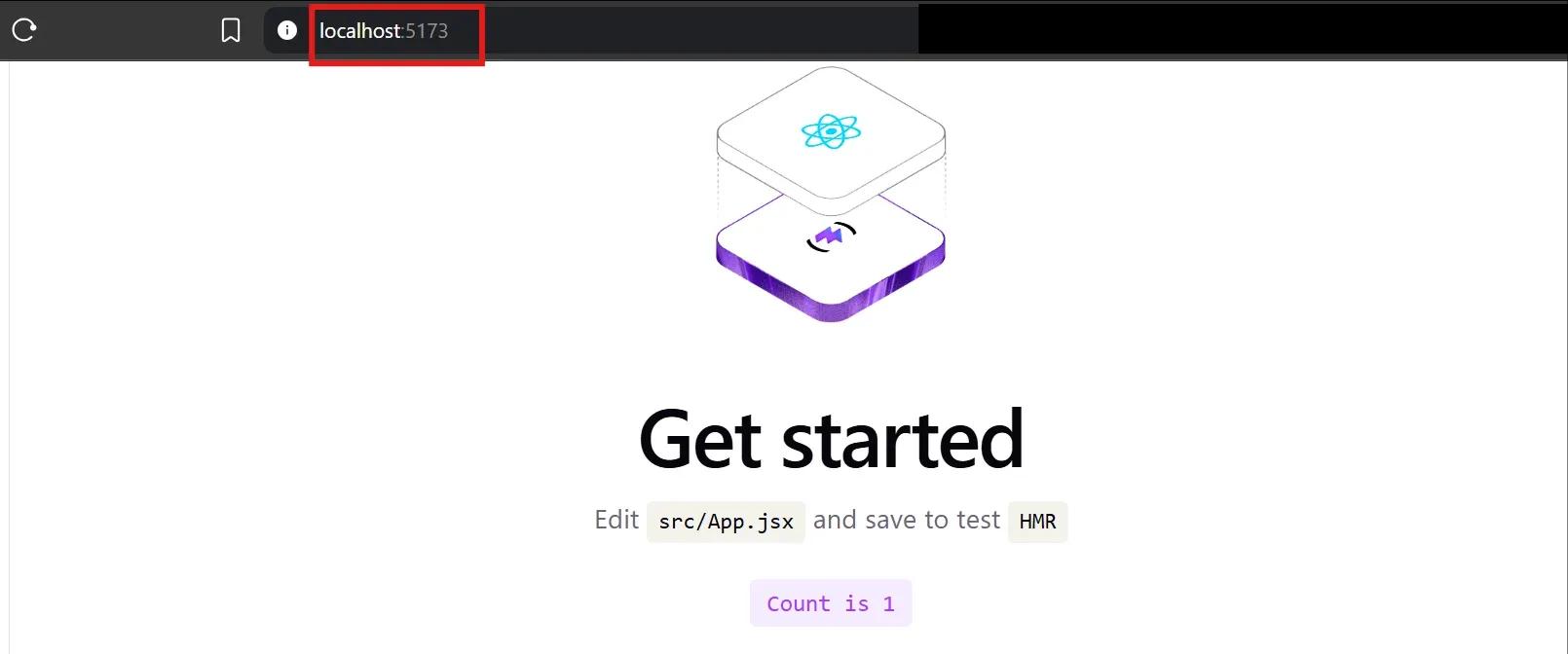
After running npm run dev, open your browser and navigate to http://localhost:5173. You should see a React welcome page with a spinning logo. Your first React application is running.
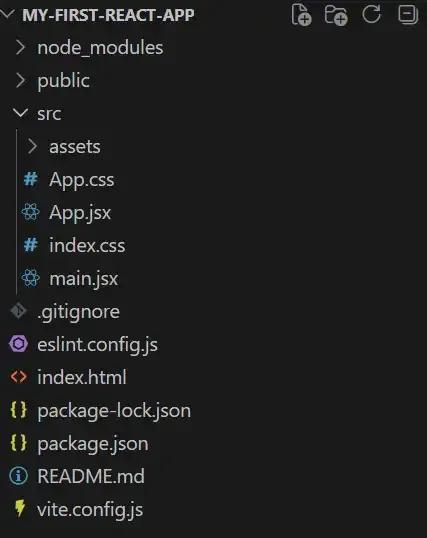
Take a moment to explore the project folder structure. The key files you will work with are:
src/App.jsx is your main application component. This is where the UI code lives.
src/main.jsx is the entry point. It mounts your App component into the HTML page.
index.html is the single HTML file that serves your application. React injects the entire UI into the <div id="root"> element inside this file. This is why React applications are called "single-page applications" (SPAs): there is only one HTML page, and React dynamically updates its content.
package.json lists your project's dependencies and available scripts.
Understanding Components, Props, and State
These three concepts form the foundation of every React application. The official React documentation at react.dev refers to them as the building blocks you will use to describe the different visual states for each piece of your UI. Once you internalize how they work together, every other React concept builds on top of them.
Components
A React component is a JavaScript function that returns JSX, which is a syntax extension that looks like HTML but is actually JavaScript under the hood. Here is the simplest possible component:
function Greeting() {
  return <h1>Hello, World!</h1>;
}
This function returns a UI component. You can use it anywhere in your application by writing <Greeting />, the same way you would use an HTML tag. React calls the function, receives the returned JSX, and renders it to the screen.
Components can contain other components. This is called composition, and it is how you build complex UIs from simple pieces. For example:
function App() {
  return (
    <div>
      <Header />
      <MainContent />
      <Footer />
    </div>
  );
}
Each of those child components, Header, MainContent, and Footer, is its own self-contained unit with its own logic and UI. The App component composes them together into a full page.
This tree-like structure, where the App component sits at the top and child components branch downward, is called the component tree. Data flows down this tree from parent to child, which is a pattern React calls "one-way data flow." Understanding this flow is essential for structuring your applications properly.
Props (Passing Data to Components)
Props (short for "properties") are the mechanism for passing data from a parent component to a child component. Think of them like function arguments. You define what data a component needs, and the parent provides it.
function Greeting({ name }) {
  return <h1>Hello, {name}!</h1>;
}
// Using it:
<Greeting name="Sarah" />
In this example, name is a prop. The parent passes "Sarah" as the value, and the Greeting component uses it to render "Hello, Sarah!" on screen instead of a hardcoded value.
There are two important rules about props. First, props flow in one direction only: from parent to child. A child component cannot send props back up to its parent. Second, props are read-only. A component that receives props must never modify them directly. This constraint is intentional. It makes your application's data flow predictable because you always know where data comes from and how it reaches a particular component.
Props are what make components reusable. The same Greeting component can render different names without any code changes:
<Greeting name="Sarah" />
<Greeting name="James" />
<Greeting name="Alex" />
Three instances of the same component, each displaying different data, all from one function definition.
State (Data That Changes)
While props are data that a component receives from outside itself, state is data that a component creates and manages internally. State represents information that can change over time, typically in response to user interactions.
React provides the useState hook for managing state in functional components. Here is a simple counter example:
import { useState } from 'react';
function Counter() {
  const [count, setCount] = useState(0);
  return (
    <div>
      <p>You clicked {count} times</p>
      <button onClick={() => setCount(count + 1)}>
        Click me
      </button>
    </div>
  );
}
Let’s break this down. useState(0) creates a piece of state with an initial value of 0. It returns an array with two items: the current value (count) and a function to update it (setCount). Every time you call setCount with a new value, React updates the state, then re-renders the component to reflect the change on screen. You never manually edit the DOM. You update the state, and React handles the rest.
This is the core principle that makes React different from vanilla JavaScript. You describe what the UI should look like for a given state, and React's reconciliation process ensures the screen matches your description.
How Do Props and State Work Together?
In practice, props and state are used in combination. The React documentation describes props as "arguments you pass to a function" and state as "a component's memory." A parent component often holds data in its own state and passes portions of that data down to child components as props.
Consider this example: a parent component manages a list of users in its state. It passes each user's data as props to a UserCard child component. The parent owns the data. The children display it.
function UserList() {
  const [users, setUsers] = useState([
    { name: "Sarah", role: "Designer" },
    { name: "James", role: "Developer" },
  ]);
  return (
    <div>
      {users.map((user, index) => (
        <UserCard key={index} name={user.name} role={user.role} />
      ))}
    </div>
  );
}
function UserCard({ name, role }) {
  return (
    <div>
      <h3>{name}</h3>
      <p>{role}</p>
    </div>
  );
}
The UserList component is stateful. It creates and manages the user data. The UserCard component is stateless. It receives data through props and renders it. If the list of users changes (for example, a new user is added through an API call), the parent updates its state, React re-renders, and the new user card appears automatically.
This pattern, state in the parent, props flowing down to children, is the standard data management approach in React applications. It keeps your data flow unidirectional and predictable, which significantly reduces bugs as your application grows.
[Image: Props and State Data Flow]
How Do You Style React Components
Styling is not unique to React, but there are a few React-specific patterns worth understanding before you start building real interfaces.
The most familiar approach is plain CSS. You write your styles in a .css file and apply them using the className attribute (not class, since class is a reserved keyword in JavaScript). This works exactly as it does in regular HTML, and for many applications, it is all you need.
React also supports inline styles, but they work differently from HTML inline styles. Instead of passing a string like style="color: red; font-size: 14px", you pass a JavaScript object where property names are camelCased, and values are strings or numbers: style={{ color: 'red', fontSize: '14px' }}. You saw this pattern in our todo app example. Inline styles are useful for dynamic values that change based on state, like the textDecoration property we toggled for completed tasks.
Beyond these basics, three popular approaches have emerged in the React ecosystem.
CSS Modules automatically scope your class names to a specific component. You create a file named ComponentName.module.css, write regular CSS inside it, and import the classes as a JavaScript object. This prevents naming collisions between components, because the build tool generates unique class names behind the scenes. If two components both define a .button class, CSS Modules ensures they do not conflict.
CSS-in-JS libraries like Styled Components and Emotion let you write CSS directly inside your JavaScript files, often as tagged template literals attached to components. This keeps styles co-located with the component logic they belong to, which some teams find easier to maintain. The styles are scoped automatically, and you can use JavaScript variables and logic inside your CSS.
Tailwind CSS takes a utility-first approach where you apply pre-built utility classes directly in your JSX: className="bg-blue-500 text-white px-4 py-2 rounded". It avoids writing custom CSS for most common patterns and has become one of the most popular styling approaches for React projects in 2026.
None of these approaches is definitively better than the others. Plain CSS and CSS Modules are the simplest to start with. CSS-in-JS and Tailwind offer additional developer ergonomics as projects scale. Choose one that fits your team and project, and be consistent with it.
Code Splitting and Lazy Loading
As your React application grows, the JavaScript bundle that gets sent to the browser grows with it. If your application has 50 pages, sending all 50 pages' worth of JavaScript upfront means the user waits longer for the initial load, even though they only need one page at a time.
Code splitting solves this by breaking your bundle into smaller chunks that load on demand. React provides React.lazy() for this purpose: you wrap a dynamic import() around a component, and React loads that component's code only when it is actually needed. Combined with React.Suspense, which displays a loading indicator while the chunk downloads, can significantly reduce initial load times for larger applications. Route-based splitting, where each page route loads its own chunk, is the most common starting point.
Building Your First React App: A Simple Todo List
Now that you understand the core concepts, let us put them to work. We will build a todo list application that lets you add tasks and mark them as complete. This project exercises components, props, state, event handling, and list rendering, all the fundamentals covered so far.
Open the file src/App.jsx in your project and replace everything with the following code:
import { useState } from 'react';
function App() {
  const [todos, setTodos] = useState([]);
  const [input, setInput] = useState('');
  function addTodo() {
    if (input.trim() === '') return;
    setTodos([...todos, { text: input, done: false }]);
    setInput('');
  }
  function toggleTodo(index) {
    const updated = todos.map((todo, i) =>
      i === index ? { ...todo, done: !todo.done } : todo
    );
    setTodos(updated);
  }
  return (
    <div style={{ maxWidth: '400px', margin: '40px auto' }}>
      <h1>My Todo List</h1>
      <div>
        <input
          value={input}
          onChange={(e) => setInput(e.target.value)}
          placeholder="Add a new task"
        />
        <button onClick={addTodo}>Add</button>
      </div>
      <ul>
        {todos.map((todo, index) => (
          <li
            key={index}
            onClick={() => toggleTodo(index)}
            style={{
              textDecoration: todo.done ? 'line-through' : 'none',
              cursor: 'pointer'
            }}>
            {todo.text}
          </li>
        ))}
      </ul>
    </div>
  );
}
export default App;
Let’s walk through what each part does.
Two pieces of state manage the application. todos is an array that stores the task objects (each with a text property and a done boolean). input holds the current text value in the input field.
The addTodo function runs when you click the "Add" button. It first checks whether the input is empty. If not, it creates a new array by spreading (...) all existing todos and appending a new todo object at the end. The spread operator is used instead of push() because React state must never be mutated directly (more on that below). After adding the task, the input field clears.
The toggleTodo function runs when you click on a task. It creates a new array using .map(), which iterates over every todo. For the todo at the clicked index, it flips the done property. For all others, it returns them unchanged. This new array replaces the previous state.
The JSX return block renders the UI. The input field's value is bound to the input state, and every keystroke triggers the onChange handler, which updates the state. The todos.map() call loops through the array and renders a list item for each task. The key prop helps React identify which items have changed during re-renders.
Save the file and check your browser. You should see a working todo list. Add a few tasks. Click them to mark them done.
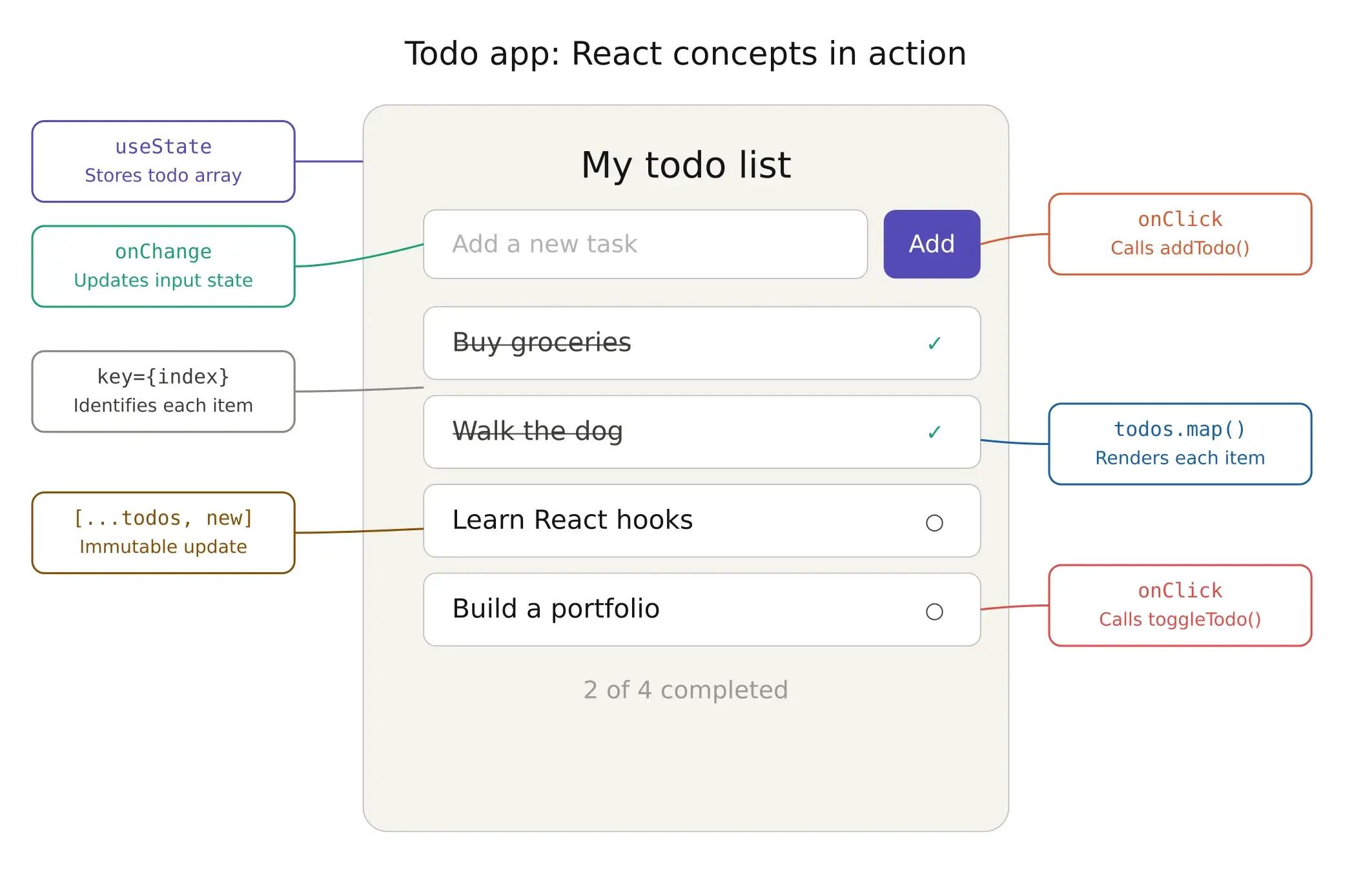
Save the file and check your browser. You should see a working todo list. Try adding a few tasks and clicking on them to mark them done.
Common Beginner Mistakes to Avoid
After working with React teams and reviewing code from developers at various experience levels, I see the same mistakes come up again and again. Recognizing these early will save you significant time spent debugging. Here are the most common ones.
Mutating state directly. This is the most common and most consequential mistake. React detects state changes by comparing the old state reference with the new one. If you mutate the existing object or array directly, the reference does not change, and React does not know an update occurred.
// Wrong: never mutate state directly
todos.push(newItem);
setTodos(todos); // React may not re-render because the array reference is the same
// Correct: always create a new array
setTodos([...todos, newItem]); // new array reference triggers a re-render
This rule applies to objects as well. Always use the spread operator or methods like .map(), .filter(), and .concat() to create new copies of your data before passing them to the setter function.
Forgetting the key prop. When you render a list using .map(), React needs a way to uniquely identify each item so it can efficiently update only the items that have changed. The key prop serves this purpose.
// Avoid using index as key in dynamic lists
{todos.map((todo, index) => (
  <li key={index}>{todo.text}</li>
))}
// Preferred: use a unique identifier
{todos.map((todo) => (
  <li key={todo.id}>{todo.text}</li>
))}
We used the array index as a key in our todo example for simplicity. In production applications, use a unique identifier (like a database ID or a generated UUID). Index-based keys can cause subtle rendering bugs when items are reordered, inserted, or deleted from the middle of a list.
Not understanding re-renders. Every time a component's state changes, React calls that component function again. This is not a bug. It is how React works. The function runs, produces new JSX, React diffs it against the previous output, and applies the minimal changes to the DOM.
New developers sometimes worry that this is inefficient, and they try to prevent re-renders prematurely. In practice, React's diffing algorithm is fast enough that most re-renders are not a performance concern. Optimization tools like useMemo and useCallback exist for the rare cases where they are needed, but reaching for them before measuring an actual problem often adds complexity without benefit.
The guideline is simple: write clear, correct code first. Profile for performance issues if they arise. Optimize only what your profiling data identifies as a bottleneck.
Next Steps: What to Learn After React Basics
With the fundamentals in place, here is a structured path forward. Each item builds on what you have already learned and progressively expands the types of applications you can build.
React Hooks in Depth
useState and useEffect are the two hooks you will use in nearly every component. useEffect lets you synchronize your component with external systems, such as fetching data on mount or subscribing to events. Beyond these two, learn useContext to share data between components without prop drilling, useMemo to memoize expensive calculations, and useCallback to memoize functions passed as props.
We have covered React hooks in detail, and you can find more information in the React documentation, which includes interactive examples that you can edit directly in the browser.
React Router and Multi-Page Apps
A real-world application has multiple pages: a home page, a settings page, and a user profile page. React Router lets you define routes that map URLs to components, so navigating between pages does not require a full page reload. The application stays fast because only the relevant component swaps in and out.
Full-Stack React with Node.js and MongoDB
React handles the frontend. To build complete applications, you need a backend to manage data, authentication, and business logic. Node.js is the most natural pairing because it uses JavaScript on the server, meaning you work in a single language across your entire stack.
For data storage, MongoDB is a popular choice in the React ecosystem. It stores data as JSON-like documents, which aligns naturally with how data flows through a JavaScript application. The combination of React, Node.js (with Express.js), and MongoDB is commonly referred to as the MERN stack. It is one of the most widely deployed architectures for modern web applications.
If you're interested in learning about how backend and frontend development work together, read this article on a Full-Stack React App with Node.js Backend. You can also look into the work of experienced backend developers, who can provide valuable architectural insights.
Next.js for Production
Next.js is a React framework that adds capabilities essential for production applications: server-side rendering (SSR) for better SEO and initial load performance, file-based routing that eliminates manual route configuration, built-in API routes for lightweight backend logic, and automatic code splitting that sends only the JavaScript needed for each page.
Many teams that start with React eventually adopt Next.js as their applications mature and require production-grade performance optimization. Softaims maintains comprehensive development roadmaps for React and other technologies, outlining the progression from foundational skills to production-level expertise.
TypeScript for Safer React Code
As you build more complex applications, type errors become an increasingly common source of bugs. Passing a string where a component expects a number, or forgetting a required prop, can cause failures that only surface at runtime.
TypeScript is a superset of JavaScript that adds static type checking. It catches these kinds of errors at compile time, before the application ever runs, and it provides significantly better autocomplete and refactoring support in code editors. TypeScript has become the industry standard for React projects. Most major React libraries ship with TypeScript type definitions, and the React community has broadly adopted it as the preferred way to write new projects. If you are starting a new React application in 2026, beginning with TypeScript from day one is a strong default choice.
Profiling Performance and Production Builds
When you are developing locally, React runs in development mode. This mode includes extra warnings, detailed error messages, and debugging tools that help you catch problems early but make the application noticeably slower. Before deploying your application to users, you need to create a production build that strips out development-only checks and minifies your code.
With Vite, creating a production build is a single command: npm run build. This generates optimized, minified files in a dist folder that you deploy to your hosting provider. Always verify that your deployed application is running in production mode. The React Developer Tools browser extension displays a colored icon that indicates whether you are viewing a development or production build.
If your application feels slow even after optimization, two profiling tools can help identify the cause. The Chrome Performance Tab records what happens during a time window, showing you exactly how long each component takes to mount and update. The React DevTools Profiler, built into the React Developer Tools extension, provides a component-level view of render times. It shows you which components re-rendered, how long each render took, and what triggered it. Together, these tools let you pinpoint the specific component or interaction that is causing sluggishness, rather than guessing.
Error Handling
Without error handling, a single runtime error in one component can crash your entire React application into a blank white screen. Error boundaries are components that catch JavaScript errors in their child tree and display a fallback UI instead. You can wrap your whole app in one, or wrap individual sections so a failing widget does not take down the rest of the page. They also provide a natural hook for logging errors to monitoring tools like Sentry. One limitation: error boundaries only catch rendering errors, not errors in event handlers or async code, which still need standard try/catch.
Need Expert React Developers for Your Project?
Learning React is the first step. Shipping a production application with real users, real traffic, and real edge cases is an entirely different challenge. It demands that the developer have lived through the decisions that tutorials do not teach. For example, building a scalable component architecture, optimizing rendering performance under load, managing complex state across dozens of interconnected features, and integrating with backend systems and databases such as MongoDB.
At Softaims, we match companies with pre-vetted React developers who bring years of production experience across the modern JavaScript ecosystem. Whether you need a single React specialist, a full-stack engineer comfortable with Node.js on the backend, or a complete frontend team that can also handle mobile app development, we deliver matched candidates within 48 hours.
Get matched with expert React developers →
Frequently Asked Questions
Is React a framework or a library?
React is a library, not a framework. A framework like Angular dictates your entire application structure, while React focuses only on building user interfaces. You choose your own tools for routing, state management, and other concerns from the ecosystem.
How long does it take to learn React as a beginner?
With solid JavaScript knowledge, expect 2 to 4 weeks for React fundamentals and 1 to 3 months for intermediate skills. Becoming job-ready with a portfolio typically takes 3 to 6 months. Add 4-6 weeks if you need to learn JavaScript first.
What is JSX in React?
JSX is a syntax extension that lets you write HTML-like code inside JavaScript files. It compiles to regular JavaScript function calls under the hood. Key differences from HTML: use className instead of class, and wrap JavaScript expressions in curly braces {}.
What is the difference between props and state?
Props are read-only data passed from a parent component to a child. State is internal data that a component creates and manages on its own. When the state changes, React automatically re-renders the component. Use props for received data and state for data that changes over time.
Do I need to learn JavaScript before React?
Yes. You need to be comfortable with functions, arrays (.map(), .filter()), objects, destructuring, the spread operator, and ES6 import/export syntax. Without these foundations, you cannot tell where JavaScript ends and React begins.
What is the Virtual DOM, and why does React use it?
The Virtual DOM is a lightweight in-memory copy of the real DOM. When state changes, React builds a new Virtual DOM tree, compares it against the previous one (diffing), and applies only the actual changes to the real DOM in a single batch. This minimizes expensive browser operations.
Is React still worth learning in 2026?
React holds a 69.74% market share among JavaScript framework websites. Developer positions are projected to grow by 667,600 openings through 2030, and 55% of companies plan to expand their dev teams in 2026. It remains the most in-demand frontend skill globally.
Can I use React to build mobile apps?
Yes. React Native uses the same component model, props, state, and hooks to build native iOS and Android apps with JavaScript. Your React knowledge transfers directly. If you need mobile app developers, Softaims connects you with professionals experienced in React Native, Flutter, and native platforms.
What is the MERN stack?
MERN stands for MongoDB, Express.js, React, and Node.js. It is a full-stack JavaScript architecture in which a single language covers the database, server, and frontend. It is one of the most common stacks for startups and modern web applications.
What is the difference between controlled and uncontrolled components?
In a controlled component, React state manages the form element's value through value and onChange. In an uncontrolled component, the DOM manages the value, and you access it through a ref when needed. Controlled components are recommended for most forms. Uncontrolled components suit edge cases like file upload inputs.
Should I use TypeScript with React?
For new projects in 2026, yes. TypeScript catches type errors at compile time, improves autocomplete, and makes refactoring safer. You do not need it before starting React, but plan to adopt it once you are comfortable with the core concepts.
What is useRef, and when should I use it?
useRef creates a reference to a DOM element that persists across re-renders. Common uses include setting focus on inputs, measuring element dimensions, and integrating third-party libraries. Treat it as an escape hatch for cases where React's declarative model does not cover what you need.
Looking to build with this stack?
Hire React Developers →

 GitHub
 Stackoverflow
Lytle F.

 Verified Expert in Engineering
My name is Lytle F. and I have over 7 years of experience in the tech industry. I specialize in the following technologies: Python, Django, Flask, LLM Prompt, OpenAI API, etc.. Some of the notable projects I’ve worked on include: Riverwalk Ambulatory Surgery Center, Mempools, SimpleTalk AI, Five21 AI, Vocon AI, etc.. I am based in Sarasota, United States. I've successfully completed 9 projects while developing at Softaims.
I thrive on project diversity, possessing the adaptability to seamlessly transition between different technical stacks, industries, and team structures. This wide-ranging experience allows me to bring unique perspectives and proven solutions from one domain to another, significantly enhancing the problem-solving process.
I quickly become proficient in new technologies as required, focusing on delivering immediate, high-quality value. At Softaims, I leverage this adaptability to ensure project continuity and success, regardless of the evolving technical landscape.
My work philosophy centers on being a resilient and resourceful team member. I prioritize finding pragmatic, scalable solutions that not only meet the current needs but also provide a flexible foundation for future development and changes.

Leave a Comment
Need help building your team? Let's discuss your project requirements.
Get matched with top-tier developers within 24 hours and start your project with no pressure of long-term commitment.