Python Programming for Absolute Beginners: 2026 Complete Guide
Python is the world's #1 language and the easiest way to start coding. This 2026 guide takes you from install to your first real program, with diagrams and copy-ready code.
Technically reviewed by:
Md Mehdi H.|Matthew L.|Ahmed E.
Table of contents
Key Takeaways
- Python is the most-used programming language in the world and the most beginner-friendly, with syntax that reads close to plain English.
- You can install Python and run your first working program in under an hour.
- The foundation is six skills: variables and types, control flow, functions, data structures (lists, dictionaries, sets, tuples), file handling, and object-oriented programming.
- Two details trip up nearly every beginner: Python uses indentation instead of braces to define blocks, and = assigns a value while == compares two values.
- Build projects, not just tutorials. The calculator in this guide extends easily into a full project, and adding Git and SQL turns basic skills into a job-ready set.
- You can learn entirely for free with Scrimba, freeCodeCamp, CS50P, and Automate the Boring Stuff. Avoid any 2026 course still teaching Python 2 or skipping OOP.
If you've never written a line of code and are wondering which language to learn first, the answer in 2026 is almost always Python. It reads like plain English, powers everything from web backends to artificial intelligence, and has one of the most active support communities of any language. For anyone starting out in Python, that combination eliminates the majority of the friction that makes a first language difficult.
The popularity is not a matter of opinion. Python continues to lead the TIOBE programming index as the most used language in the world, and the Stack Overflow Developer Survey recorded Python's largest single-year jump in adoption of any major language, driven mostly by AI and data work. That demand translates into careers: Python developers earn an average of roughly $128,000 per year in the US, and developer roles are projected to grow about 15% through 2034.
I've been teaching Python to junior developers for about 7 years, and the pattern remains consistent. They are nervous at first; they write their first working program in an hour, and within a few weeks, they are building actual things. Python is that approachable.
This guide takes you from zero to writing your own programs. No prior experience needed. Just a computer and some curiosity.
What is Python? (Why It is the Best First Language)
Python is a general-purpose language created by Guido van Rossum in 1991. The design philosophy is simple: code is read far more often than it is written, so it should be easy to understand. That principle is why universities, bootcamps, and self-taught developers reach for Python first.
The easiest way to see this is to compare the same program across three languages. Notice how much ceremony the others require to do the same job.
Here is what Hello World looks like in Python vs other languages:
# Python
print('Hello, World!')
// JavaScript
console.log('Hello, World!');
// Java
public class Main {
    public static void main(String[] args) {
        System.out.println("Hello, World!");
    }
}
Python does it in one clean line, with no curly braces, no semicolons, and no boilerplate. That low overhead is what lets a beginner focus on logic instead of syntax. The same readability scales up to production: Python powers the backends of YouTube, Instagram, Spotify, and Dropbox, and it remains the primary language for data science and AI.
Three properties make Python the strongest starting point, and they reinforce each other. If you want to see how Python fits into broader learning tracks, the Softaims developer roadmaps lay out step-by-step paths for popular technologies.
Installing Python and Setting Up Your IDE
Before you can write code, you'll need two things: the Python interpreter, which will run your programs, and an editor to write them in. Setting both up correctly now eliminates the most common initial frustrations.
Installing Python
Python can be downloaded from python.org starting with version 3.12. On Windows, the most important step during installation is to check the box labeled "Add Python to PATH. " Skipping it is the most common reason beginners receive a "command not found" error.
Verify the installation from your terminal:
# Check if Python is installed
python --version    # Should show Python 3.12.x or higher
# On macOS, you might need to use python3
python3 --version
Setting Up VS Code
For an editor, I recommend VS Code as it is a reliable choice. It is free, lightweight, and has strong Python support. After installing VS Code, add the Python extension by Microsoft, which gives you syntax highlighting, code completion, debugging, and an integrated terminal.
For specific goals there are several alternatives. PyCharm - Free community edition of this Python-focused IDE. Thonny is targeted at absolute beginners. The interface is simple. For data science and machine learning work, Jupyter Notebook and Google Colab let you run code in cells and see results inline, with Colab running completely in the browser and not requiring any installation.
The full setup follows a short, linear path. Once you reach the last step, you are ready to write real programs.
Working With Virtual Environments
One habit worth forming early is using virtual environments. Real projects depend on specific versions of external libraries, and installing everything globally leads to version conflicts between projects. A virtual environment is an isolated space where each project keeps its own dependencies. Python ships with the venv tool for this, and data science workflows often use conda for the same purpose. You do not need it for the first few exercises, but adopt it as soon as you install your first library to keep your projects clean and reproducible.
Your First Python Program
With the tools in place, create a file called hello.py and type the following. The goal here is to see input and output working together.
# My first Python program
name = input('What is your name? ')
print(f'Hello, {name}! Welcome to Python.')
print('Let us build something cool together.')
Run it in the terminal:
python hello.pyThe program asks for your name and greets you. Three ideas are in play. input() stops the program, waits for the user to type something, and stores the answer in a variable called name. print() displays text on the screen. The f in front of the string means that it’s an f-string, meaning you can put a variable right inside curly braces. These three building blocks you will find in almost every program you write.
Variables, Data Types, and Operators
A variable is a named location to store a value. Python is dynamically typed, you don't have to declare the type; the interpreter knows from the value you assign. Each kind behaves differently, so knowing the core kinds up front helps to avoid subtle bugs later.
# Strings (text)
name = 'Sarah'
greeting = "Hello"  # Single or double quotes both work
# Numbers
age = 28          # Integer (whole number)
price = 19.99     # Float (decimal number)
# Booleans (True or False)
is_student = True
has_account = False
# None (no value)
middle_name = None
# Check types
print(type(name))      # <class 'str'>
print(type(age))       # <class 'int'>
print(type(price))     # <class 'float'>
print(type(is_student))# <class 'bool'>
Those five types cover most of what a beginner needs on a day to day basis. It helps to think of them as branches of one tree.

Operators let you act on those values. Math operators work as expected, and Python adds a few that read naturally, such as % for remainder and ** for powers. String operators reuse the same symbols with different meanings.
Basic operations:
# Math
total = 10 + 5       # 15
remainder = 10 % 3   # 1
power = 2 ** 8       # 256
# String operations
full_name = 'John' + ' ' + 'Doe'  # Concatenation
repeated = 'ha' * 3               # 'hahaha'
length = len('Python')             # 6
upper = 'hello'.upper()            # 'HELLO'
# Comparison (returns True or False)
print(10 > 5)    # True
print(10 == 10)  # True
print(10 != 5)   # True
A common beginner trap lives in that last block. A single = assigns a value, while a double == compares two values. Writing if x = 5 when you meant if x == 5 is one of the first mistakes nearly everyone makes, so train your eye to spot the difference now.
Control Flow: if/else and Loops
Control flow is how a program makes decisions and repeats work. Without it, code runs top to bottom and does the same thing every time. With it, your programs can respond to data.
If/Else Statements
An if statement runs a block only when a condition is true. The elif and else branches handle the remaining cases. Read the example below as a series of questions asked in order.
age = int(input('Enter your age: '))
if age < 13:
    print('You are a child.')
elif age < 18:
    print('You are a teenager.')
elif age < 65:
    print('You are an adult.')
else:
    print('You are a senior.')
The logic flows as a decision tree, where each failed condition passes control down to the next check.
Python uses indentation (spaces) to define code blocks instead of curly braces. This is unusual, but it forces your code to be clean and readable. Use 4 spaces per indentation level. Mixing tabs and spaces, or indenting unevenly, produces an IndentationError, which is the second classic beginner stumble. The upside is that Python code is forced to stay clean and readable.
For Loops
A for loop repeats a block once for each item in a sequence. It is the right tool when you know what you are iterating over, such as a range of numbers or a list of values.
# Loop through a range of numbers
for i in range(6):
    print(i)  # Prints 0, 1, 2, 3, 4, 5
# Loop through a list
fruits = ['apricot', 'oranges', 'peach']
for fruit in fruits:
    print(f'I like {fruit}')
# Loop with index
for index, fruit in enumerate(fruits):
    print(f'{index}: {fruit}')
The logic is a decision tree in which each failed condition passes control to the next check.
While Loops
A while loop repeats as long as a condition stays true. Reach for it when you do not know in advance how many times you need to loop, and remember to change the condition inside the loop so it eventually stops.
# While loop - runs until condition is False
count = 0
while count < 5:
    print(f'Count is {count}')
    count += 1  # Same as count = count + 1
The difference between the two is worth holding on to: a for loop iterates over a known sequence, while a while loop runs until a condition evaluates to false.
Functions, Lists, Dictionaries, and File Handling
Once you can make decisions and repeat tasks, the next step is to organize that work so you can reuse it and store the data it produces.
Functions and Modules
Functions let you structure your code into reusable blocks. A function groups a set of logic together under a name so you can run it whenever you need. It can take inputs known as parameters and produce a result. This way you don't have to repeat the same code, and you keep things clean and easier to manage.
def greet(name, greeting='Hello'):
    """Greet a person with a custom greeting."""
    return f'{greeting}, {name}!'
# Using the function
print(greet('Sarah'))              # Hello, Sarah!
print(greet('John', 'Good morning'))  # Good morning, John!
def calculate_total(items, tax_rate=0.1):
    """Calculate total price with tax."""
    subtotal = sum(items)
    tax = subtotal * tax_rate
    return subtotal + tax
prices = [10.99, 24.50, 5.00]
total = calculate_total(prices)
print(f'Total: ${total:.2f}')  # Total: $44.54
Every function follows the same shape: inputs go in, logic runs, and a value comes out.
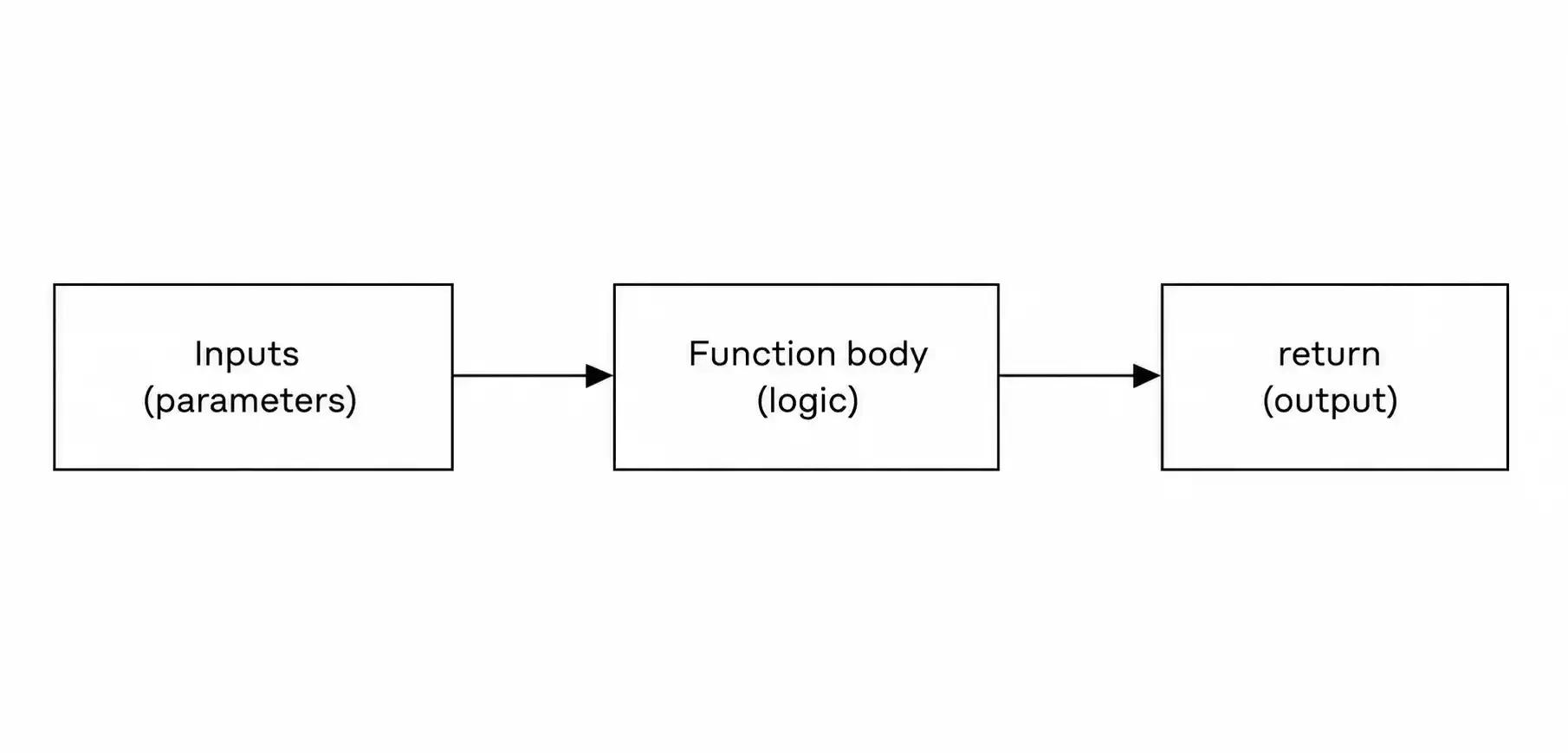
The triple-quoted text under each function name is a docstring. It documents what the function does, and it is good practice to include in every function you write. One caution as you grow more comfortable: avoid using a mutable value, such as a list, as a default parameter, because Python reuses that same object across calls, and the results can surprise you.
Lists, Dictionaries, and Tuples
Most programs require storing collections of data, not just single values. There are 3 core container types in Python, and it’s important to pick the right one.
A list is an ordered, changeable collection. Use it when order matters and the contents will change.
Lists (ordered, changeable)
# Creating a list
colors = ['red', 'green', 'blue']
# Adding items
colors.append('yellow')       # Add to end
colors.insert(1, 'orange')    # Insert at position 1
# Removing items
colors.remove('green')        # Remove by value
last = colors.pop()           # Remove and return last item
# List operations
numbers = [3, 1, 4, 1, 5, 9]
numbers.sort()                # [1, 1, 3, 4, 5, 9]
length = len(numbers)         # 6
# List comprehension (powerful shortcut)
squares = [x ** 2 for x in range(10)]
# [0, 1, 4, 9, 16, 25, 36, 49, 64, 81]
even_numbers = [x for x in range(20) if x % 2 == 0]
# [0, 2, 4, 6, 8, 10, 12, 14, 16, 18]
Dictionaries (key-value pairs)
A dictionary stores data as key-value pairs, which is ideal when you want to look something up by name rather than by position.
# Creating a dictionary person = { 'name': 'Sarah', 'age': 28, 'city': 'New York', 'hobbies': ['reading', 'hiking', 'coding'] }Accessing values
print(person['name']) # Sarah print(person.get('phone', 'N/A')) # N/A (default if key missing)
Adding/updating
person['email'] = '[email protected]' person['age'] = 29
Looping through a dictionary
for key, value in person.items(): print(f'{key}: {value}')
The short version of when to use each: a list keeps an ordered, editable sequence; a dictionary maps keys to values for fast lookups; and a tuple holds an ordered group of values that should not change. The key-value model you see in dictionaries is also the foundation of document databases such as MongoDB, which is why understanding it early pays off. Teams building data-heavy products often hire MongoDB developers who think in exactly these terms.
Two more containers make the set. A tuple is like a list, but the elements of a tuple cannot be changed after the tuple is created. A tuple is perfect for values that are related and should not be changed. A set is a collection of unique items and is the fastest way to remove duplicates or check for membership.
# Tuple: ordered and unchangeable coordinates = (40.7128, -74.0060) latitude = coordinates[0] # 40.7128Set: unordered, no duplicates
tags = {'python', 'beginner', 'python'} print(tags) # {'python', 'beginner'} print('python' in tags) # True
File Handling
Programs become far more useful when they can save and load data. Python reads and writes files with the open() function, and the with statement is the safe way to use it.
# Writing to a file with open('notes.txt', 'w') as file: file.write('My first note\n') file.write('Python is fun!\n')Reading a file
with open('notes.txt', 'r') as file: content = file.read() print(content)
Reading line by line
with open('notes.txt', 'r') as file: for line in file: print(line.strip()) # strip() removes extra whitespace
Appending to a file
with open('notes.txt', 'a') as file: file.write('Another note\n')
The with statement ensures the file is closed automatically when the block exits (even if an error occurs). Always better than opening and closing files. What happens is determined by the mode argument. 'w' overwrites, 'r' reads, and 'a' appends to the end.
Handling Errors
Every real program runs into something unexpected somewhere. A missing file, bad user input, a network timeout. The program crashes without any handling. Instead of stopping, Python catches problems and responds to them using try and except blocks. You’ll see this pattern from the calculator project later in this manual.
# Ask for a number and handle invalid input gracefully
try:
   age = int(input('Enter your age: '))
   print(f'Next year you will be {age + 1}')
except ValueError:
   print('That was not a whole number. Please try again.')
The code inside try runs first. If it raises the specified error, control jumps to the matching except block instead of crashing. Catch the specific error you expect, such as ValueError, rather than silencing every possible failure, because broad catches hide bugs you would rather see. Learning to anticipate and handle exceptions early is one of the habits that separates beginners from developers writing dependable code.
Object-Oriented Programming Basics
Object-oriented programming, or OOP, lets you model real-world concepts as objects that bundle data and behavior. This is not an advanced topic to skip; modern Python codebases rely heavily on classes, so it is worth covering now. A class is a blueprint, and an object is a specific thing built from that blueprint.
Here is a simple example:
class BankAccount: def init(self, owner, balance=0): self.owner = owner self.balance = balance def deposit(self, amount): if amount > 0: self.balance += amount print(f'Deposited ${amount:.2f}. Balance: ${self.balance:.2f}') else: print('Amount must be positive') def withdraw(self, amount): if amount > self.balance: print('Insufficient funds') elif amount <= 0: print('Amount must be positive') else: self.balance -= amount print(f'Withdrew ${amount:.2f}. Balance: ${self.balance:.2f}')def str(self): return f'Account({self.owner}, ${self.balance:.2f})'
Using the class
account = BankAccount('Sarah', 1000) account.deposit(500) # Deposited $500.00. Balance: $1500.00 account.withdraw(200) # Withdrew $200.00. Balance: $1300.00 print(account) # Account(Sarah, $1300.00)
The relationship is the part to internalize. BankAccount is the blueprint that defines what data an account holds and what it can do. Each call to BankAccount(...) creates a separate object, also called an instance, with its own data.
When an object is created, the init method runs automatically and initializes the object’s starting data. The parameter self is the object the method is called on. These conventions are strange at first, and soon second nature.
Writing Clean, Pythonic Code
Python developers value code that reads clearly, and the community has shared conventions that make collaboration easier. Following them from the start builds good habits and makes your code recognizable to other developers.
The official style guide is PEP 8. Its most visible rules are simple: indent with four spaces, keep lines reasonably short, and name variables in snake_case, meaning lowercase words joined by underscores such as user_name rather than userName. Consistent naming and spacing make a codebase far easier to read and maintain.
Python also has an informal philosophy you can read any time by typing import this in the interpreter, which prints a short set of guiding principles known as the Zen of Python. The practical takeaways are that readable code beats clever code, explicit choices beat hidden ones, and simple solutions beat complicated ones. Two habits put this into practice immediately: write short comments with the # symbol to explain why a piece of code exists, and add docstrings to your functions and classes, as shown earlier in this guide. Well-documented code is a professional standard that pays off the moment you or a teammate revisits it months later.
Building Your First Project: Simple Calculator
Reading examples is good, but building something helps to cement the ideas. Reading examples is good, but building something helps to cement the ideas. This small calculator packs input, loops, conditions, and error handling into one working program. This small calculator packs input, loops, conditions, and error handling into one working program.
def calculator(): """A simple calculator that runs until the user quits.""" print('=== Python Calculator ===') print('Operations: +, -, *, /') print('Type "quit" to exit') print()while True: user_input = input('Enter calculation (e.g., 10 + 5): ')
if user_input.lower() == 'quit': print('Goodbye!') break try: result = eval(user_input) # Simple for learning print(f'Result: {result}') except Exception: print('Invalid input. Try something like: 10 + 5') print()
calculator()
Note: eval() is used here for simplicity in a learning project. In a real application, you should parse the input manually because eval() can execute arbitrary code, which poses a security risk.
Running the calculator in the terminal. It reads each expression, prints the result, and keeps looping until you type quit. From here, you can extend it with features like a calculation history, a memory function, or support for powers and parentheses to grow it into a complete project.
When you are ready for the next challenge, try building one of these:
- A number guessing game that compares the user's guess to a random number
- A to-do list that saves tasks to a file and loads them on startup
- A file organizer that sorts files in a folder by their extension
Each one reuses the concepts in this guide and pushes you to combine them in new ways.
Where to Go Next: Python Career Paths
Knowing the basics opens several directions, and Python is a strong base for all of them. Your choice depends on what kind of work interests you.
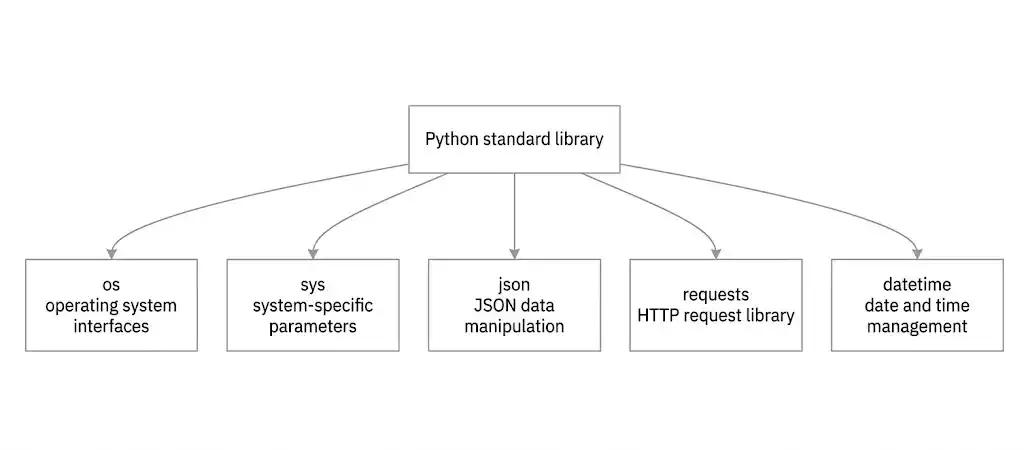
For web development, Django and Flask let you build websites and APIs, and Python frequently sits on the server side of modern stacks. If you want to go hands-on with a framework, our complete Django guide for beginners walks you through building your first web app, and Django REST Framework: build a complete API in 60 minutes shows how to expose that app as a working API. Companies that need this work often hire back-end developers or hire Node.js developers to complement a Python service, and many build out a full team by choosing to hire full-stack developers who handle both ends. On the front end, the same teams hire React developers to build the interfaces those Python APIs power, and increasingly they hire mobile app developers to bring the product to iOS and Android.
For data science, the Pandas, NumPy, and Matplotlib stack is for analysis and visualization. Python is a great choice for automation, especially for the drudgery of file management, email, and web scraping. Python continues to grow in popularity because Scikit-learn, TensorFlow, and PyTorch are the standard tools for AI and machine learning. The Softaims freelance developer rates guide breaks down pricing by skill and region to give you an idea of what it costs to staff these roles, and the engineering tools and best practices library covers the workflows professional teams rely on.
Whichever direction you choose, two companion skills apply to almost every Python role. The first is version control with Git. Every professional team uses Git to track changes and collaborate. The second is SQL, as most Python jobs include reading from or writing to a database. Type hints are also something that is worth getting into the habit of using early. Annotating your functions with expected types improves readability and tooling support and has become standard practice in professional codebases. Turn a beginner skill set into a job-ready one by adding Git, SQL, and type hints to your fundamentals.
The Best Free Resources to Learn Python Basics
You don’t need to pay for a course to learn python well. The free ecosystem is so deep that paid courses are rarely needed for the basics. One rule for all of them: avoid any 2026 course that’s still teaching Python 2 or that’s not teaching object-oriented programming. Both are red flags for outdated material.
The strongest option depends on how you like to learn, so pick the one that matches your style:
- Scrimba's Learn Python for fully interactive practice, where you edit the instructor's code directly in the browser from the first lesson.
- freeCodeCamp for a free, widely recognized certification earned by completing real projects, and for one of the most-watched beginner Python courses ever produced.
- Harvard CS50P for academic depth, built for students with or without prior programming experience and covering functions, loops, exceptions, file I/O, and OOP.
- The University of Helsinki Python MOOC for rigorous, university-grade exercise volume that forces real fluency.
- Coursera's Python for Everybody for a structured video specialization you can audit for free.
- Automate the Boring Stuff for practical, project-driven automation, available free online.
- The official Python tutorial as your source of truth, best used alongside a structured course rather than on its own.
- Real Python and Programiz for targeted, searchable reference when you get stuck on a single concept.
A reliable free progression is an interactive intro such as Scrimba, followed by practical projects from Automate the Boring Stuff, followed by the depth of CS50P or the Helsinki MOOC. Whichever you pick, the dividing line between people who learn Python and people who stay stuck is the same: those who finish actually build projects instead of only watching tutorials.
Tips to Learn Python Faster
Most beginners struggle not because the material is difficult, but because their approach is ineffective. A few habits consistently distinguish people who move forward from those who stay stuck. Code every day, even if it's only for 15 minutes. Consistency outperforms intensity because short daily sessions keep concepts fresh and build momentum in ways marathon sessions do not. Don't just follow tutorials; write the code yourself. Passive viewing creates the illusion of learning. Writing code, modifying it, intentionally breaking it, and fixing it are all examples of true skill.
Create something you genuinely care about. A tool that automates a task in your daily life or work is far more motivating than an abstract exercise, and motivation is what gets you through the tough times.
Learn to read documentation. Relying only on tutorials limits you to what others have already explained. The ability to read official documentation is a skill in itself and one of the clearest markers of a developer rather than a hobbyist.
Use AI tools to learn, not to replace your reasoning. Assistants can explain unfamiliar code and help you debug more quickly, but make sure you understand what they produce rather than simply copying it. Finally, join a community like the Python subreddit or a local meetup, where questions are answered and accountability keeps you on track.
Frequently Asked Questions
Is Python good for beginners?
Yes. Python's readable syntax, immediate feedback, and large support community make it one of the smoothest first languages to learn. You can write a working program in your first hour, which helps keep your motivation up while you learn the fundamentals.
How long does it take to learn the basics of Python?
Most beginners understand the fundamentals covered in this guide after two to four weeks of consistent practice, averaging six to ten hours a week. It usually takes a few months to become job-ready with projects and version control. When people cram, their retention suffers significantly, so consistent practice is preferable to marathon sessions.
Should I learn Python or JavaScript first?
For most beginners, Python is the smoother entry point because of its clean syntax and gentle learning curve. JavaScript becomes essential if your goal is building interfaces that run in a browser. Many developers eventually learn both, but starting with Python is often easier. For a deeper side-by-side breakdown, see our guide on Python vs JavaScript: which programming language you should learn first.
Do I need to learn object-oriented programming as a beginner?
Yes, at least the fundamentals. Modern Python codebases rely heavily on classes, and a learner who has never encountered OOP will struggle on real-world projects. The class and object concepts presented in this guide are sufficient to get started; you can expand on them as you progress.
Do I need a computer science degree to become a Python developer?
No. A degree is not required to get hired as a Python developer, data scientist, or machine learning engineer. Many successful developers are self-taught or have completed bootcamps. What matters most to employers is demonstrated ability through projects, problem-solving in technical interviews, and a clear grasp of fundamentals. A well-organized GitHub profile usually carries more weight than a list of certificates.
Is Python still worth learning in 2026 given how fast AI is evolving?
Python is arguably more worth learning now than ever, precisely because AI is evolving so quickly. The tools used to build, deploy, and interact with AI systems are predominantly Python-based. Learning Python does not compete with the rise of AI; it positions you to participate in it, alongside steady long-term demand across data science, automation, and web development.
Conclusion
Python is the most approachable introduction to programming available in 2026, and the skills covered in this guide provide a solid foundation: setup, variables, control flow, functions, data structures, files, and object-oriented fundamentals. The path from here is straightforward. Choose the career path that interests you the most, select one free resource, and begin developing small projects that incorporate what you've learned.
Developers who continue to ship are more likely to succeed than those who continue to watch. If your team is ready to deploy Python in production, Softaims can help you hire vetted Python developers with deep experience in Django, Flask, FastAPI, and the data science ecosystem. Get in touch to scope your project and meet matched candidates within days.


 GitHub
Stefan V.

 Verified Expert in Engineering
My name is Stefan V. and I have over 10 years of experience in the tech industry. I specialize in the following technologies: GStreamer, DirectShow, C++, Python, C#, etc.. I hold a degree in Bachelor of Applied Science (BASc). Some of the notable projects I’ve worked on include: SMART DVB analyzer and multiviewer, EPG generator, Mosaic multiviewer, DVB/MPEG-2 transport stream analyzer, Development Directshow filters for raw audio, etc.. I am based in Someren, Netherlands. I've successfully completed 9 projects while developing at Softaims.
I specialize in architecting and developing scalable, distributed systems that handle high demands and complex information flows. My focus is on building fault-tolerant infrastructure using modern cloud practices and modular patterns. I excel at diagnosing and resolving intricate concurrency and scaling issues across large platforms.
Collaboration is central to my success; I enjoy working with fellow technical experts and product managers to define clear technical roadmaps. This structured approach allows the team at Softaims to consistently deliver high-availability solutions that can easily adapt to exponential growth.
I maintain a proactive approach to security and performance, treating them as integral components of the design process, not as afterthoughts. My ultimate goal is to build the foundational technology that powers client success and innovation.

Leave a Comment
Need help building your team? Let's discuss your project requirements.
Get matched with top-tier developers within 24 hours and start your project with no pressure of long-term commitment.