Top 10 Mobile App Development Mistakes (And How to Avoid Them)
Over 50% of apps get deleted within 30 days. After reviewing hundreds of failed projects, we found the same 10 mistakes behind almost every one of them. Here is how to spot and fix each one before your users do.
Table of contents
Key Takeaways
- Performance is an architecture decision, not a last-minute fix. Set measurable performance budgets (startup time, render speed, memory limits) before writing feature code. Apps that take longer than 3 seconds to load lose over half their users to uninstalls.
- Onboarding determines retention more than any feature. The majority of app uninstalls happen on Day 1. Let users experience your app's core value before requiring account creation, and A/B test the onboarding flow early.
- Offline support and security are not optional. Users lose patience when apps break without connectivity, and a single security breach can destroy trust permanently. Architect both into the foundation from day one, not as afterthoughts.
- Test on real devices across the performance spectrum. An app that runs smoothly on a flagship phone may stutter or crash on the mid-range and budget devices that the majority of your users actually own. Test on at least three tiers.
- Ship less, learn faster. The most expensive mistake is building 30 features when users need 5. Launch an MVP, instrument it with analytics and crash reporting, and let real user behavior guide what you build next.
Mobile apps are expected to generate more than $673 billion in revenue by 2027. That’s outstanding. Want to know what motivates people to use (or not use) a mobile app? We have reviewed and worked on many mobile apps over the years. Some were new builds, some were rescue projects where things had gone wrong. The interesting thing is that most apps fail for the same reasons.
These are not obscure edge cases or unpredictable failures. According to data from AppsFlyer's 2025 uninstall report, more than one in two apps are uninstalled within 30 days of download. Research from SQ Magazine reinforces this, showing that 42% of app failures occur because developers did not research market needs before building, while another 19% fail due to a weak product core.
The good news is that every one of these mobile app development mistakes is avoidable if you know what to look for. Whether you are building your first app or managing a team working on its tenth, the pitfalls below will look familiar. Here are the 10 biggest mistakes we see, along with exactly how to fix or prevent each one. If you are just starting your mobile development journey, our guide on mobile app development fundamentals covers the foundational decisions you need to make first.
Mistake #1: Ignoring App Performance from Day One
This is the most common mistake we encounter. Teams build features as fast as they can and promise themselves they will optimize later. Later never comes. By the time the app feels slow, the performance problems are deeply embedded in the architecture, and fixing them requires significant refactoring.
The real cost here is user retention. Data shows that 53% of people uninstall apps due to technical performance issues. An app that takes longer than 3 seconds to load is often perceived as slow enough to warrant deletion. And once a user uninstalls, the probability of them returning is extremely low.
The Problem
Performance degradation typically manifests in four ways: slow app startup, laggy scrolling and transitions, high memory usage, and excessive battery drain. These symptoms rarely appear in isolation. A bloated bundle leads to a slow cold start, which leads to a poor first impression, which leads to an uninstall on Day 1.
The root cause is almost always a lack of performance budgets. Without a measurable target, "we will optimize later" becomes the default mindset, and performance slowly degrades with each new feature.
How to Avoid It
Set performance budgets early. Define measurable thresholds before writing any feature code. For example, the app must launch in under 2 seconds, screens must render in under 100ms, and total memory usage must stay below a defined ceiling. These budgets become constraints that guide architectural decisions from the start.
Profile regularly, not just before release. Use Xcode Instruments (iOS) or Android Studio Profiler at least once a week during active development. Performance regressions are far easier to catch and fix when they are introduced, not after 20 more features have been built on top of them.
Optimize images from the start. Use the WebP format, compress all images, and lazy-load anything below the fold. Image optimization is one of the highest-impact, lowest-effort performance improvements available.
Here is a quick React Native example of lazy loading images:
import { Image } from 'react-native';
// Use a low-res placeholder first, then load the full image
<Image
  source={{ uri: highResUrl }}
  defaultSource={require('./placeholder.png')}
  style={{ width: 300, height: 200 }}
/>
Consider your backend architecture. Performance is not only a frontend concern. If your API responses are slow or your database queries are unoptimized, even a perfectly built client will feel sluggish. Teams that hire experienced backend developers early in the project lifecycle tend to avoid the costly backend rewrites that ruin many apps post-launch.
More on mobile performance: Android Performance Documentation
Mistake #2: Poor User Onboarding Experience
You get one chance to make a first impression. According to AppsFlyer's research, most uninstalls occur on the first day, primarily due to unmet expectations. Also, industry data shows that 25% of users abandon an app after just one use. Your onboarding experience is often the single biggest determinant of whether a user stays or leaves.
The Problem
The typical failure pattern looks like this: a user downloads the app, opens it, and is immediately hit with a mandatory account-creation form, followed by several tutorial screens, then a barrage of permission requests. By the time they reach the actual product, their patience is exhausted.
The underlying problem is that teams design onboarding from the product's perspective (what the app needs from the user) rather than the user's perspective (what the user needs from the app). This generates friction at the very point when the user is least committed. So users open the app, do not understand what to do, and leave.
How to Avoid It
Let users explore before asking for a login. Forced login is one of the biggest reasons people abandon apps during onboarding. Let users see the value of your product before asking them to invest time in creating an account.
Keep the first experience simple. Do not present five tutorial screens before the user can do anything meaningful. Instead, guide them toward a single "aha moment," the first action where the app demonstrates its core value.
Use progressive disclosure. Show features gradually as the user needs them, not all at once. A feature that is useful on day 30 does not need to be explained on day one.
A/B test your onboarding flow. Tools like Firebase A/B Testing make it easy to measure which onboarding approaches lead to higher retention. Small changes to the flow, like reordering screens or removing a single step, can result in measurable improvements.
Apps that include onboarding tutorials see approximately 12% higher retention compared to those without. But the key word is "tutorials," not "information dumps." Knowing the difference is important.
Mistake #3: Not Planning for Offline Functionality
Mobile users are not always connected. They use apps on subways, in elevators, in rural areas with unreliable coverage, and on flights. If your app shows a blank screen or an error message every time the network drops, users will get frustrated.
This is a particularly common oversight in apps built by teams that develop and test exclusively on fast office Wi-Fi. The gap between development conditions and real-world usage is a leading source of user complaints.
The Problem
The consequences of not supporting offline mode are threefold: • The app cannot be used without internet • Spinners appear everywhere when the internet is slow • User data is lost when the internet connection is lost in the middle of an action (e.g. a form that is partially filled out and disappears when submission fails)
Cache frequently accessed data locally. In React Native, use AsyncStorage or MMKV. In Flutter, use Hive or shared_preferences. The choice of storage solution depends on the complexity and size of the data, but the principle is the same: if the user has seen it before, they should be able to see it again without a network request.
Show stale data instead of nothing. It is always better to display slightly old information than a loading screen. Users understand that data may not be current. They do not understand why an app they used five minutes ago now shows a blank page because they walked into a parking garage.
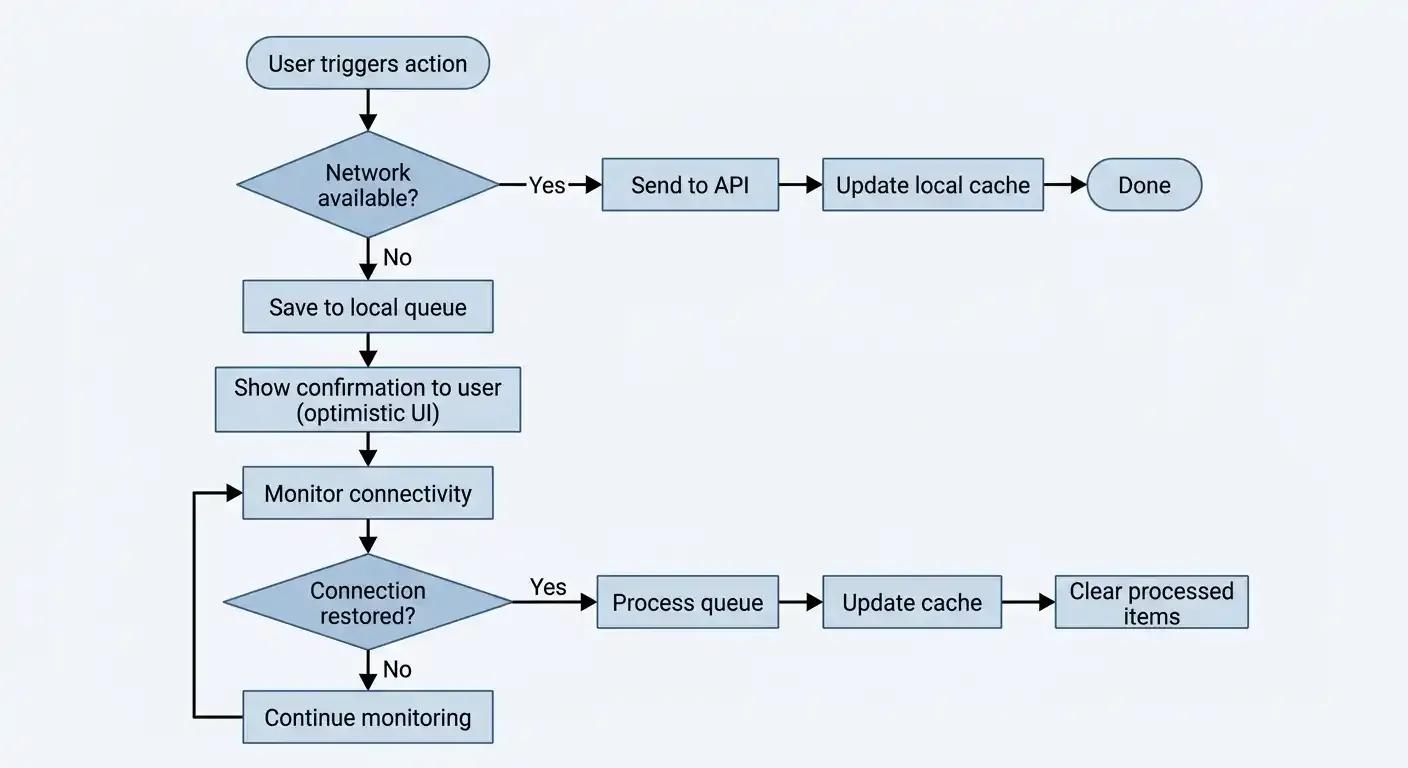
Queue actions that need network access. If a user submits a form or triggers an action offline, save it locally and sync when the connection returns. This pattern, sometimes called "optimistic UI," treats the network as an asynchronous dependency rather than a blocking requirement.
For teams working with MongoDB on the backend, Atlas Device Sync's built-in offline sync capabilities provide a robust framework for handling this pattern at the data layer.
Example of a simple offline queue pattern:
// Save action to local queue when offline
async function submitAction(data) {
  try {
    await api.post('/actions', data);
  } catch (error) {
    // Network error - queue for later
    const queue = JSON.parse(await AsyncStorage.getItem('offlineQueue')) || [];
    queue.push({ data, timestamp: Date.now() });
    await AsyncStorage.setItem('offlineQueue', JSON.stringify(queue));
  }
}
// When connection returns, process the queue
async function processQueue() {
  const queue = JSON.parse(await AsyncStorage.getItem('offlineQueue')) || [];
  for (const item of queue) {
    await api.post('/actions', item.data);
  }
  await AsyncStorage.removeItem('offlineQueue');
}
How Offline Data Sync Works
The following diagram illustrates the decision flow for handling user actions in an environment with intermittent connectivity:
Mistake #4: Overlooking Platform-Specific Design Guidelines
iOS and Android users have fundamentally different expectations about how an app should look and behave. An Android user expects a bottom navigation bar, a floating action button, and Material Design transitions. An iOS user expects a tab bar, swipe-to-go-back gestures, and standard navigation patterns consistent with Apple's ecosystem.
When an app ignores these conventions, users describe it as "feeling off" without being able to articulate exactly why. That feeling is enough to drive uninstalls.
The Problem
The most common version of this mistake is to build a single design and deploy it identically across both platforms. The second most common approach is to build for one platform (usually iOS, since many design teams use Macs) and treat the other as an afterthought.
The details that matter most are the ones developers tend to overlook: back-button behavior, navigation transitions, input-field styles, alert-dialog appearance, and system-font rendering. These small inconsistencies add up to a user experience that feels foreign.
How to Avoid It
Study both platform guidelines thoroughly. Read Apple's Human Interface Guidelines and Google's Material Design 3 guidelines. These are not suggestions. They represent years of user research and testing by the platform creators, and users internalize these patterns whether they realize it or not.
Pay attention to small interaction details. Navigation transitions, input field styles, alert dialogs, haptic feedback, and pull-to-refresh behavior should all match each platform's conventions.
Use platform-appropriate widgets. If you are using Flutter, leverage the Cupertino widgets for iOS and Material widgets for Android. React Native handles most of this automatically because it uses native components, which is one reason many teams choose to hire React Native developers for cross-platform projects. For a deeper comparison of these two frameworks, our guide on React Native vs. Flutter covers the trade-offs in detail.
Mistake #5: Testing on Only One Device
We have seen apps that look perfect on the developer's iPhone 15 but break completely on an iPhone SE or a Samsung Galaxy A series phone. The screen is clipped, buttons overlap, text is unreadable, and in some cases, the app crashes outright.
This happens more often than it should, and it is one of the most preventable mobile app development mistakes on this list. It happens because developers test on whatever device is sitting on their desk.
The Problem
The symptoms are layout issues, crashes, and broken features on devices that were never tested. The root cause is the enormous fragmentation in the mobile device market. Screen sizes range from 4 inches to over 7 inches. Aspect ratios range from 16:9 to 21:9. Notches, dynamic islands, punch-hole cameras, and foldable screens all introduce edge cases in layout. And that is before accounting for differences in OS versions, RAM, and GPU capabilities.
Budget and mid-range devices, which make up the majority of the global smartphone market, have significantly less RAM and processing power than the flagship devices most developers use. An animation that runs smoothly on a flagship may stutter badly on a device with 2-3GB of RAM.
How to Avoid It
Test on at least three real devices: a flagship, a mid-range, and a budget device. This gives you coverage across the performance spectrum where most of your users actually are.
Use emulators and simulators for breadth. The iOS Simulator and Android Emulator allow you to test across different screen sizes and OS versions without purchasing dozens of physical devices.
Consider cloud testing services. Services like BrowserStack or Firebase Test Lab let you test on hundreds of real devices remotely. For teams shipping to a global audience, this is one of the most cost-effective investments in quality assurance.
Pay special attention to safe areas. Notches, dynamic islands, and different aspect ratios require careful handling. SafeAreaView in React Native and SafeArea in Flutter exist specifically for this purpose. Use them consistently.
Mistake #6: Neglecting App Security
Security is not optional, and it is not something you add on at the end. If your app handles user data, financial information, or personal details, a security breach can destroy user trust, expose you to legal liability, and destroy your business.
The consequences are asymmetric: building security in from the start costs relatively little, while recovering from a breach costs orders of magnitude more.
The Problem
The most common security failures in mobile apps are hardcoded API keys and secrets in client-side code, unencrypted data storage, insecure authentication flows, and vulnerability to man-in-the-middle attacks.
These are not sophisticated attack vectors. They are well-documented, well-understood vulnerabilities that appear in the OWASP Mobile Security Top 10 year after year. They persist because security is treated as a separate concern rather than an integrated part of the development process.
How to Avoid It
Never hardcode API keys or secrets in your app code. Client-side code can be decompiled and inspected. Use environment variables and server-side configuration to manage sensitive credentials.
Always use HTTPS. This is non-negotiable. Certificate pinning adds an additional layer of protection against man-in-the-middle attacks.
Store sensitive data in secure storage. Tokens, credentials, and personal information should never be stored in plain AsyncStorage or SharedPreferences. These are unencrypted by default and accessible to anyone with access to the device.
For secure storage in React Native:
// Use react-native-keychain for secure credential storage
import * as Keychain from 'react-native-keychain';
// Save credentials securely
await Keychain.setGenericPassword('username', 'authToken');
// Retrieve credentials
const credentials = await Keychain.getGenericPassword();
if (credentials) {
  console.log('Token:', credentials.password);
}
Validate all input on the server side. Never trust data coming from the client. Client-side validation improves UX, but server-side validation is where actual security enforcement happens.
Security is one area where your development team's experience has an outsized impact on outcomes. Working with developers who have shipped production apps with proper security practices, particularly experienced Node.js developers who understand server-side security patterns, significantly reduces the risk of shipping exploitable vulnerabilities.
Mistake #7: Bloated App Size
Nobody wants to download a 200MB app, especially on mobile data. In developing markets where storage space and bandwidth are constrained, large app sizes are a real barrier to adoption. Even in developed markets, users often delete the largest apps on their phones to free up storage, and research shows that 50.6% of users uninstall apps that consume too much memory.
The Problem
App bloat typically comes from three sources: Unoptimized media assets (images, videos, fonts). Unused or redundant third-party packages. And a lack of code-splitting, so that every feature loads up front, regardless of whether the user needs it.
The problem compounds over time. Each new feature adds a few megabytes, and without regular audits, an app that started at 15MB can quietly grow to 80MB or more.
How to Avoid It
Use Android App Bundles (AAB) instead of APKs. Google Play generates optimized APKs for each device configuration, which can significantly reduce the download size for individual users.
Compress and resize images. Use WebP format wherever possible. Audit your asset pipeline to ensure that full-resolution images are not being bundled when smaller versions would suffice.
Remove unused packages and code. Run bundle analyzers regularly. In a typical project that has been in development for six months or more, you will almost certainly find packages that were added for a feature that was later removed or replaced.
Use code splitting and dynamic imports. Features that are not needed on every screen should not be loaded on every screen. Lazy loading modules reduces the initial bundle size and improves startup time.
Mistake #8: No Analytics or Crash Reporting
If you do not know how users interact with your app, you are making product decisions based on assumptions. If you do not know when your app crashes, you cannot fix issues before they affect retention. Operating without analytics or crash reporting is like flying blind.
The Problem
Without instrumentation, three things happen. First, crashes go undetected until users leave negative reviews. Second, product decisions are based on intuition rather than data. Third, drop-off points in key flows (sign-up, checkout, onboarding) remain invisible, and opportunities to improve conversion are missed entirely.
The cost of adding analytics and crash reporting before launch is minimal. The cost of not having them is measured in lost users, lost revenue, and delayed diagnosis of critical issues.
How to Avoid It
Set up crash reporting before you launch. Firebase Crashlytics is free and takes approximately 30 minutes to integrate. There is no justifiable reason to skip it.
Add analytics to track user behavior. Firebase Analytics or Mixpanel provides the instrumentation you need to understand how users actually interact with your app.
Track key events, not everything. Focus on the events that matter: sign-up completion, first meaningful action, purchase, and the points where users tend to drop off. A focused set of tracked events is more actionable than logging every tap.
Set up alerts for crash spikes. A new release that introduces a crash-inducing bug should trigger an alert within minutes, not when you check the dashboard three days later.
Mistake #9: Skipping Accessibility
The World Health Organization estimates that about 1.3 billion people, or 16% of the global population, live with some form of disability. If your app is not accessible, you are excluding a substantial user base. Risking regulatory non-compliance (particularly in markets governed by ADA, EAA, or WCAG standards) and leaving revenue on the table.
Accessibility is also one of the most frequently deferred quality attributes in mobile development. Teams plan to "add it later," which in practice means it never gets added at all.
The Problem
Common failures include missing accessibility labels on interactive elements, fixed text sizes that ignore system-level accessibility settings, insufficient color contrast between text and background, and untested screen reader compatibility. Each of these creates a barrier for a specific group of users, and in combination, they render the app unusable for millions of people.
How to Avoid It
Add accessibility labels to all interactive elements. In React Native, use the accessibilityLabel prop. In Flutter, use Semantics widgets. Every button, input, and touchable area needs a label that screen readers can announce.
Support dynamic text sizes. Users who configure larger text in their system settings should see that change reflected in your app. Hardcoded font sizes break this expectation and force users with visual impairments to use a magnifier or abandon the app entirely.
Ensure sufficient color contrast. Use a contrast checker tool to verify that all text meets WCAG AA standards at minimum. This is a straightforward pass/fail test that takes minutes to validate.
Test with VoiceOver (iOS) and TalkBack (Android). There is no substitute for experiencing your app the way screen reader users do. Spend 15 minutes navigating your app with the screen off and a screen reader enabled. The gaps in your accessibility implementation will become immediately obvious.
If you are building with React Native, our React Native tutorial for building your first mobile app includes guidance on setting up accessibility from the start.
Mistake #10: Building Everything Before Getting User Feedback
This is the most expensive mobile app development mistake on this list. Teams spend 6 to 12 months building a feature-complete app, only to discover that users do not want half of those features and desperately need something that was never built.
The instinct to build a "complete" product before releasing it is understandable. It feels risky to ship something unfinished. But the data consistently shows the opposite: the risk is in building too much without validation, not too little.
As Reid Hoffman puts it, "If your first version doesn’t embarrass you, you’ve launched too late."
The Problem
The failure pattern follows a predictable path. The team identifies 30 features they believe are essential. They spend months building all 30. They launch. Users gravitate toward 5 of those features and ignore the rest. Meanwhile, the 3 features users actually wanted were never on the roadmap because no one asked.
The root cause is building in isolation from users. Every assumption about what users want is exactly that: an assumption, and assumptions are only valuable when tested.
How to Avoid It
Launch an MVP (Minimum Viable Product) with just the core functionality. Find the one or two problems your app solves better than anything else. Ship that. Test, learn & improve based on user experience. If you are unsure where to start, our guide to publishing your first app on the App Store and Google Play walks through the practical steps from submission to launch.
Get real user feedback within the first month. Feedback from 50 actual users is more valuable than months of internal speculation. Use your app to capture usage data (see Mistake #8) and supplement that with direct conversations, surveys, and support channel analysis.
Use feature flags to gradually roll out new features. Feature flags let you release a new feature to 5% of users, measure its impact, and decide whether to expand or roll it back, all without shipping a new build.
Build in public or run a beta program. Real user behavior always surprises you. The most successful apps we have worked on were not the ones with the most features at launch. They were the ones that nailed one core function exceptionally well and then expanded based on what users actually wanted.
The most successful apps we have worked on were not the ones with the most features at launch. They were the ones that nailed one thing really well and then expanded based on what users actually wanted.
Pre-Launch QA Checklist: Catch Mobile App Development Mistakes Before They Ship
Before you submit your app to the stores, run through this checklist. Each item maps directly to one of the mistakes discussed above:
Performance
☐ App launches in under 2 seconds on a mid-range device
☐ Scrolling and transitions are smooth (60fps)
☐ Memory usage profiled and within budget
☐ Images compressed and lazy loaded
User Experience
☐ Onboarding flow A/B tested
☐ Users can explore core features before account creation
☐ Offline behavior handled gracefully (stale data shown, actions queued)
Platform & Device Coverage
☐ Tested on 3+ real devices (flagship, mid-range, budget)
☐ Tested on multiple OS versions
☐ Platform-specific design guidelines followed for both iOS and Android
Security
☐ No hardcoded API keys or secrets in client code
☐ HTTPS enforced everywhere
☐ Sensitive data stored in secure storage (Keychain/Keystore)
☐ All input validated server-side
Quality & Monitoring
☐ Crash reporting configured (Firebase Crashlytics or equivalent)
☐ Analytics tracking key user events
☐ Accessibility labels on all interactive elements
☐ Dynamic text size support verified
App Store Readiness
☐ App size optimized (images compressed, unused code removed)
☐ Privacy policy URL prepared
☐ Screenshots and store listing finalized
Avoid These Mobile App Development Mistakes by Hiring Experienced Developers
The easiest way to avoid these mobile app development mistakes is to work with developers who have already made them (and learned from them).
Every mistake on this list has a common thread: it is easier to prevent than to fix after the fact. Performance budgets are easier to set at the start of a project than to retrofit into a slow app. Security best practices are simpler to implement during development than to patch after a breach. Offline support is cheaper to architect from day one than to add after users have already complained.
At Softaims, our mobile app developers have years of experience shipping apps that perform well, follow platform guidelines, and are not rejected by app stores. Whether you need React developers for your frontend, Node.js developers for your API layer, or full-stack developers who can own the entire stack, our team has the technical depth to get it right the first time.
Browse our vetted developers to find the right fit for your project.
Further Reading on the Softaims Blog:
- Mobile App Development 101: iOS, Android, or Cross-Platform
- How to Publish Your First App to App Store and Google Play
- Flutter vs React Native: Complete Comparison for 2026
- How to Build Your First Mobile App in 30 Minutes
- How Much Does It Cost to Hire a Developer in 2026
- Developer Hourly Rates by Country 2026
Looking to build with this stack?
Hire Mobile App Developers →

 GitHub
Stanislav K.

 Verified Expert in Engineering
My name is Stanislav K. and I have over 13 years of experience in the tech industry. I specialize in the following technologies: Mobile App Development, Android, iOS, Flutter, iOS Development, etc.. I hold a degree in Bachelor of Engineering (BEng). Some of the notable projects I’ve worked on include: Theraform Healthcare, Ziroop Social App, Logistics App Japan, Women’s Health App, Patient Transportation, etc.. I am based in Ivano-Frankivsk, Ukraine. I've successfully completed 24 projects while developing at Softaims.
I am a dedicated innovator who constantly explores and integrates emerging technologies to give projects a competitive edge. I possess a forward-thinking mindset, always evaluating new tools and methodologies to optimize development workflows and enhance application capabilities. Staying ahead of the curve is my default setting.
At Softaims, I apply this innovative spirit to solve legacy system challenges and build greenfield solutions that define new industry standards. My commitment is to deliver cutting-edge solutions that are both reliable and groundbreaking.
My professional drive is fueled by a desire to automate, optimize, and create highly efficient processes. I thrive in dynamic environments where my ability to quickly master and deploy new skills directly impacts project delivery and client satisfaction.

Leave a Comment
Need help building your team? Let's discuss your project requirements.
Get matched with top-tier developers within 24 hours and start your project with no pressure of long-term commitment.